80 User’s Manual PLZ-5W
Sequence Function
Setting Steps
Creating steps
1
Press SEQUENCE and then Program.
2
Use the rotary knob to select the program, and then press Select.
A check mark appears to the left of the selected program name.
3
Press Steps.
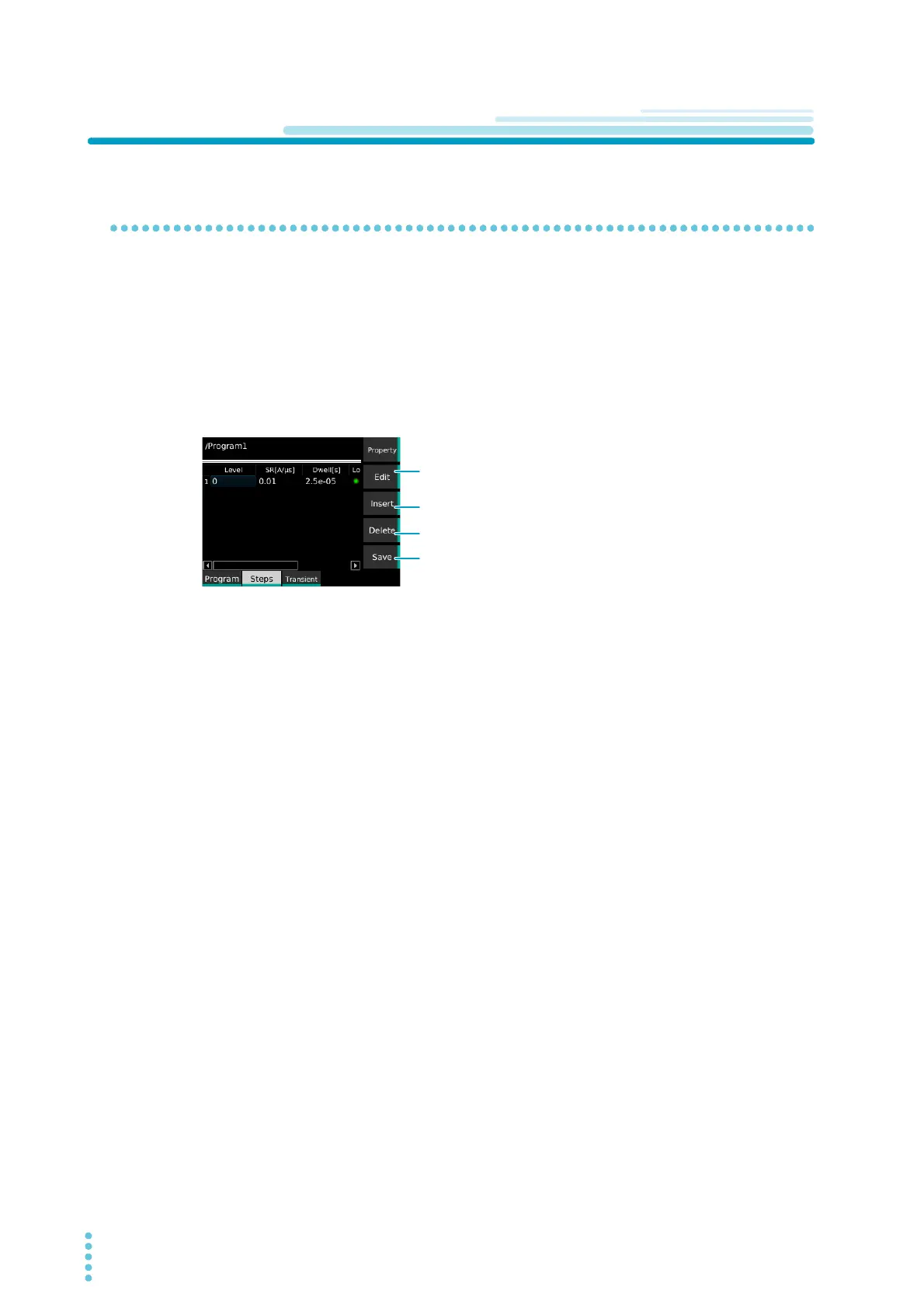
The step editing screen appears.
If a new step editing screen is opened, the first step with the initial value is registered.
4
Use the rotary knob and the ←/→ keys to select a step and item, and then press Edit.
5
Set the items.
Item (p.81): Level, SR, Dwell, Load, Wait (pre), Wait (post), Generate,
To confirm an item, press Edit again.
6
Repeat step 4 and step 5 until all the steps have been registered.
7
Press Save.
The steps are registered to the program.
Enables the editing of the settings of the selected step.
Or confirms the settings.
Adds a copy of the selected step below that step.
Deletes the selected step.
Saves the edited step.


 To Next Page