PLZ-5W User’s Manual 85
Sequence Function | Sequence Creation Tutorial
Registering steps to Program1
When registering steps to a program, we recommend that you save the program after setting all the steps.
There is no need to save a program after setting each step.
Creating step 1
1
Use the rotary knob to select Program1, and then press
Select.
A check mark appears to the left of Program1.
2
Press Steps and then Edit.
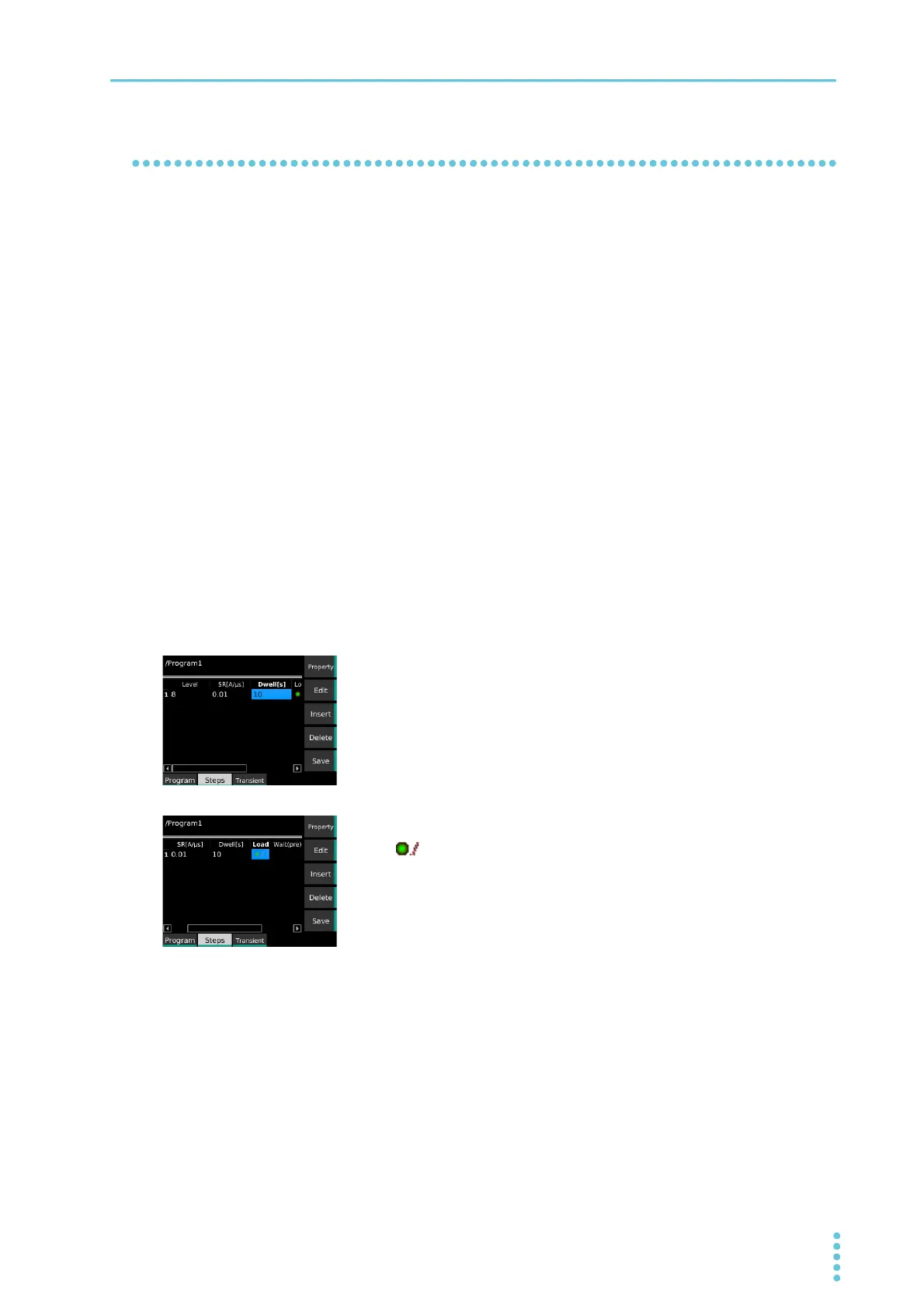
The Level (current) cell of step 1 becomes editable.
3
Use the numeric keypad or the rotary knob to enter the cur-
rent value “8”, and then press Edit.
This sets the value to 8 A.
4
Use the → key to select a cell in the Dwell column, and then
press Edit.
Dwell (execution time) becomes editable.
5
Use the numeric keypad or the rotary knob to enter execu-
tion time “10”, and then press Edit.
This sets the value to 10 s.
6
Use the → key to select a cell in the Load column, and then
press Edit.
Load (load and transition) becomes editable.
7
Press Ramp and then Edit.
(load on, ramp transition) is set.
Proceed to create step 2.


 To Next Page