86 User’s Manual PLZ-5W
Sequence Function | Sequence Creation Tutorial
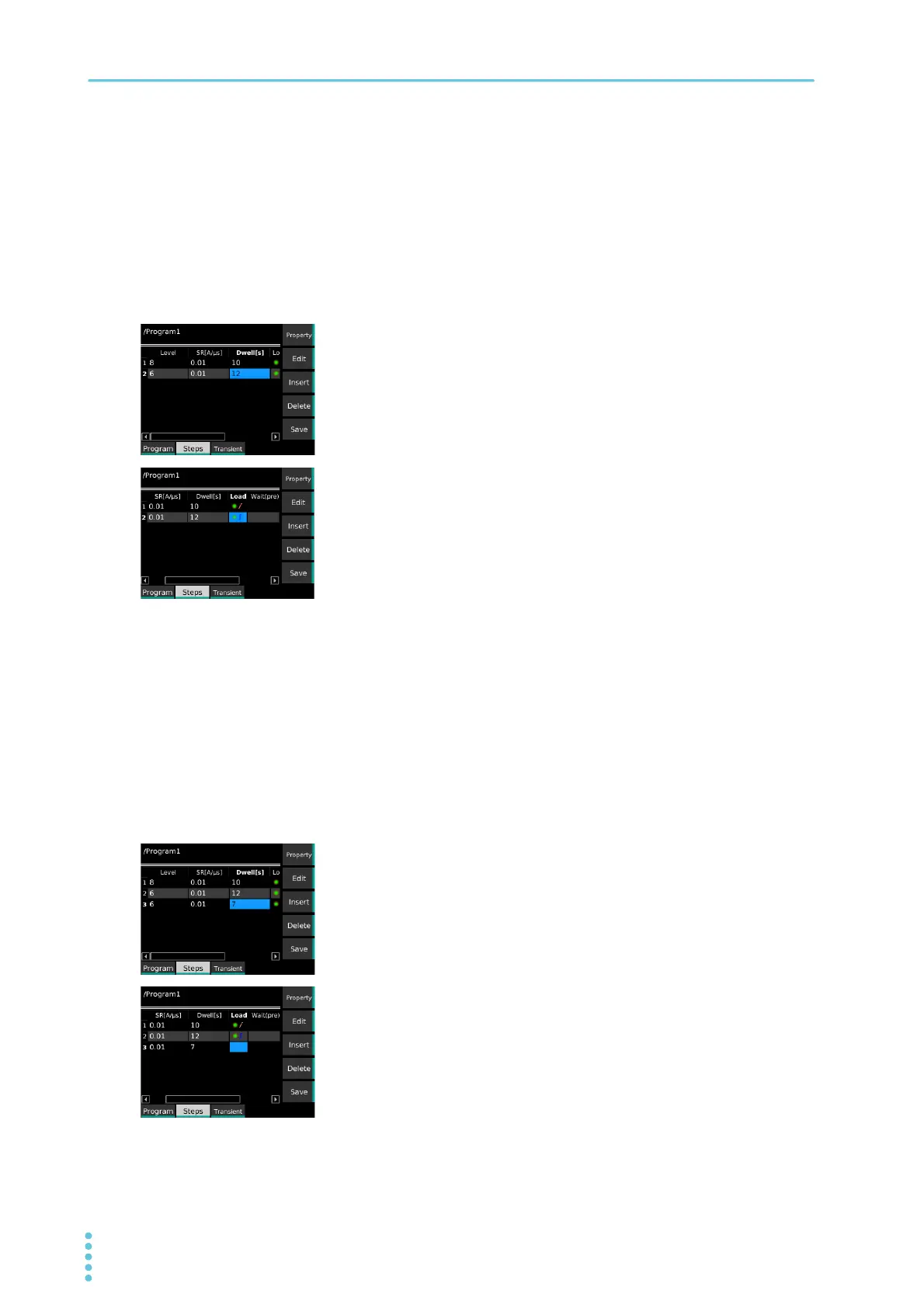
Creating step 2
1
Press Insert.
Step 2 is inserted.
2
Use the ← key to select a cell in the Level column of Step 2
(row 2), and then press Edit.
3
Set step 2 as follows: Level: 6, Dwell: 12, Load: On (Immedi-
ate).
The current is set to 6 A, the execution time to 12 s, and the load to on.
Immediate transition is selected.
Proceed to create step 3.
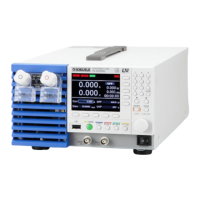
Creating step 3
1
Press Insert.
Step 3 is inserted.
2
Use the ← key to select a cell in the Dwell column of Step 3
(row 3), and then press Edit.
Because the load is off in this step, there is no need to set the current.
3
Set step 3 as follows: Dwell: 7, Load: Off (blank).
The execution time is set to 7 s and the load to off.
Proceed to create step 4.


 To Next Page