82 User’s Manual PLZ-5W
Sequence Function | Setting Steps
Wait (post)
Set the post-trigger source (Trig IN). If you set Trig IN, the program pauses after executing a step.
Releases the pause state when a trigger is received (p.102).
Trig IN switches between on and off each time you press the Trig IN key.
Generate
Set the trigger signal output at the start of a step.
Press TA Link and Trig Out to turn each trigger output on or off. The value switches between on and off
each time you press the key.
Set whether to set the EXT CONT connector pins (DIGITAL 0, 1, 2) to high level during a step.
Press Digital0, Digital1, and Digital2 to turn each item on or off. The value switches between on and off
each time you press the key.
Value Description
TA Link A trigger is output at the start of a step. In the trigger setting (p.48) of the measurement function,
setting Source to TA Link causes measurements to be recorded at the start of a step.
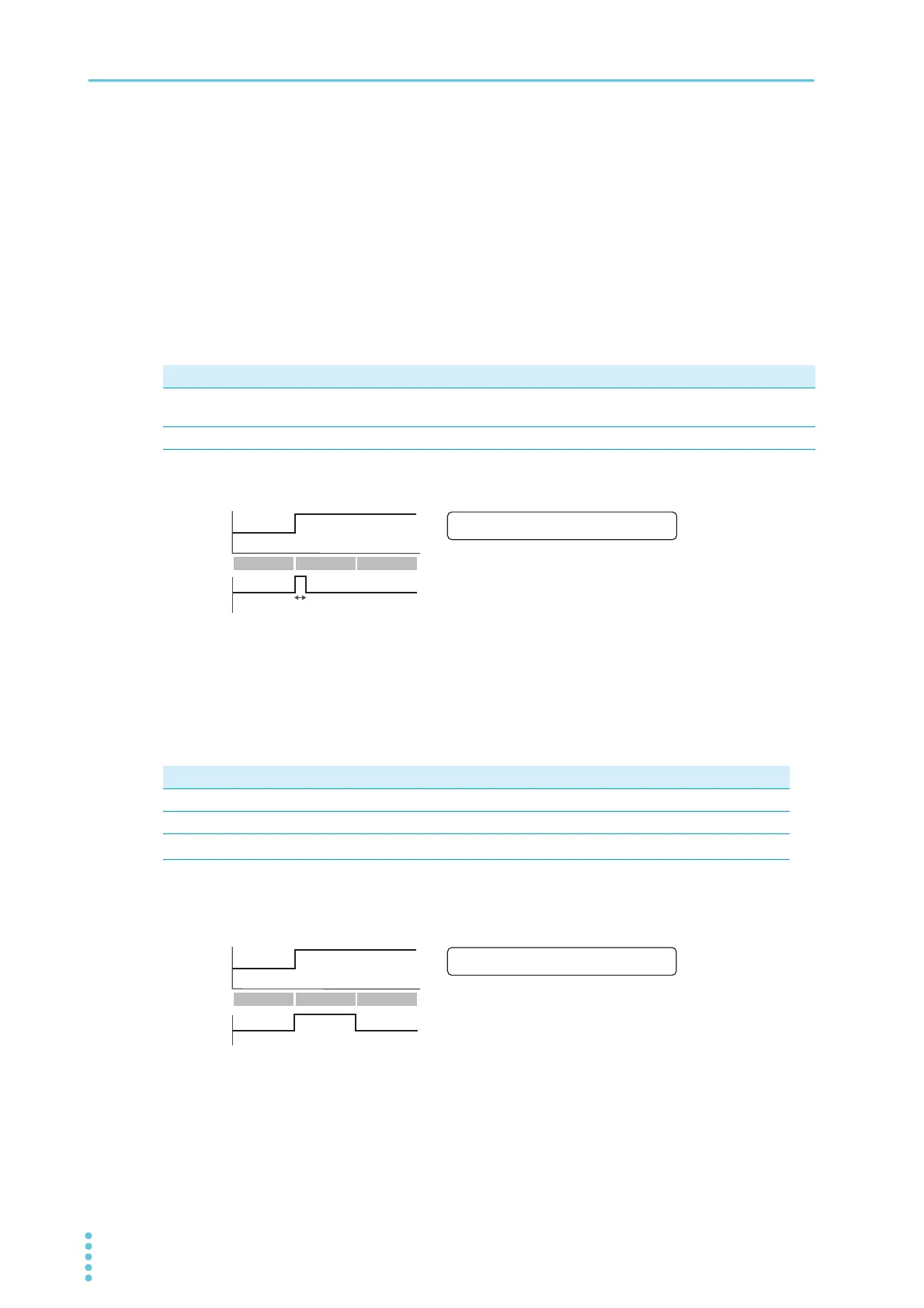
Trig Out A 10 µs trigger signal is output from the TRIG OUT connector.
Value Description
Digital0 Pin 11 (DIGITAL 0) of the EXT CONT connector is set to high level.
Digital1 Pin 12 (DIGITAL 1) of the EXT CONT connector is set to high level.
Digital2
*1
*1. Only when Direction of Digital 2 is set to Output (p.115).
Pin 13 (DIGITAL 2) of the EXT CONT connector is set to high level.
TRIG OUT
Example: When Generate is set to Trig Out in step 2.
Set
0
Load value
Time
Step 1 Step 2 Step 3
Set: Load setting based on step setting
10 ȝs10 ȝs
([DPSOH:KHQĺLVVHWWR'LJLWDOLQVWHS
6HW
/RDGYDOXH
7LPH
',*,7$/
6WHS 6WHS 6WHS
6HW/RDGVHWWLQJEDVHGRQVWHSVHWWLQJ


 To Next Page
 Loading...