16
USING YOUR FOOD PROCESSOR
3
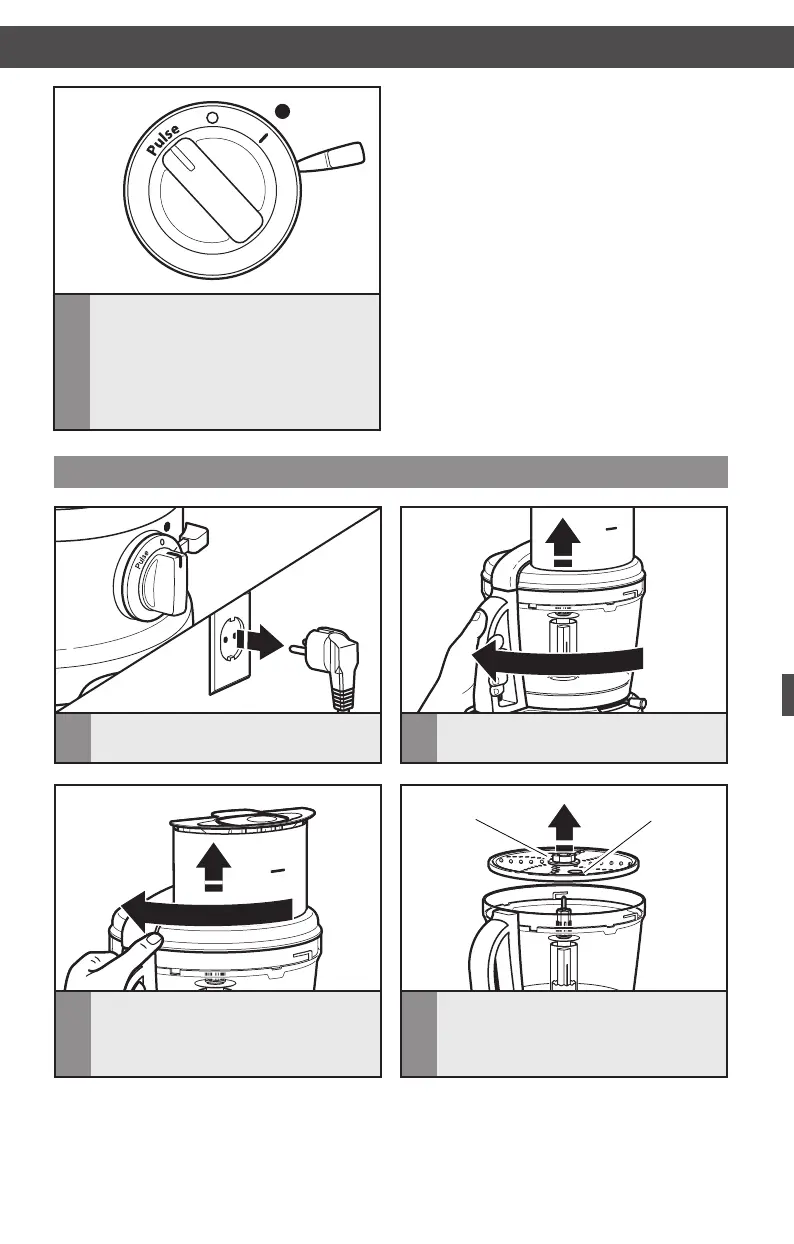
Topulse,ipthespeedleverto“2”
(high), then turn the dial to PULSE
to start processing; the dial will
automatically go back to “O” (OFF)
position to stop. The pulse control
allows precise control of the duration
and frequency of processing.
Removing processed foods
1
Be sure the Food Processor is off and
unplugged before disassembling.
2
1
3
Or turn the lid to unlock, as shown, and
lift the lid to remove, continuing next
steps with bowl still attached to Food
Processor.
USING YOUR FOOD PROCESSOR
Finger gripFinger grip
4
If using a disc, remove it. Hold the disc
by the 2 finger grips, lift it straight up.
USING YOUR ACCESSORIES
2
Turn the work bowl and lift to remove,
and then turn and lift the lid.
W10529664B_01_ENv07.indd 16 8/8/14 1:56 PM


 To Next Page
 Loading...