4-14
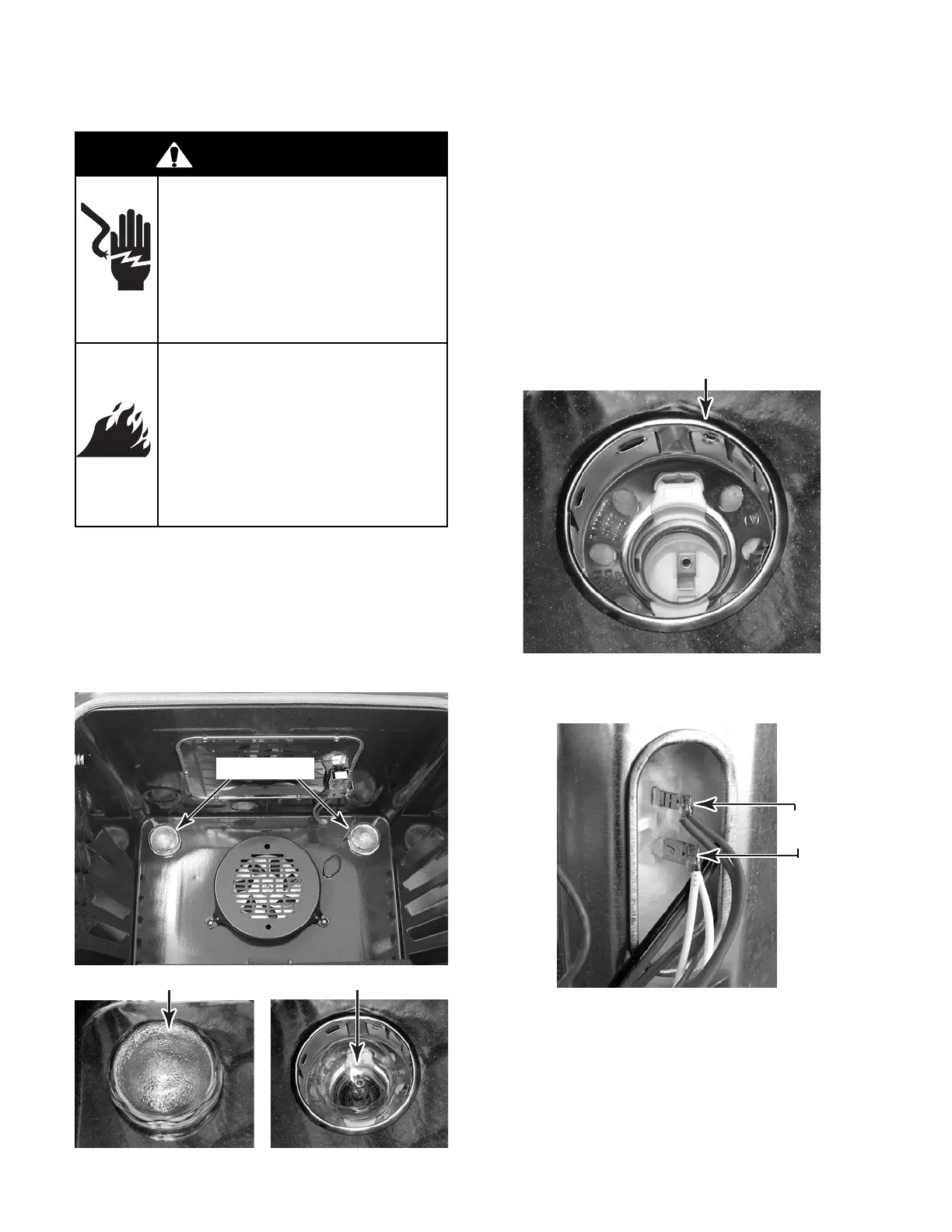
REMOVING AN OVEN LIGHT SOCKET ASSEMBLY
CAUTION: Be careful not to scratch or chip the
oven liner paint when you remove the oven
light socket in the next step.
4. Use a screwdriver and bend the clips on
the oven light socket away from the edges
of the liner hole, and pull the socket out of
the liner. NOTE: If it is too difficult to re-
move the socket from the front of the oven,
you will have to push the socket out from
the back of the unit.
5. Disconnect the wires from the socket ter-
minals.
Socket Clip
(Viewed From Rear Panel)
Oven Light Lens
1. Turn off gas supply and disconnect power
to the range.
2. Open the oven door and remove the racks
from inside the oven.
3. Unscrew the lens and bulb from the oven
light socket assembly and remove them.
Oven Light Bulb
Socket
Wires
Oven Lights
WARNING
Electrical Shock Hazard
Disconnect power before
servicing.
Replace all parts and panels
before operating.
Failure to do so can result in
death or electrical shock.
Fire Hazard
Shut off gas supply line valve
before servicing.
Check all gas line connec-
tions and replace all parts
and panels before operating.
Failure to do so can result in
explosion, fire or other injury.



 To Next Page