4
IC-203
2. SERVICE TOOL Field Service Ver2.0 August.2005
2.1.2 Installing / Booting Up Hyper Terminal
Hyper Terminal is a terminal communications program which comes with Windows 98/Me/NT4.0/2000/XP as
standard. If it is not installed in your Windows 98/Me/NT4.0, it is necessary to install it.
Caution
• For Windows 2000/XP, it is installed by default. There is no need to install it.
• To install Hyper Terminal, the system program CD for the Windows PC in use is required.
• The procedure of setting up and booting up Hyper Terminal depends on the Windows version.
G. To install Hyper Terminal
In the following, Windows 98 is used as an example.
1.
Insert the CD containing OS of the Windows PC
in use into the CD drive.
2.
Select [Start]-[Settings]-[Control Panel].
• A [Control Panel] window will appear.
3.
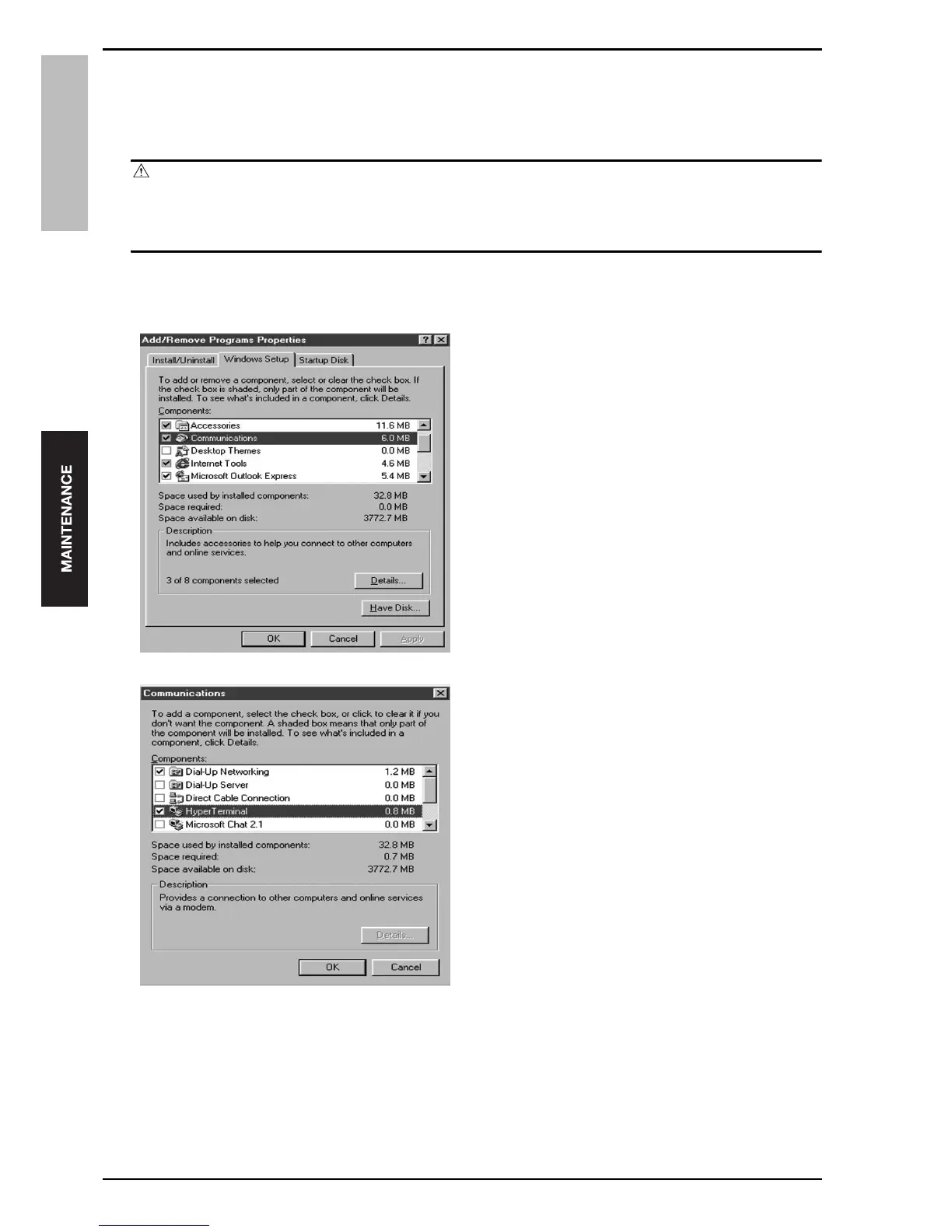
Double-click [Add/Remove Programs].
• An [Add/Remove Programs Properties] window will
appear.
4.
Click the [Windows Setup] tab, and check the
[Connection] check box under [Components].
5.
Click the [Details] button.
• A [Communication] window will appear.
6.
Check the [Hyper Terminal] check box, and click
the [OK] button.
7.
When the [Add/Remove Programs] window
reopens, click the [OK] button.
• The necessary files are copied and the installation is
completed.










 To Next Page