3. OTHER PARTS
43
Field Service Ver2.0 Aug.2005
FS-509/604
1
3.3.9 Removing/reinstalling the stacker unit (FS-509)
Caution
• Be sure to conduct this operation with 2 personnel.
• Be sure to unplug the power cord of the main body from the power outlet.
• Be careful not to let FS fall down when removing FS from the main body and pulling out the
stacker unit from FS. It may cause the injury.
A. Procedure
1.
Remove FS from the main body.
2.
Remove the following parts.
•Booklet tray
• Left cover (See "3.3.5 Removing/reinstalling
the left cover")
• Front cover (See "3.3.3 Removing/reinstalling
the front door")
• Rear cover (See "3.3.4 Removing/reinstalling
the rear cover")
3.
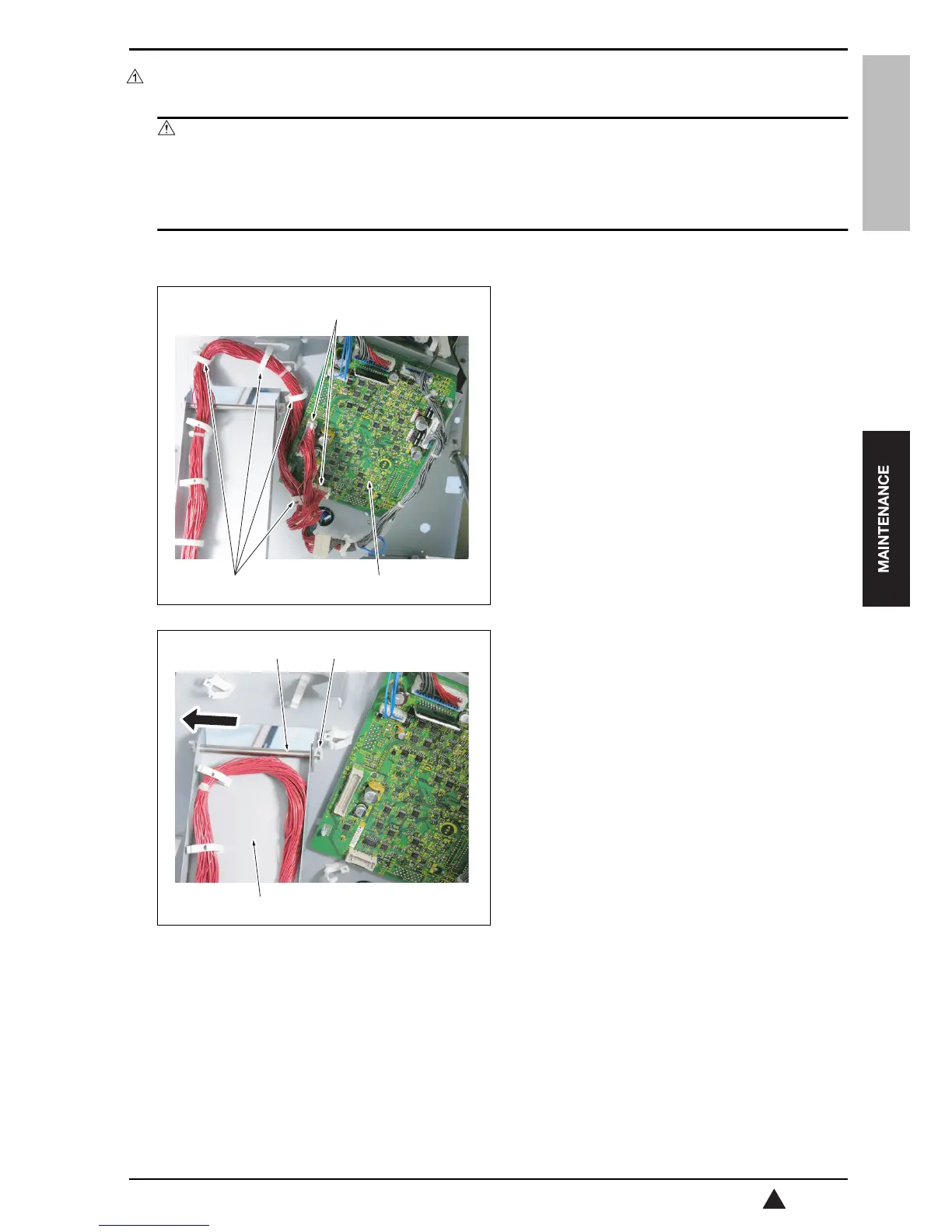
Disconnect 2 connectors [2] from the relay board
(RB) [1] on the back of the stacker unit.
4.
Remove the wiring harness from the 4 clamps [3].
5.
Remove the C-clip [1] and the shaft [2], and then
separate the coupling arm [3].
[3] [1]
[2]
15sff2c016na
[3]
[1][2]
15sff2c017na










 To Next Page