4. MECHANICAL ADJUSTMENT
51
Field Service Ver2.0 Aug.2005
FS-509/604
1
ADJUSTMENT/SETTING
4. MECHANICAL ADJUSTMENT
4.1 Adjusting the bypass gate
Conduct this adjustment when the paper gets jammed in the bypass gate.
A. Procedure
1.
Open the front door.
2.
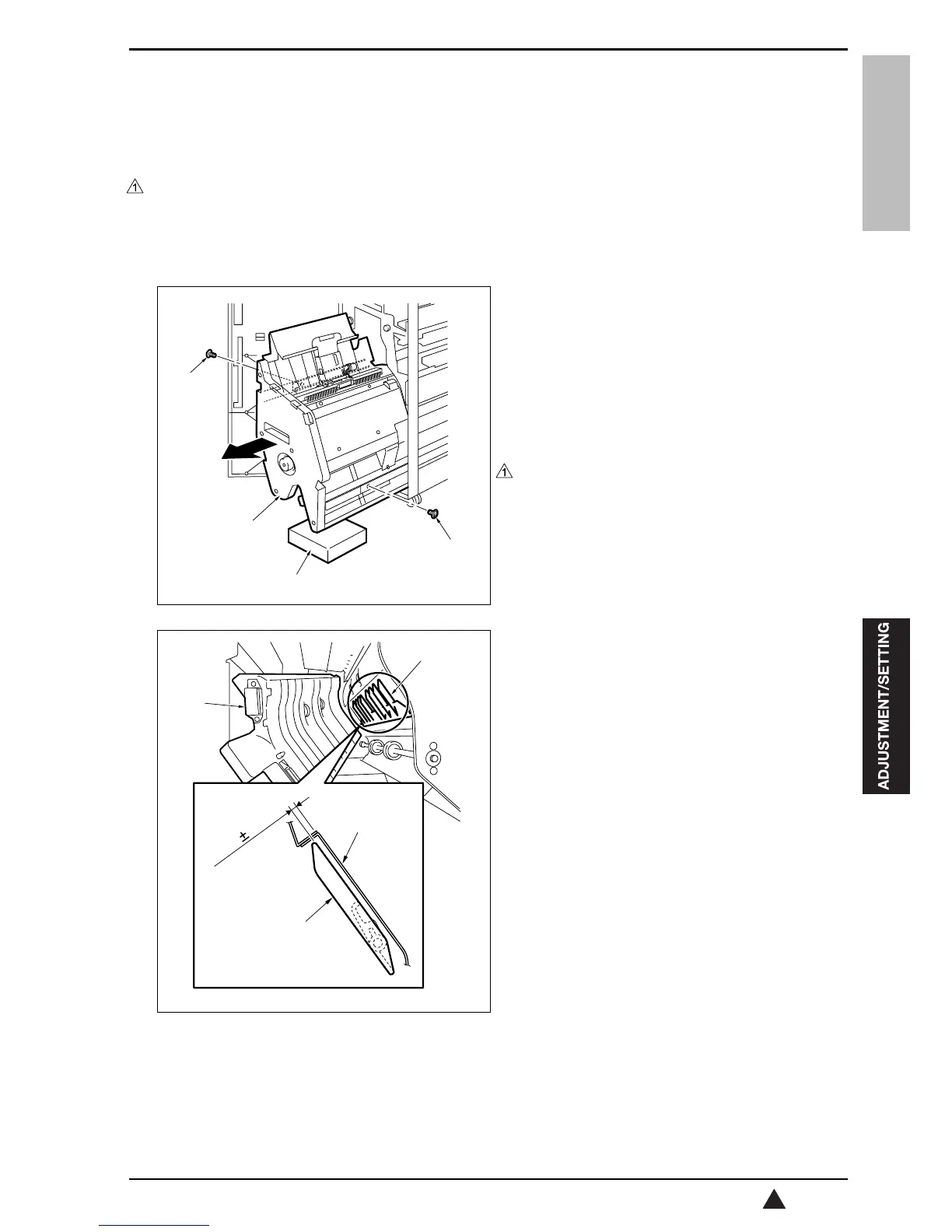
Pull out the stacker unit [1].
3.
Remove 2 screws [2] from the rail stopper, and
then pull out the stacker unit further.
Note
• Be sure to place a support [3] under the
stacker unit to prevent FS from falling down.
• The illustration given left shows FS-604 as an
example.
4.
Open the bypass transfer guide plate [1].
5.
Check to see if the clearance between the bypass
gate [2] and the bypass transfer plate [3] is within
a standard value when the bypass gate solenoid
(SD5) turns OFF.
Standard value: A = 3.2 ± 0.5 mm
When the value is not within the standard value,
perform the following adjustment.
15sjf3c001na
[3]
[1]
[2]
[2]
15sjf3c002na
A=3.2 0.5mm
[2]
[2]
[1]
[3]










 To Next Page