2. PERIODIC CHECK
10
Field Service Ver2.0 Aug.2005
FS-509/604
1
2.2 Maintenance procedure of the stacker section
2.2.1 Replacing the paper assist roller (sponge roller) (FS-509)
A. Periodically replaced parts/cycle
• Paper assist roller (sponge roller): Every 500,000 prints
B. Procedure
1.
Open the front door.
2.
Pull out the stacker unit.
3.
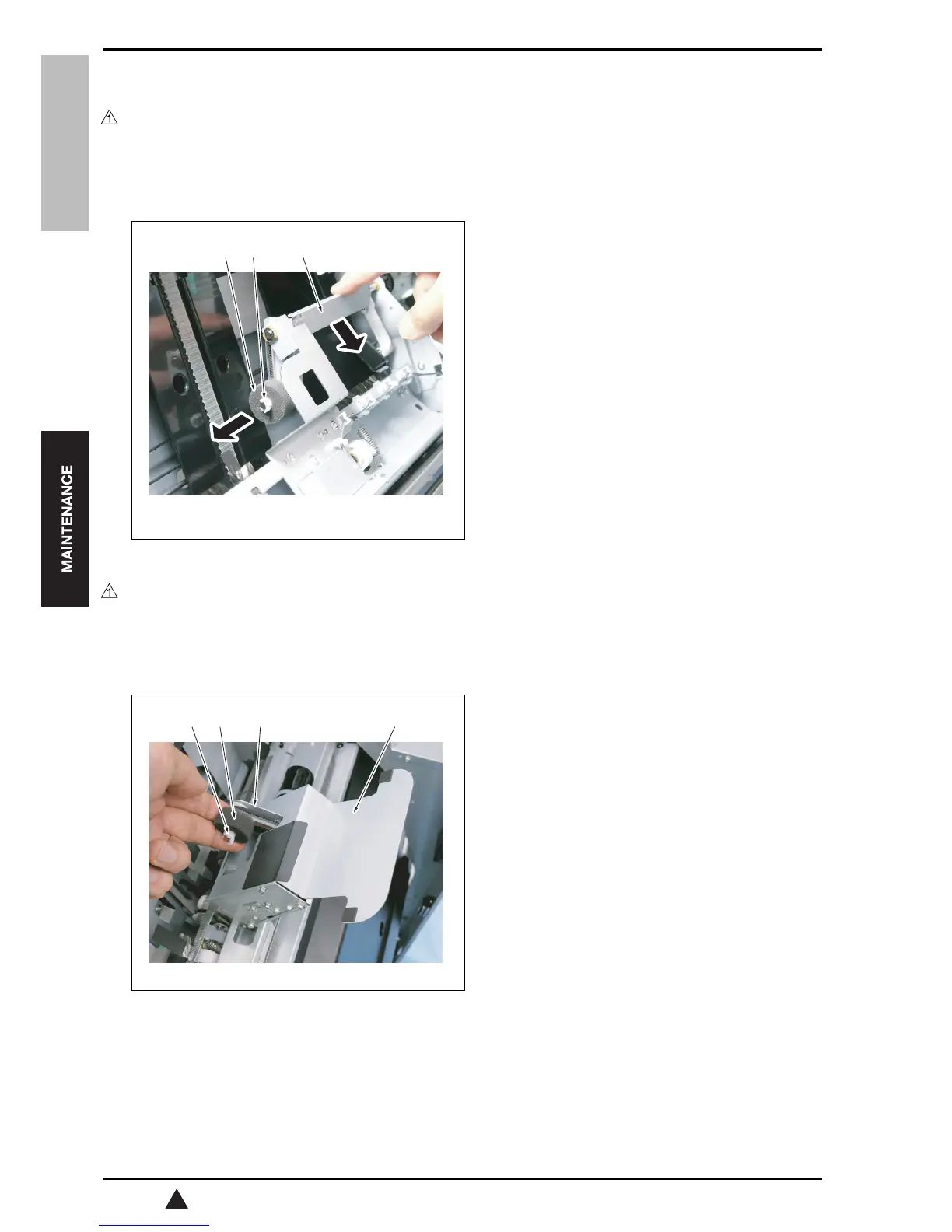
Pull the upper section of the paper assist section
[1] to this side and open the paper assist section.
4.
Remove the C-clip [2], and then remove the paper
assist roller [3].
5.
Reinstall the above parts following the removal
steps in reverse.
2.2.2 Replacing the paper assist roller (sponge roller) (FS-604)
A. Periodically replaced parts/cycle
• Paper assist roller (sponge roller): Every 500,000 prints
B. Procedure
1.
Open the front door.
2.
Pull out the stacker unit.
3.
With the paper assist section [1] open, hold gently
the sponge section of the paper assist roller [2] to
pick it up.
4.
With the paper assist roller picked up, support the
roller at the holder section [3] with your fingers.
5.
Remove the C-clip [4], and then remove the paper
assist roller [2].
6.
Reinstall the above parts following the removal
steps in reverse.
[1][3] [2]
15sff2c001na
[4] [2] [3] [1]
15sjf2c007na










 To Next Page