3. OTHER PARTS
30
Field Service Ver2.0 Aug.2005
FS-509/604
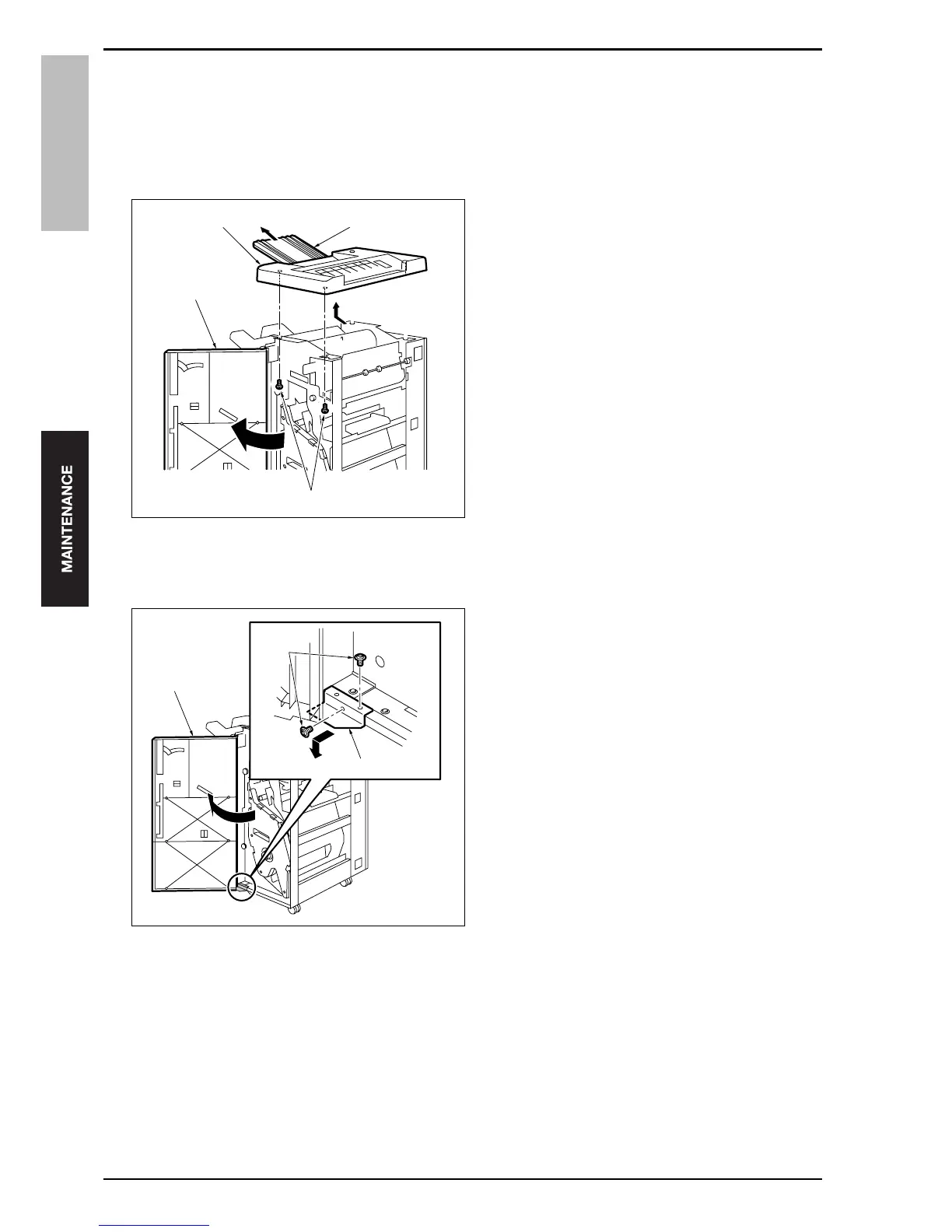
3.3.2 Removing/reinstalling the upper cover /2
Note
• Remove optional PI if it is installed.
A. Procedure
1.
Remove the upper cover /1. (See "3.3.1 Remov-
ing/reinstalling the upper cover /1.")
2.
Open the front door [1].
3.
Remove 2 screws [2] and pull out the sub tray [3],
and then remove the upper cover /2 [4].
4.
Reinstall the above parts following the removal
steps in reverse.
3.3.3 Removing/reinstalling the front door
A. Procedure
1.
Open the front door [1].
2.
Remove 2 screws [3] from the lower hinge plate
[2], and then remove the front door [1].
3.
Reinstall the above parts following the removal
steps in reverse.
[4] [3]
[1]
[2]
15sjf2c029na
[1]
[3]
[2]
15sjf2c030na










 To Next Page