Chapter 3 Field Service
3-12
4.
Turn the copier's main power switch ON (i.e., boot up the print controller).
Now you can access various functions from HyperTerminal.
For how to install and use the HyperTerminal, refer to the manual for your Windows, as well as the
later corresponding section of this manual.
●
Installing and Booting Up HyperTerminal
HyperTerminal is a terminal communications program with which Windows95/98/Me/NT4.0/2000/XP comes
as standard. If it is not installed in your Windows, it is necessary that it should be installed.
• To install HyperTerminal, you need the installer CD for the Windows PC in use.
• The procedure for setting up HyperTerminal varies according to the version of Windows being
used.
Installing HyperTerminal
In the following, we use the Windows 98 as an example.
1.
Insert the installer CD for the version of Windows you are using.
2.
Select [Start]-[Settings]-[Control Panel].
A [Control Panel] window will appear.
3.
Double-click [Add/Remove Programs].
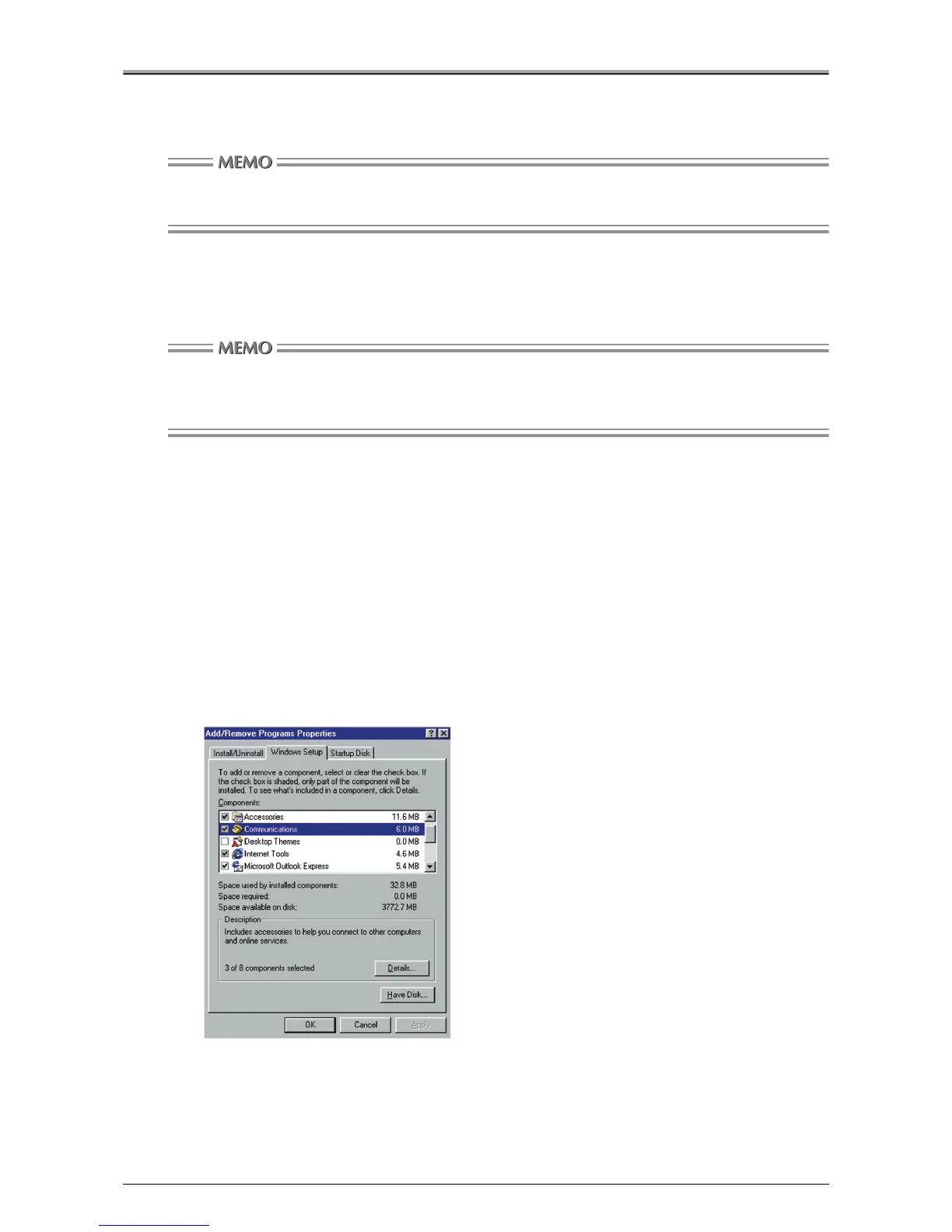
An [Add/Remove Programs Properties] window will appear.
4.
Click the [Windows Setup] tab, and check the [Communications] check box under
[Components].












 To Next Page