Replacing Consumables
7-12
7 Follow the same procedure to remove the cartridges for the cyan, black,
then yellow toners.
8 Press the Stop/Reset key to reset the machine.
Replacing the Imaging Cartridge
When replacing an imaging cartridge, refer to the following table. For opti-
mum print quality and performance, use only approved KONICA MINOLTA
imaging cartridge for your specific machine type, as listed in the table below.
You can find your machine type and the imaging cartridge part numbers on
the consumables reorder label inside the original cover.
" For optimum print quality and performance, use only the corre-
sponded TYPE genuine KONICA MINOLTA imaging cartridge.
" You are advised to replace the indicated imaging cartridge when the
message I/C LIFE END/REPLACE I/C appears.
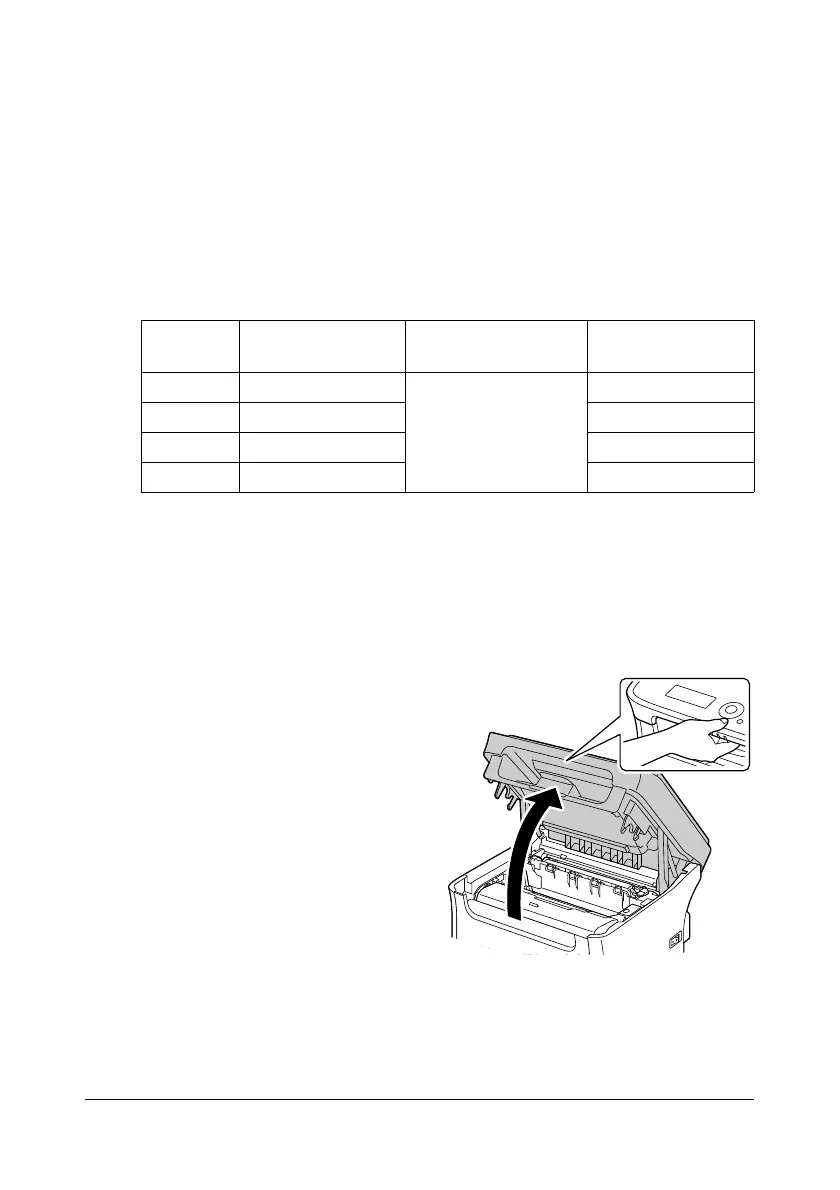
1 Open the scanner unit.
" If there is paper in the
output tray, remove it,
and then fold up the out-
put tray before opening
the scanner unit.
Machine
Type
Machine Part
Number
Part Name Imaging Cartridge
Part Number
AM A0HF 011 Imaging Cartridge A0VU 011
EU A0HF 021 A0VU 0Y1
AP A0HF 041 A0VU 0Y1
GC A0HF 081 A0VU 0Y1















 To Next Page