Using the Librarian
14
4. Press Open to select the current directory and save the les.
Exporting as a bundle
To export multiple pieces of data from the modwave to your computer as a bundle:
1. In the Main Window, select the data that you’d like to export.
2. In the File menu, select the Export Bundle… command.
3. Navigate to the location to save the bundle, and enter a name for the le.
4. Press Save to save the bundle le.
Exporting all user data
To export all of your custom data as a single bundle le, without saving the write-protected factory sounds:
1. In the menu, select the Export Bundle of All User Sounds… command.
2. Navigate to the location to save the bundle, and enter a name for the le.
3. Press Save to save the bundle le.
is exports a bundle of all non-write-protected data, for backing up or transferring all of your custom sounds at once.
Importing and exporting Set Lists
Set Lists refer to up to 64 Performances. When you export a Set List, both the Set List and its referenced Performances
are saved together. is makes it easy to transfer groups of sounds between two or more modwaves.
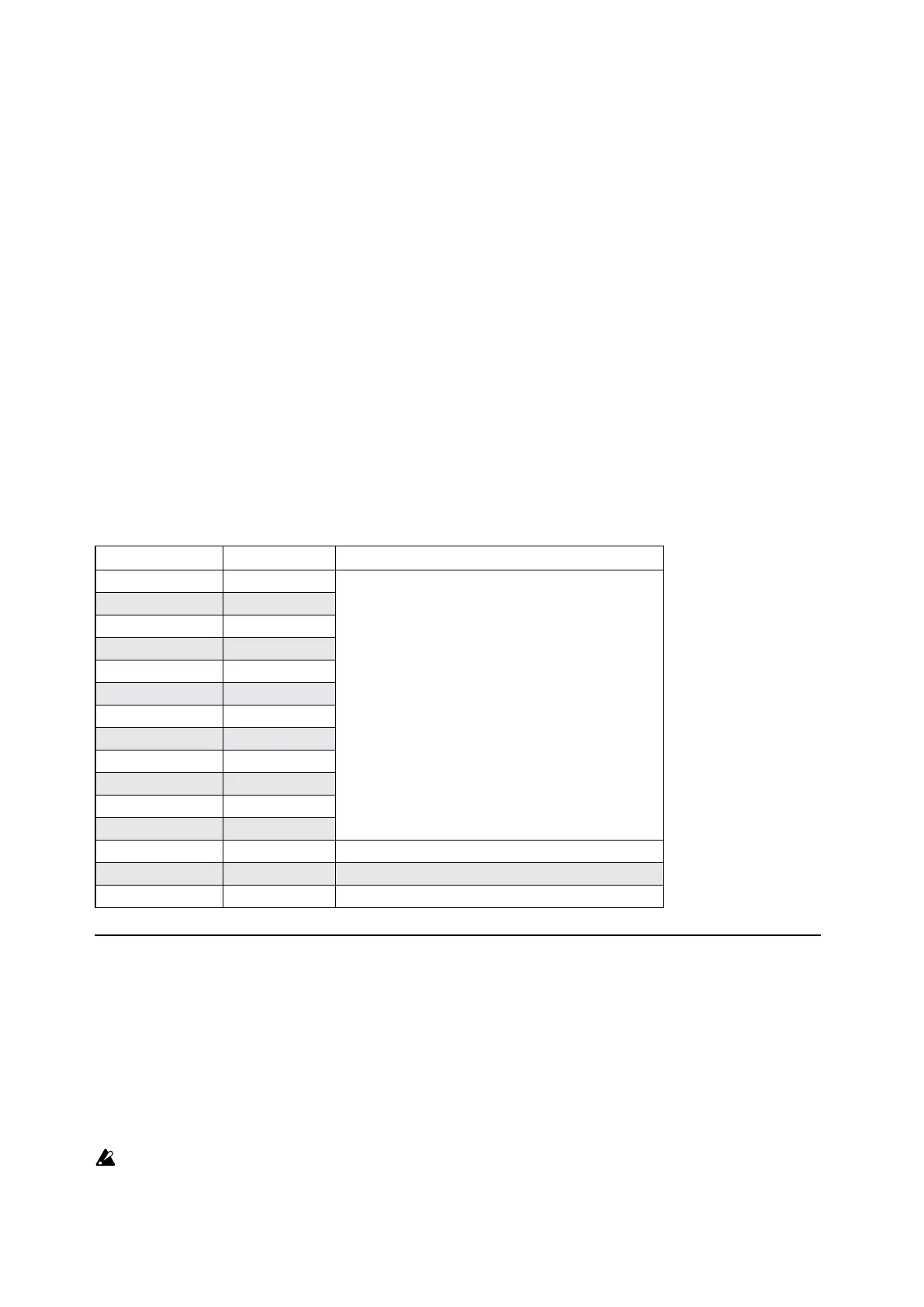
File Types
e modwave Editor/Librarian uses the le types below.
Type Extension Contents
Performance mwperf
A single item of the specied type.
Program mwprog
Wavetable mwwavetable
Kaoss Physics mwkphysics
Scale korgscale
Motion Sequence mwmotionseq
Master Lane mwmasterln
Timing Lane mwtimingln
Pitch Lane mwpitchln
Shape Lane mwshapeln
Step Seq Lane mwstepseqln
Eect mweect
Set List mwsetlist One Set List and all of its referenced Performances
Bundle mwbundle Multiple items of any type.
Backup mwbackup The entire contents of the modwave.
Importing Wavetables
You can import Wavetables in two standard formats. Both formats are specially-prepared .wav les, which contain
up to 64 individual waveforms laid out end-to-end, one immediately aer the other. Each of the waveforms must be
exactly the same length. e two supported formats are:
• 32-bit oating point data, with waveforms exactly 2048 samples long (commonly used by soware synthesizers,
such as Serum)
• 16-bit linear data, with waveforms exactly 256 samples long (commonly used by modular synth hardware)
e main dierence between the two formats is that 2048-sample waveforms allow three more octaves of high
harmonics. In practice, this means that bass notes can be brighter in timbre.
Important: .wav les must be in one of the two supported wavetable formats, as described above. Normal
audio les, such as recordings of instruments, will not be automatically converted into wavetables.


 To Next Page