Windows
20
Windows
is section provides a brief explanation of the modwave Editor/Librarian’s screens and their functions.
Main Window
is is the central window for the modwave Editor/Librarian. It has two basic states, controlled by the buttons at the top
right: Editor and Librarian.
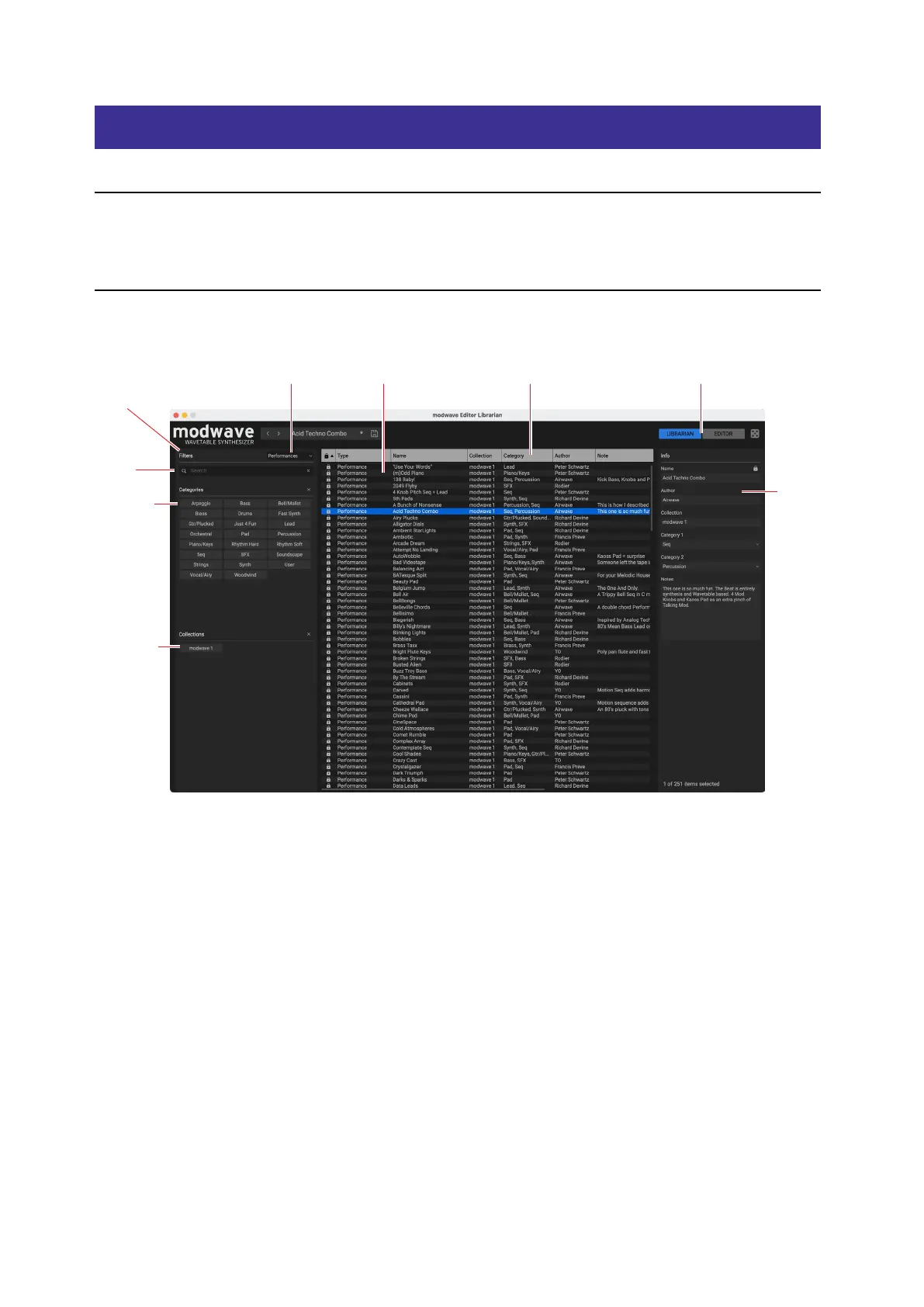
Librarian
is shows lists of all the data on the connected modwave.
Data Type
Filters Panel
Metadata ColumnsData List Editor/Librarian select
Search
Categories
Collections
Info Panel
Current Performance
is shows the Performance currently active on the connected modwave. is will update if you change the
Performance on the modwave, or if you select a Performance using the Editor/Librarian. For more information, see
“Performance Selection” on page24.
LIBRARIAN and EDITOR buttons
e buttons in the upper right of the main window select whether you’re working with the Editor or the Librarian.
Search Field
is lters the list by searching for text in any of the metadata elds.
Lock icons: factory data is write-protected
All of the data shipped from the factory is write-protected, including Performances, Programs, Eects presets, and so
on. is is shown by the lock icons in the list and at the top of the Inspector panel. Factory sounds can’t be deleted, and
their original versions can’t be changed, including metadata such as name, author etc. However, you can duplicate them
and then edit however you’d like.


 To Next Page