Using the Librarian
18
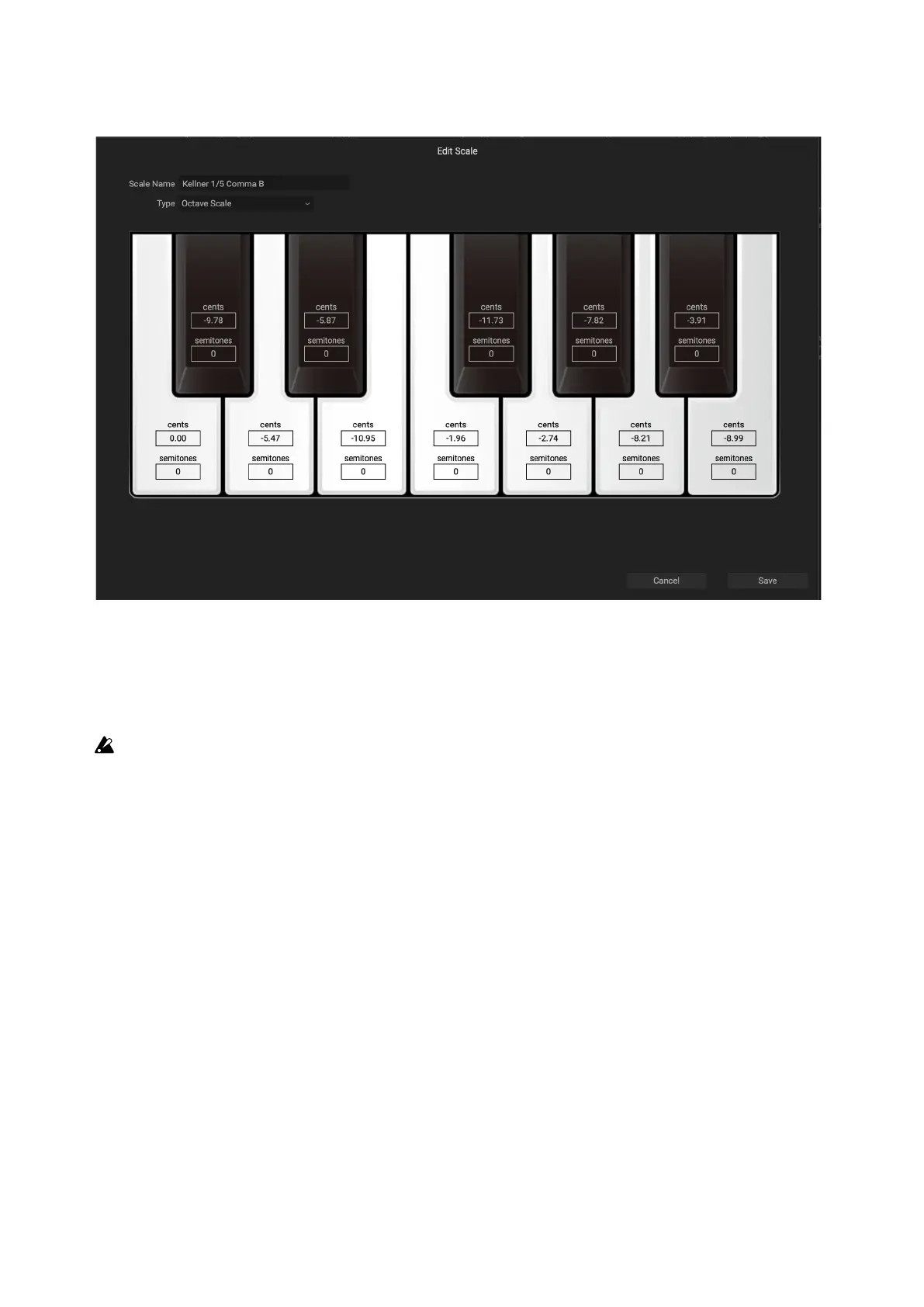
Edit Scale
Scale settings
Scale Name
[Text]
is lets you edit the name of the Scale.
Important: Save always overwrites the existing Scale data, even if you change the name!
Type
[Octave Scale, Octave Scale, A=Master Tune, 128 Note Scale]
ere are three supported scale types:
Octave Scale is a standard 12-note scale which repeats every octave.
Octave Scale, A=Master Tune is similar to the above, except that the Scale is automatically adjusted so that the pitch for
A matches the Master Tune setting (e.g., A=440Hz), regardless of the Scale Key.
128 Note Scale allows separate tuning of each MIDI note, for Scales which don’t repeat on octave boundaries.
Cents
[–100…+100]
Each note can be detuned by up to 100 cents, at or sharp.
Semitones
[–127…+127]
e Semitones parameter lets you detune a note by up to the entire MIDI range. As a simple example, to make the
C key play a D pitch, set Semitones to +2. is is useful for scales which do not repeat on octave boundaries, or for
repeated notes within an octave scale.


 To Next Page