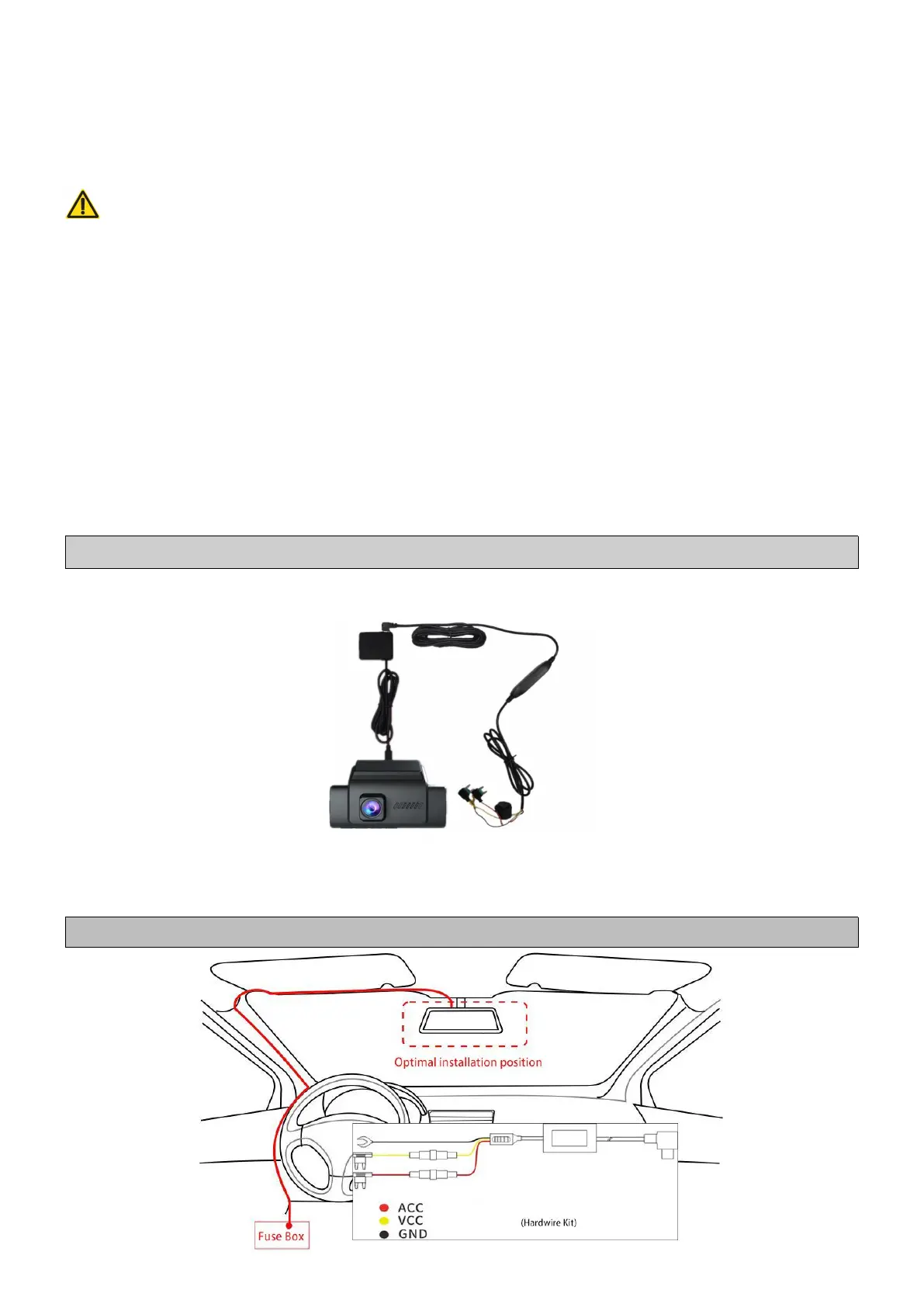
(2) Connect the Camera with Hardwire Kit
Use a 3-lead hardwire kit to connect the camera to the car Fuse Box (not
included in package), so the camera can continue to work while parking
and the 24h Parking Monitoring function will be available.
Warning:
When mounting a hardwire kit, it is recommended to get HELP from a
machinist or other professionals to avoid damage to vehicle by improper
installation. If you want to install the hardwire kit yourself, please go to
Youtube and find relevant installation video according to your car model.
As different model of cars has different locations and designs for fuse
boxes, for which it may be different to install the hardwire kit.
How to Install the Dash Cam with a Hardwire Kit?
① With the dash cam installed, connect GPS module into the USB port
on dash cam first;
Note: Please fix or hide GPS module to prevent blocking visual views.
②
Connect the 3-lead hardwire kit into the USB port on GPS module;
③ Run cable along from the top of front windshield, door frame, A-pillar,
driver-side glove box, all the way to car fuse box(As shown in figure).
Note: A designated 3-lead Hardwire kit is required. Not included.



 To Next Page