TF card. It won’t be deleted by Loop Recording and need to delete manually.
1.3 Record Sound
In video mode, short press the (Down) Button once to turn on/off
audio recording. Or turn on/off in Audio Record settings in Setup Menu.
1.4 Turn ON/OFF WiFi
In video mode, long press (UP) Button for 3s to turn ON/OFF WiFi.
Note: Please DISCONNECT the camera WiFi on your phone first, so you can
long press the Up Button to turn off wifi and exit WiFi page on the device.
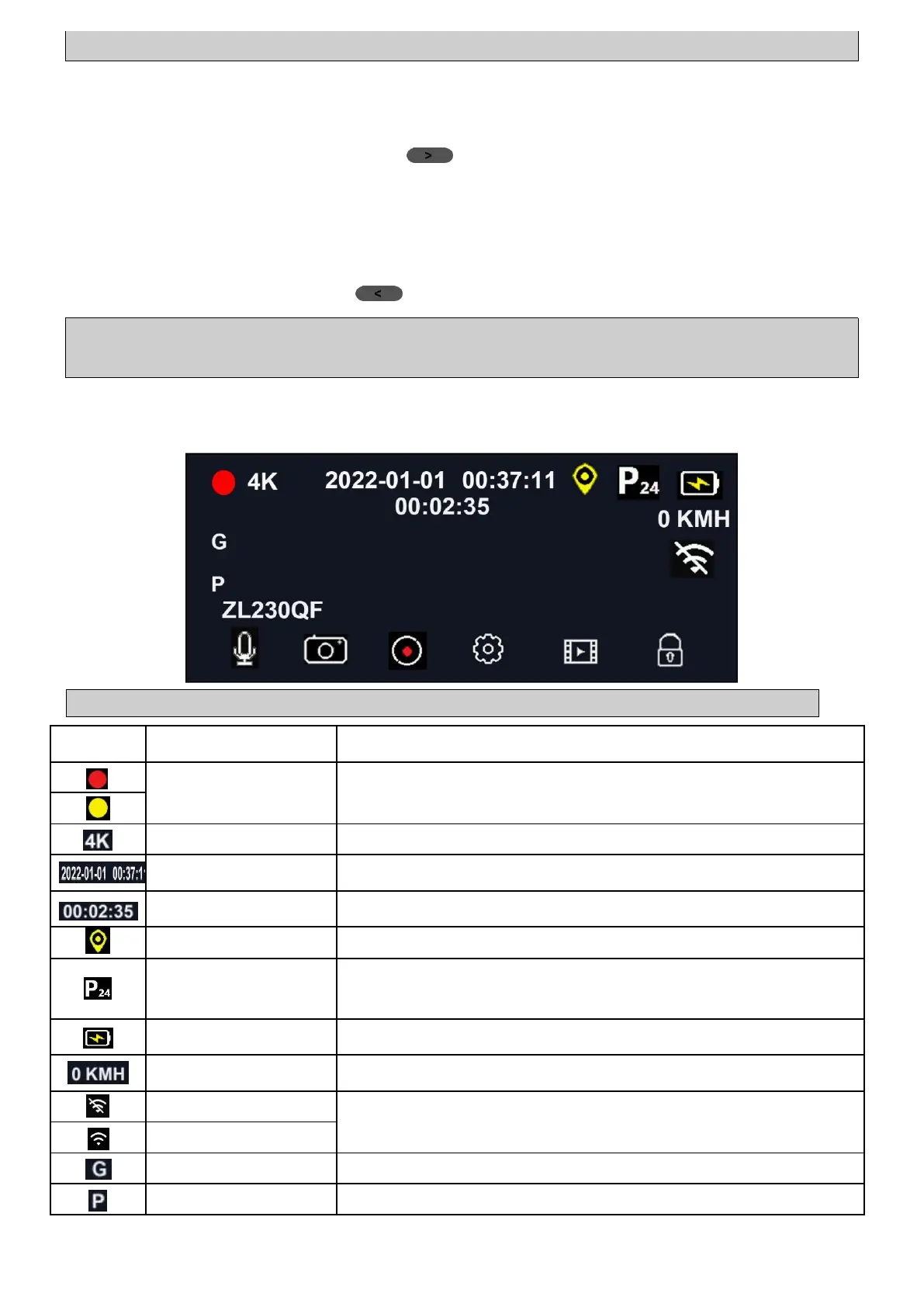
1.5 Video Mode Interface Introduction
Note: Some icons appear on the screen only after their functions are set.
Red indicator flashes: record an ordinary video.
Yellow indicator flashes: This video will be locked.
Current resolution of front camera.
Current date and time of camera.
The record duration of current video segment.
It shows only when GPS module is connected.
If the timelapse is set (1s/2s/3s), it will show
during parking. (Hardwire kit needed)
It shows when power is supplied with power cord.
If GPS connected, driving speed shows in driving.
WiFi connecting status (ON/OFF)
It shows only when the G-sensor is on.
It shows only when Parking Guard is on.



 To Next Page