①
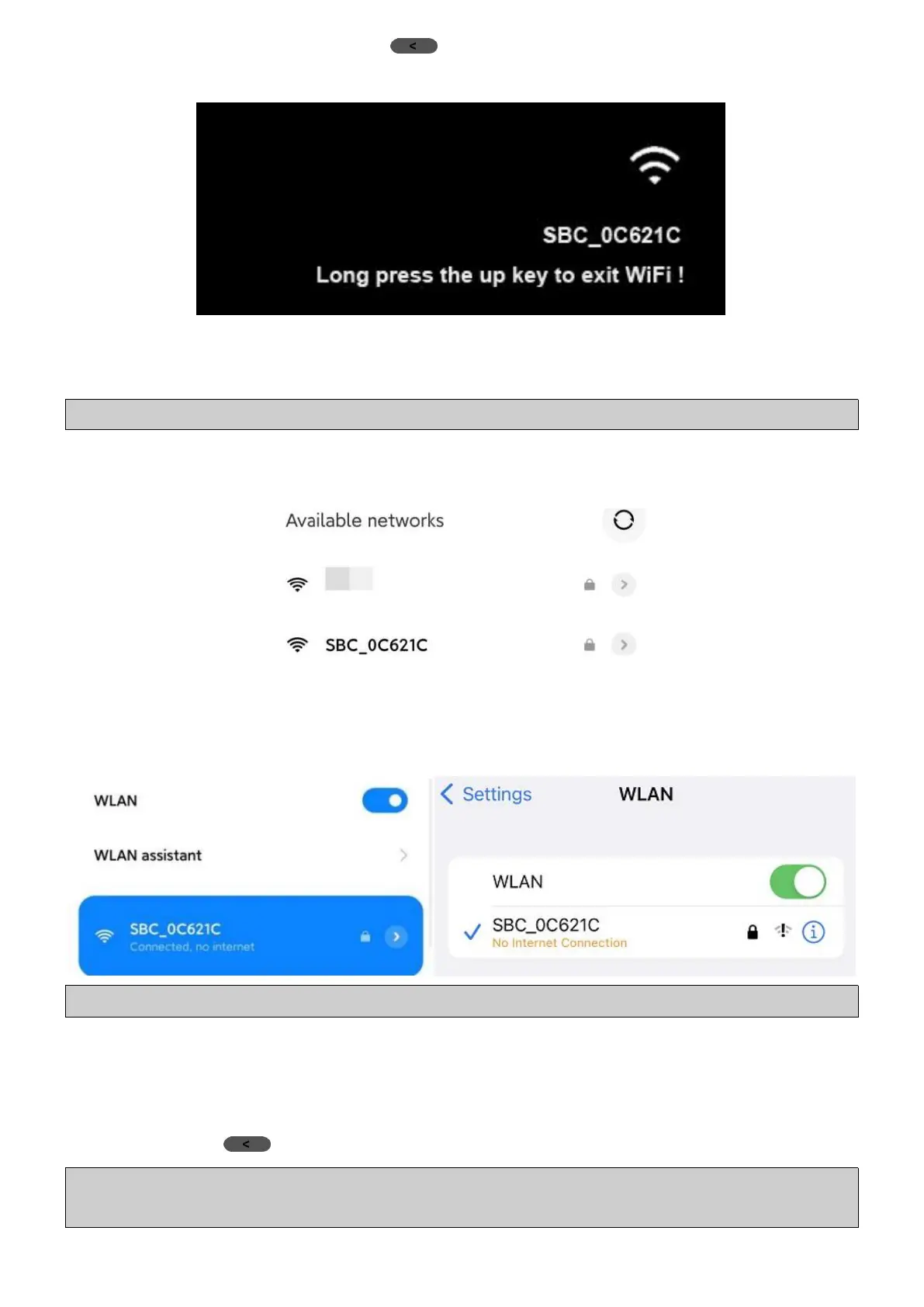
In Video Mode, long press (UP) Button for at least 3s to Turn ON
camera WiFi and you will see the WiFi hotspot name on the screen.
Each K8 camera has its Wi-Fi Name, but all is started with SBC_.
Wi-Fi Password (Default): 12345678
Note: The Wi-Fi Password can be modified in “Roadcam” App’s Setup menu.
②
Go to your phone’s “Settings” → “WLAN” → “Available networks”
or “Other networks” to find out the camera WiFi Name.
③ Choose the camera WiFi, input Wi-Fi Password (12345678) to join it.
④
Here you will see that your phone has been connected to the camera
WiFi successfully, then you can go to the App to control camera.
Note: Each K8 camera’s WiFi can pair to only one phone each time.
2.2 How to Turn OFF Camera’s WiFi
①
Disconnect the camera WiFi on your phone first;
②
Long press (UP) Button for at least 3s to Turn OFF camera WiFi.
Note: If you don’t Disconnect the camera WiFi on your phone first, you will
fail to turn off the camera WiFi by long pressing the Up Button on the camera.



 To Next Page