59INTELLIPANEL(TM) CONTROL
C Modifying the program
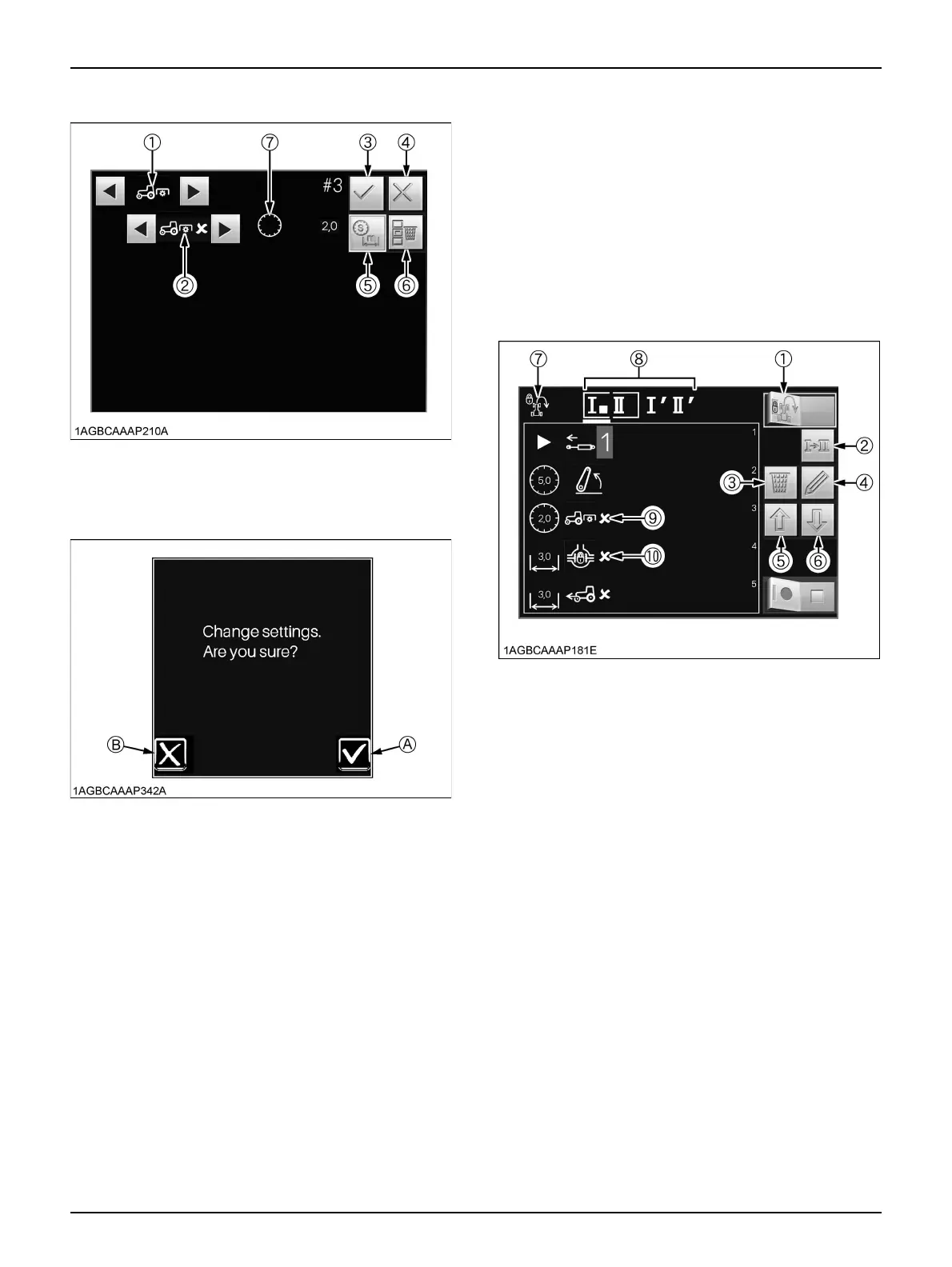
Example: Switching between the PTO program and
differential lock program
1. Make sure the Headland Management System lock
indicator (7) is off.
2. Using the program select switch (2), choose the
program code to modify.
3. Using the scroll switch (5 or 6) to select the PTO-
related subcategory icon (9) to modify. Then touch the
edit switch (4).
Now the following editing screen appears
4. On the editing screen, the PTO-related main category
icon (1) and subcategory icon (5), selected in the
above step 3, are automatically displayed
5. Using the main category scroll switch (2), select the
differential lock icon.
The subcategory icon (5) also changes itself to the
differential lock icon.
6. Using the subcategory scroll switch (6), select the
differential lock OFF icon.
7. Make sure the pre-program distance icon (7) is on.
Then touch this icon.
(If the lead time icon stays on, change it to the pre-
program distance icon with the distance/time select
switch (8).)
8. Using the appearing [NUMERIC KEYPAD], enter a
new distance (3.0 m [10 ft.] in this example) and save
the entry.
(1) PTO-related main category
icon
(2) Subcategory icon
(3) Save switch
(4) Cancel switch
(5) Distance/time select switch
(6) Delete switch
(7) Lead time icon (Timer)
(A) "YES"
(B) "NO"
(1) Headland Management
System lock/unlock switch
(2) Program select switch
(3) Delete switch
(4) Edit switch
(5) Scroll switch (UP)
(6) Scroll switch (DOWN)
(7) Headland Management
System lock indicator
(8) Program code indicator
(9) PTO-related subcategory
icon
(10) Differential lock icon



 To Next Page