4 Technical Description
23
4.6.1 Menu function
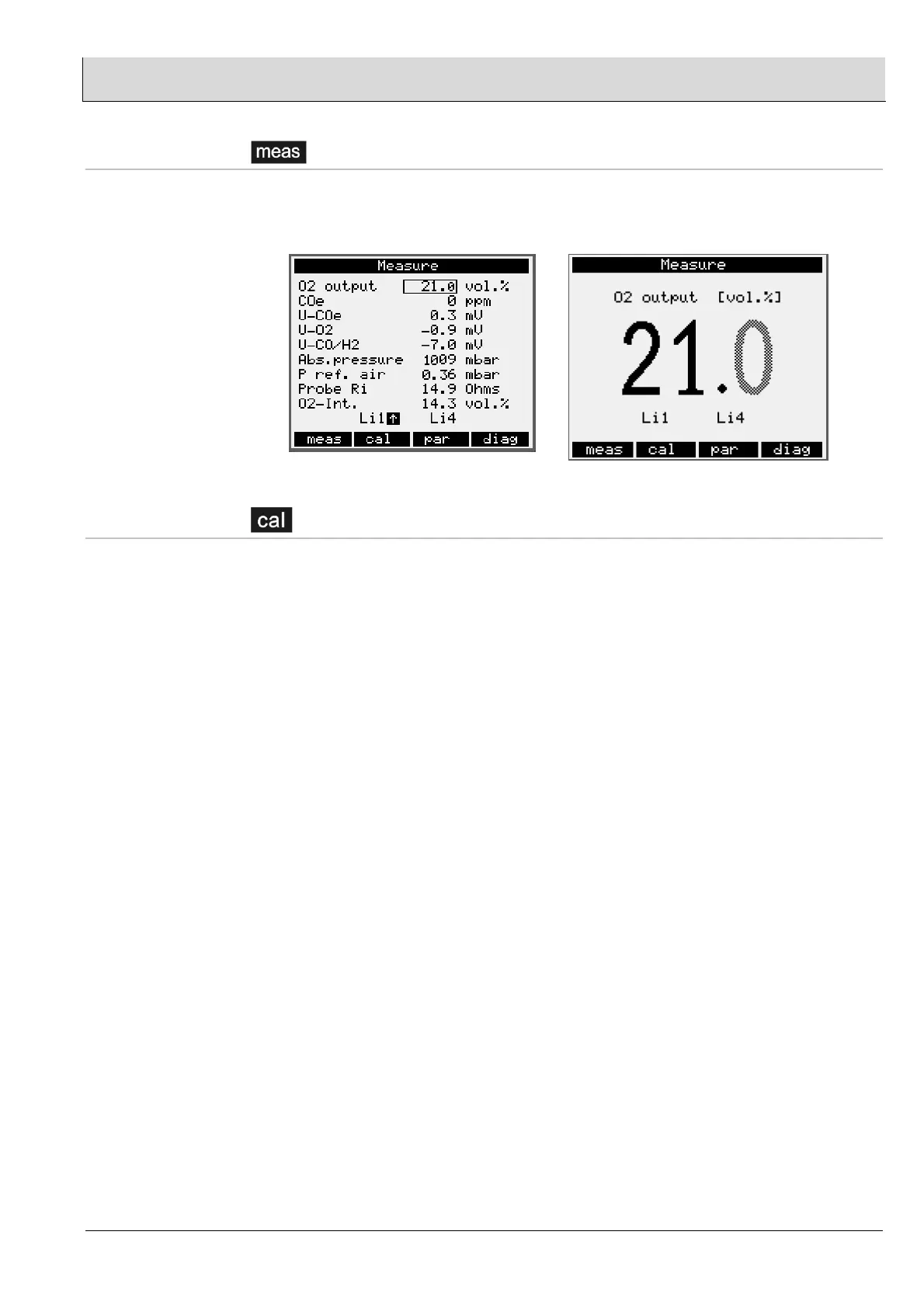
When the [meas] key is pressed, the screen switches to a large display of the
measurement value, which is selected using the cursor keys (up, down). By pressing
the [meas] key several times, you can return to the display of all measurement values.
4.6.2 Menu function
When the [cal] menu key is pressed, “Start calibration” appears in the display. When
calibration has been activated, a choice of four calibration functions is available:
• Offset calibration on ambient air
• Offset calibration with compressed air, open before
•
Calibration with reference measuring
• O
2
calibration with test gas, open gas
• CO calibration with test gas, open gas
You can select the required calibration function using the cursor keys (up, down).
Pressing the ENTER key confirms the selected calibration function and initiates this
calibration process.
You can interrupt the calibration modes using the menu function:
“Abort calibration, return to measurement mode”.
An O
2
default value is displayed during the calibration process. It only makes sense to
measure or display the O
2
value in the measuring operating state, that is, when
calibration is over.
See also chapter 6.5.


 To Next Page