4 Technical Description
22
4.6 Display and operating unit
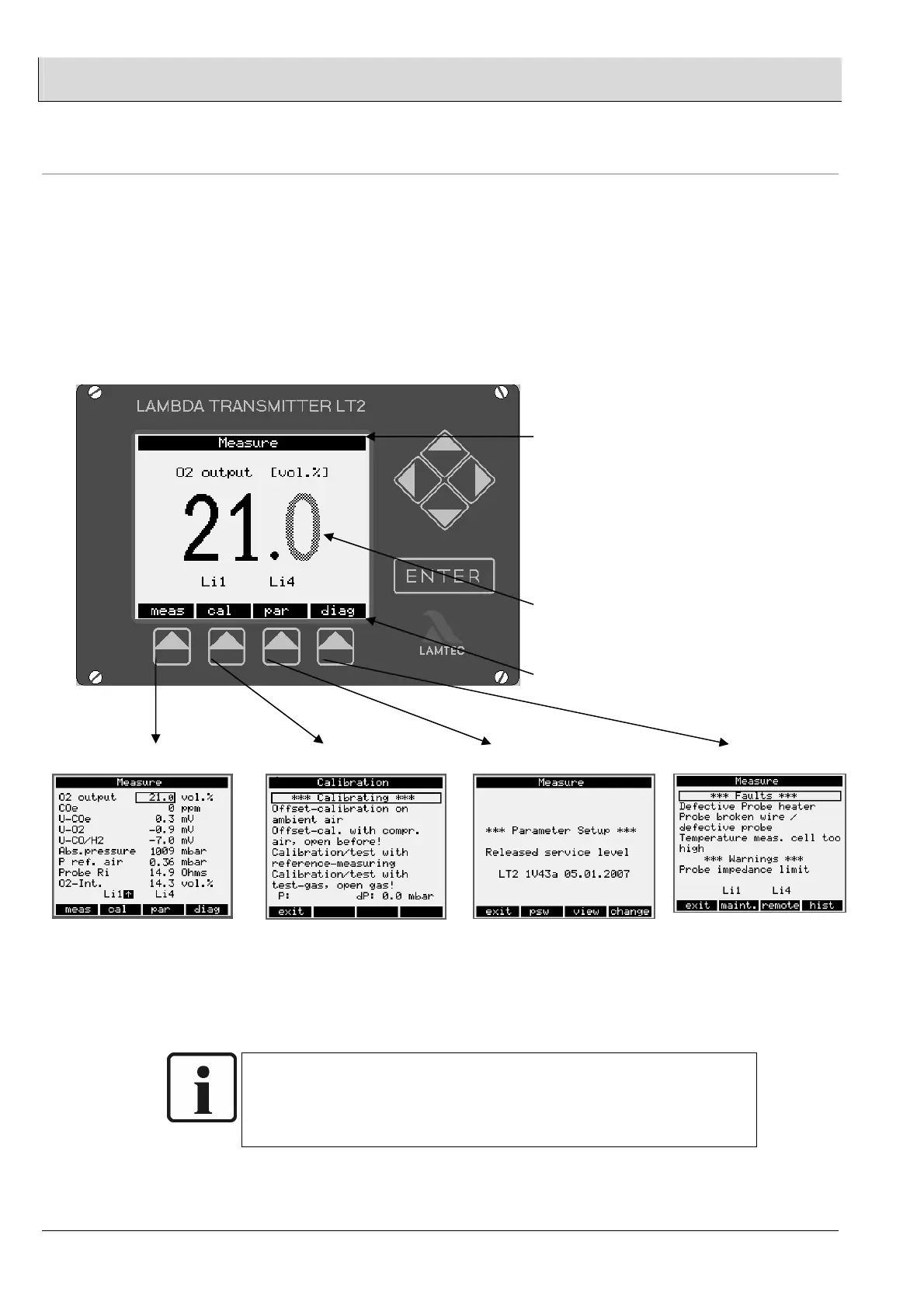
The display and operating unit of the LT 2/KS1-DK consists of an LCD, the cursor
keys, the Enter key and the menu keys.
• The cursor keys enable you to select measurement values, parameters or
functions in the viewing window of the display. These keys also allow you to
position the cursor to input and edit (Change) data.
• The Enter key activates, confirms and exits Edit mode
The menu keys are assigned to the menu items shown above them in the display.
The screen is divided into three sections:
1. The status bar at the upper edge of
the screen. This shows:
Whether Maintenance mode is active
(left).
The current operating state (centre).
Whether any warnings or faults are
present (right).
The status bar also flashes to indicate
faults.
2. The measurement value is shown in
the middle of the screen.
3. The menu bar, in which entries are
made using the menu key below.
The menu keys feature functions for the LT 2/KS1-DK in abbreviated English:
measurement, calibration
Parameter setup, diagnosis
NOTE:
The limit values are only displayed if they have been activated via the
parameters 930/940/950/960 ( “Service” access level ) (see section
4.12.8)


 To Next Page