6 Commissioning / Shutdown
65
6.4.4 O
2
calibration with test gas
Connect test gas at the hose connector “test gas” of the PCB, with a prepressure of
0,3bar.
Example for test gas: 3 Vol.% O
2
in N
2
NOTE:
The calibration/check with O2- test gas only works with O2 values < 18%.
Menu function
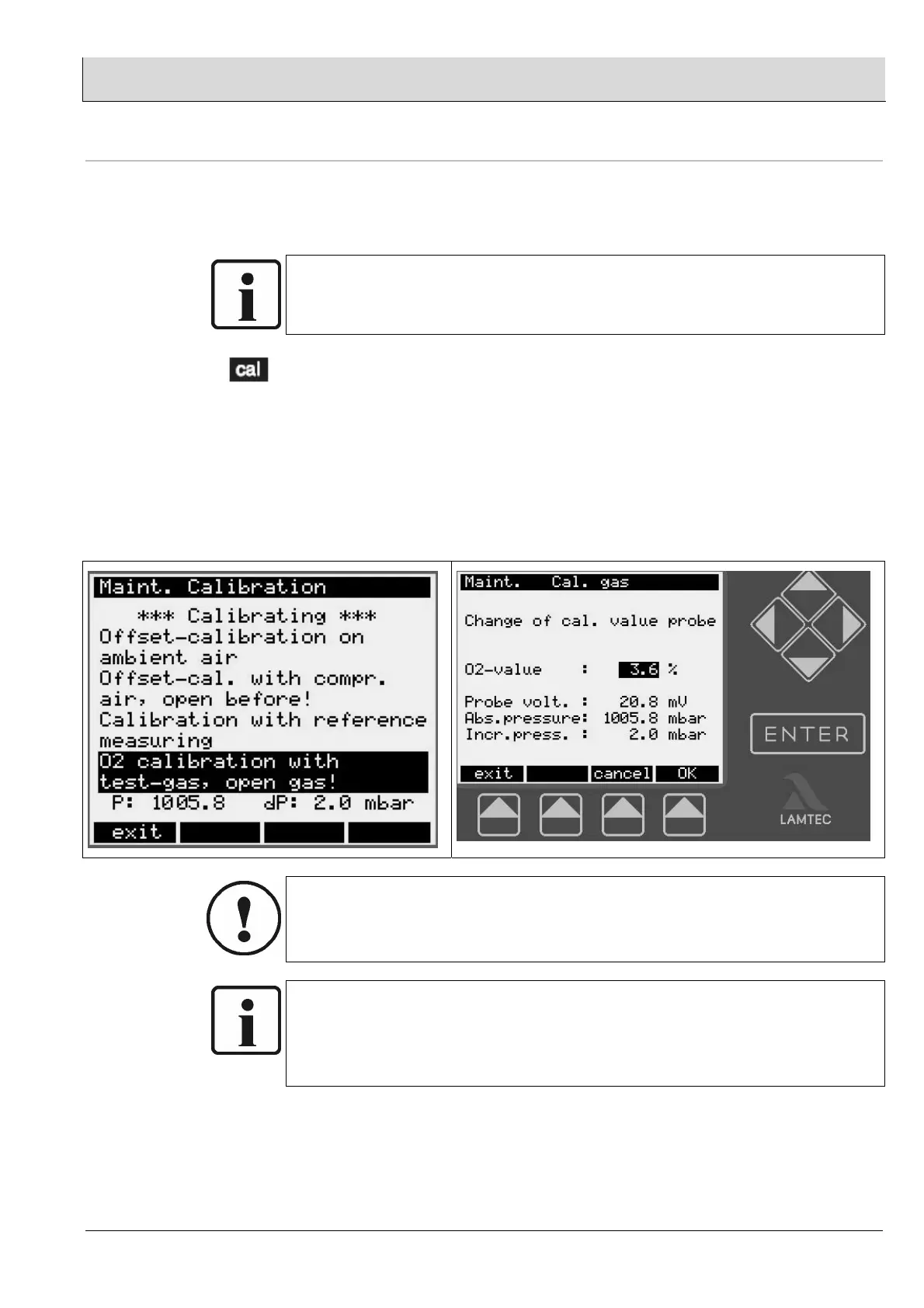
When you press the [cal] menu key, “Start calibration” appears in the display.
• Open the shut-off plug valve in the PCB
• Set the pressure rise “dp” to 2...3mbar via the test gas throttle in the PCB
• Start calibration
• When calibration starts, there is a waiting time of 5 seconds before the values are
displayed.
• Change the O2-value with the cursor keys
• Press OK
• Following successful calibration, close the shut-off plug valve
CAUTION:
If you are calibrating the measurement value using the display and operating unit →
cal, you must confirm the new calibration value with “ENTER” or “OK”. Otherwise, the
menu ends automatically after 15 seconds, and the new calibration value is rejected.
NOTE:
If there is no possibility for a reference measurement or for tes gas, you have to enter
the probe temperature of the test report in parameter 141,to get a correct
measurement value.
But this method functions only with a new probe / sensor.
- O2 + O2


 To Next Page