10
Installing CO
2
Supply
Before installing regulator, assure that a seal (washer
or o-ring) is present in regulator attachment nut.
! ATTENTION
A dedicated CO
2
regulator is required to supply the CO
2
inlet at the unit as well as to all syrup pumps.
! ATTENTION
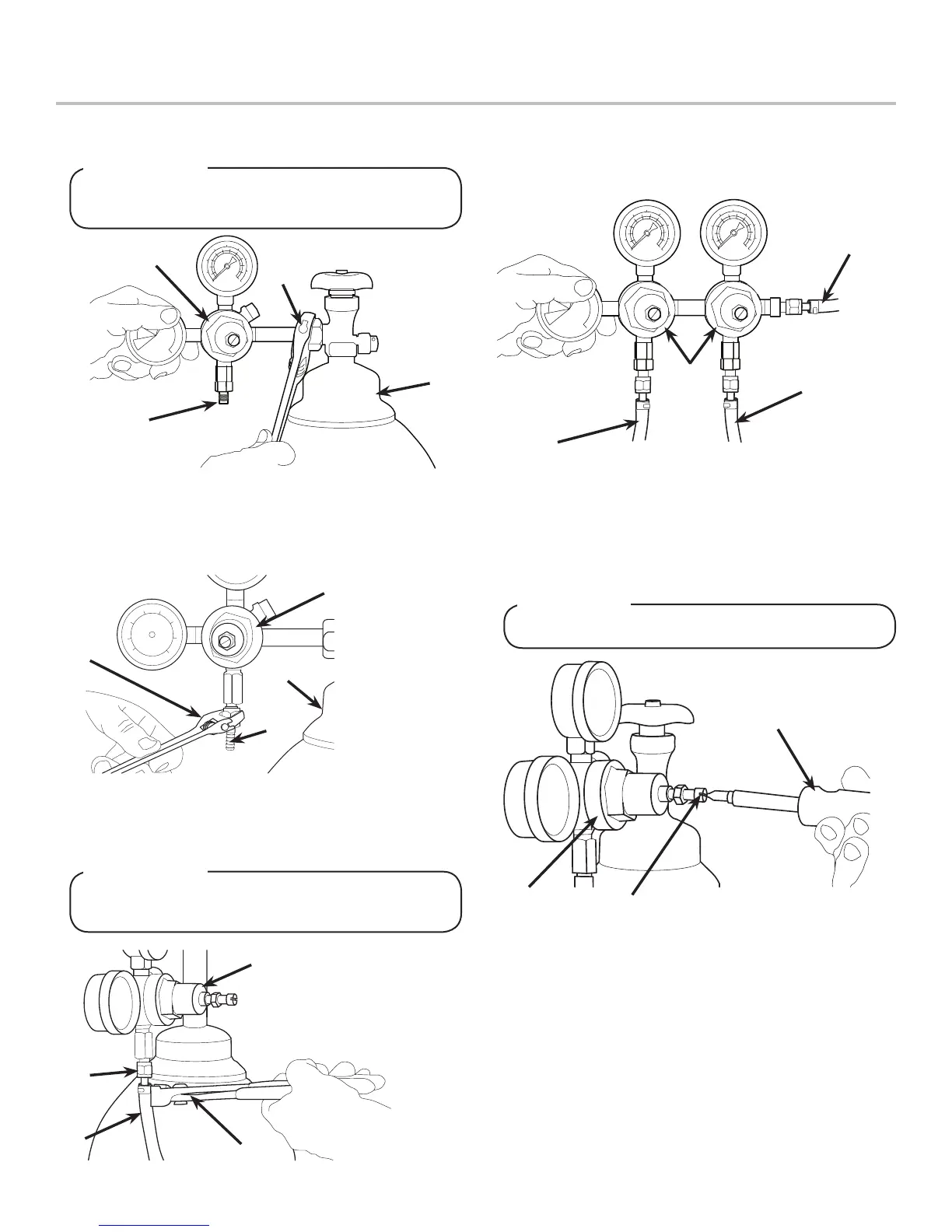
1. Connect high pressure CO
2
regulator assembly to CO
2
cylinder or bulk system.
2. Connect a 1/4” nut, stem and seal to CO
2
regulator outlet.
3. Route appropriate tubing from the low pressure CO
2
regulator manifold location to the 1/4” nut, stem on the high
pressure CO
2
regulator attached to source and connect
tubing.
4. Connect tubing routed from the CO
2
inlet at the unit to one of
the low pressure CO
2
regulator manifold outlets.
5. Connect tubing routed from the tee at the syrup pumps to
the second outlet of the low pressure CO
2
regulator manifold.
7. Repeat Step 6 for both low pressure CO
2
regulators on the
regulator manifold routed to the unit and the syrup pumps.
DO NOT TURN ON CO
2
SUPPLY AT THIS TIME
! WARNING
6. Using a wrench, loosen lock nut on the regulator adjustment
screw of the high pressure CO
2
regulator connected to the
source, then using a screwdriver back out lock nut screw all
the way.
A. CO
2
Regulator
B. Wrench
C. 1/4” nut, Stem
D. CO
2
Supply
A
B
C
D
- Thread regulator nut on to tank,
then tighten nut with wrench
A. CO
2
Regulator
B. Outlet
C. Wrench
D. CO
2
Supply
A
B
C
D
A. CO
2
Regulator
B. Fitting
C. Line to CO
2
Regulator
Manifold
D. Oetiker Pliers
A
B
C
D
A. CO
2
Regulator
B. Screwdriver
C. Regulator Adjustment Screw
A
B
C
A
B
C
D
A. Line to Dispenser
B. Line to Syrup Pumps
C. Line to CO
2
Regulator
D. CO
2
Regulator Manifold









 To Next Page