16
Programming and Setup Software
OPERATION AND MAINENANCE
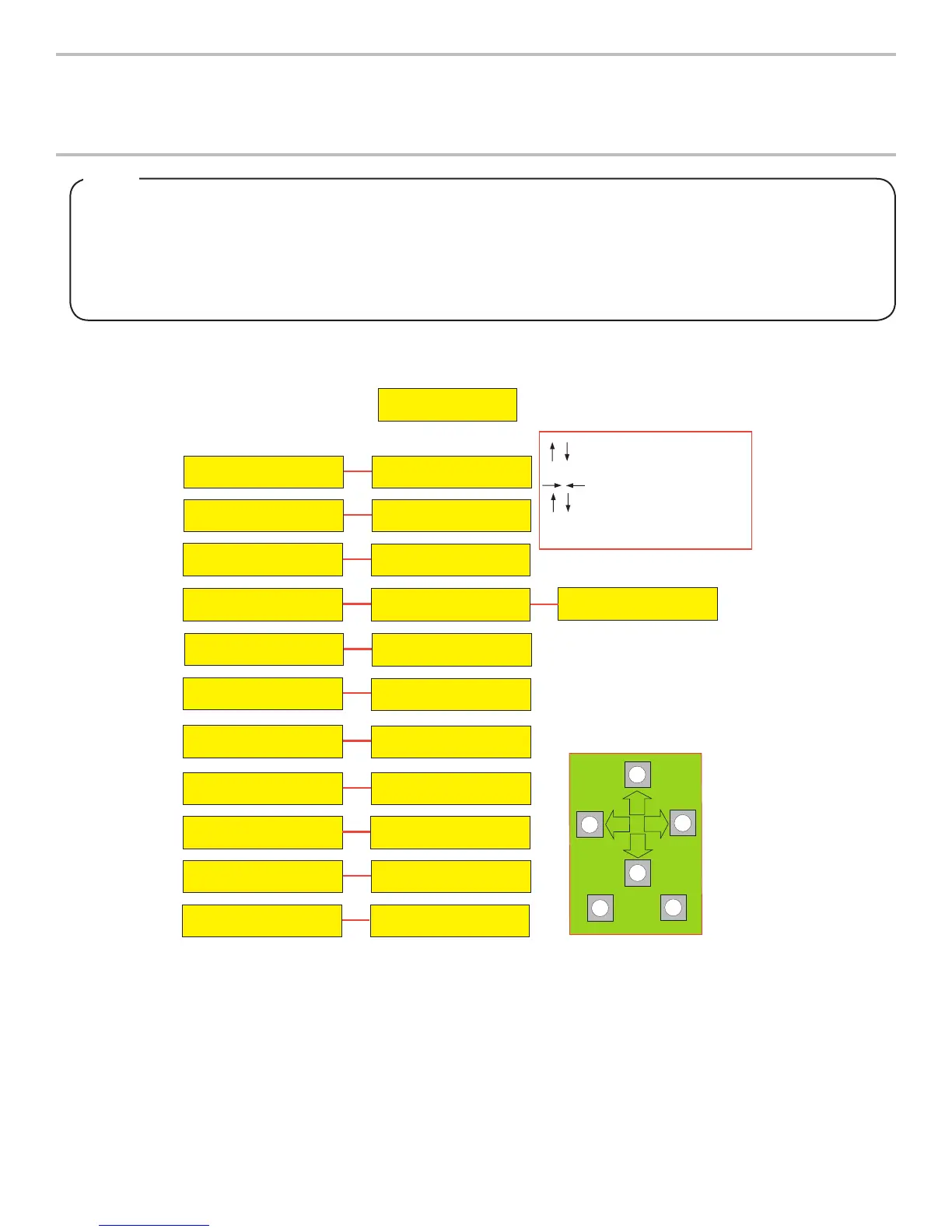
INITIALIZATION SCREEN
(BOOT UP ONLY)
LANCER FS-16
VER. 0.xxxx
MAIN MENU
SUB-CATEGORY
FS-16 SETUP
MAJOR / MINOR
2ND SUB-CATEGORY
BRANDS PER SIDE
V:1 L:2 R:1
FS-16 SETUP
CONFIG BONUS KEY
BONUS KEY SETUP
V:1 T:F M:S B:W
FS-16 SETUP
SODA / PLAIN WATER
CARB / WATER SET UP
V:2 1:S 2:W 3:S 4:W
FS-16 SETUP
VALVE CODE VER
12 1.100 1.100
34 1.100 1.100
FS-16 SETUP
NUMBER OF VALVES
4 3 2 1
OFF ON ON ON
FS-16 SETUP
ICE STIR ON
Scrolls through Main Menu
Press "Enter" to enter sub-category
Moves cursor to right or left
Changes value (number/letter)
Press "Enter" to save changes
Press "Cancel" to exit menus
CANCEL
ENTER
FS-16 SETUP
FS-16 SETUP
RELOAD DEFAULTS?
FS-16 SETUP
CFG DISPENSE DLY
DISPENSE DELAY
V:1 B1 DLY1
FS-16 SETUP
ICE STIR OFF
OFF TIME (MIN)
00060
ON TIME (MSEC)
02000
CARB SENSORS
UPPER
LOWER
307
579
FS-16 SETUP
ICE BIN SENSORS
125
ICE BIN OPTIC
NO YES
RESET DEFAULTS
SET DELAY (MS)
00075
Valves can be adjusted by scrolling through the menus (see gure above) using the UP and DOWN arrows. By pressing the
ENTER button, a submenu is revealed. In the submenu, the individual valves can be adjusted to the desired conguration.
Lancerreservestherighttomakechangesandupdatesasrequired.Ifyouhaveanyquestionsregardingthelatest
versions of programs, please contact your Lancer representative.
TheLancerFS30hasbeenfactorypresettothesettingsnecessarytocomplywiththebrand/avorversionoftheunit
requested by the customer.
Adjustmentsorupgradesshouldonlybeperformedbytrainedpersonnel.Foranyupgrades,anupgradekitmaybe
purchased.Thekitincludesallofthehardwarerequiredfortheupgrade,includingbezelsandvalves.
NOTE






 To Next Page