12
Adjust Water Flow Rate & Syrup/Water Ratio
1. If necessary, rotate switches panel forward and down by
releasing the two pin latches on its sides.
2. Rotate light panel, forward and up by releasing the two pin
latches on its sides towards the top.
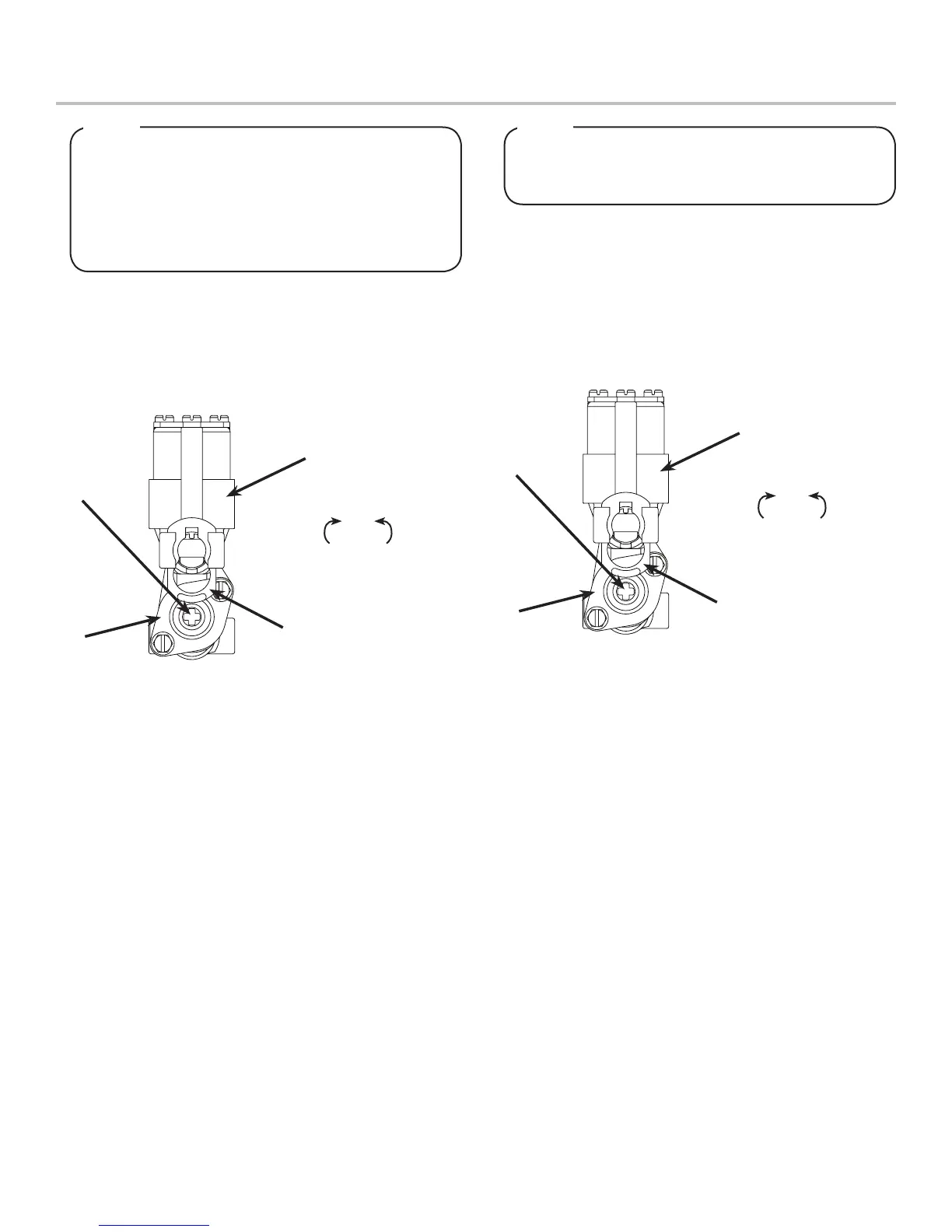
3. Using a Lancer ratio cup verify water ow rate. Use a
screwdriver to adjust if needed.
Thewaterowcanbeadjustedbetween3.25oz/sec
(96ml/sec)and4.50oz/sec(133ml/sec)onall
dispensing valves. Ensure there is ice on the cold
plate and the lines are cold before attempting to set
theowratesonthevalves.Thedrinktemperature
shouldbenohigherthan40°F(4.4°C)whenowrates
are set.
NOTE
There can be up to six gray water valves on this
dispenser (up to four carbonated water valves and two
plain water valves)
NOTE
4. Repeat procedure for each water valve.
A
B
C
D
Increase Decrease
A. Flow Control
B. Valve Retainer
C. Solenoid
D. Valve Body
A
B
C
D
Increase Decrease
A. Flow Control
B. Valve Retainer
C. Solenoid
D. Valve Body
5. Remove nozzle by twisting counter clockwise and pulling
down.
6. Install Lancer syrup seperator (PN 82-3458) in place of
nozzle.
7. Activate valve to purge syrup until steady ow is achieved.
8. Using a Lancer brix cup, activate the valve and capture a
sample. Verify that the syrup level is even with the water
level. Use a screwdriver to adjust if needed.
9. Remove syrup seperator and reinstall nozzle.
10. Repeat Steps 5-9 for each syrup valve.
11. Re-install merchandiser and top cover.



 To Next Page