LAUNCH
X-431 PADII
User's Manual
27
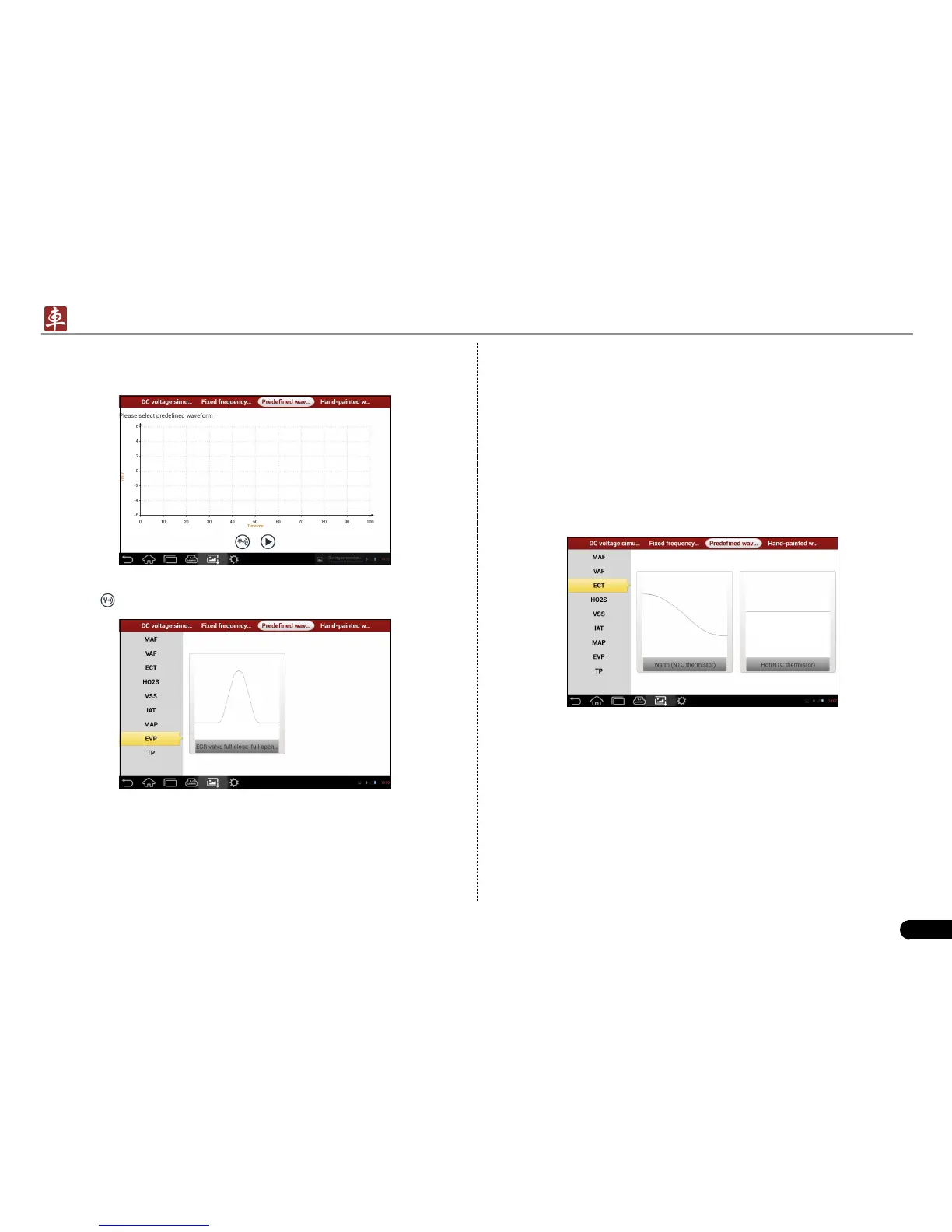
In Fig. 6-3, tap “Predened waveform simulation” to enter the screen
shown as Fig. 6-4.
Fig. 6-4
Here, tap
button, a screen similar to Fig. 6-5 will appear.
Fig. 6-5
In Fig. 6-5, the left setting column stands for sensor types and the right
area displays waveform. The sensor types are explained as below:
ECT: Coolant Temperature Sensor
EVP: EGR Valve Position Sensor
HO2S: Heated Oxygen Sensor
IAT: Intake Air Temperature Sensor
MAF: Mass Air Flow Sensor
MAP: Manifold Absolute Pressure Sensor
TP: Throttle Position Sensor
VAF: Volume Air Flow Sensor
VSS: Vehicle Speed Sensor
For example, tap “ECT” – “Warm (NTC Thermistor)” in Fig. 6-5, the
right screen will display the waveform of the sensor. See Fig. 6-6.
Fig. 6-6
In Fig. 6-6, tap the waveform, then the pre-dened waveform has been
set. See Fig. 6-7.


 To Next Page