6300 Rev H User’s Manual
125-9106A
3.2
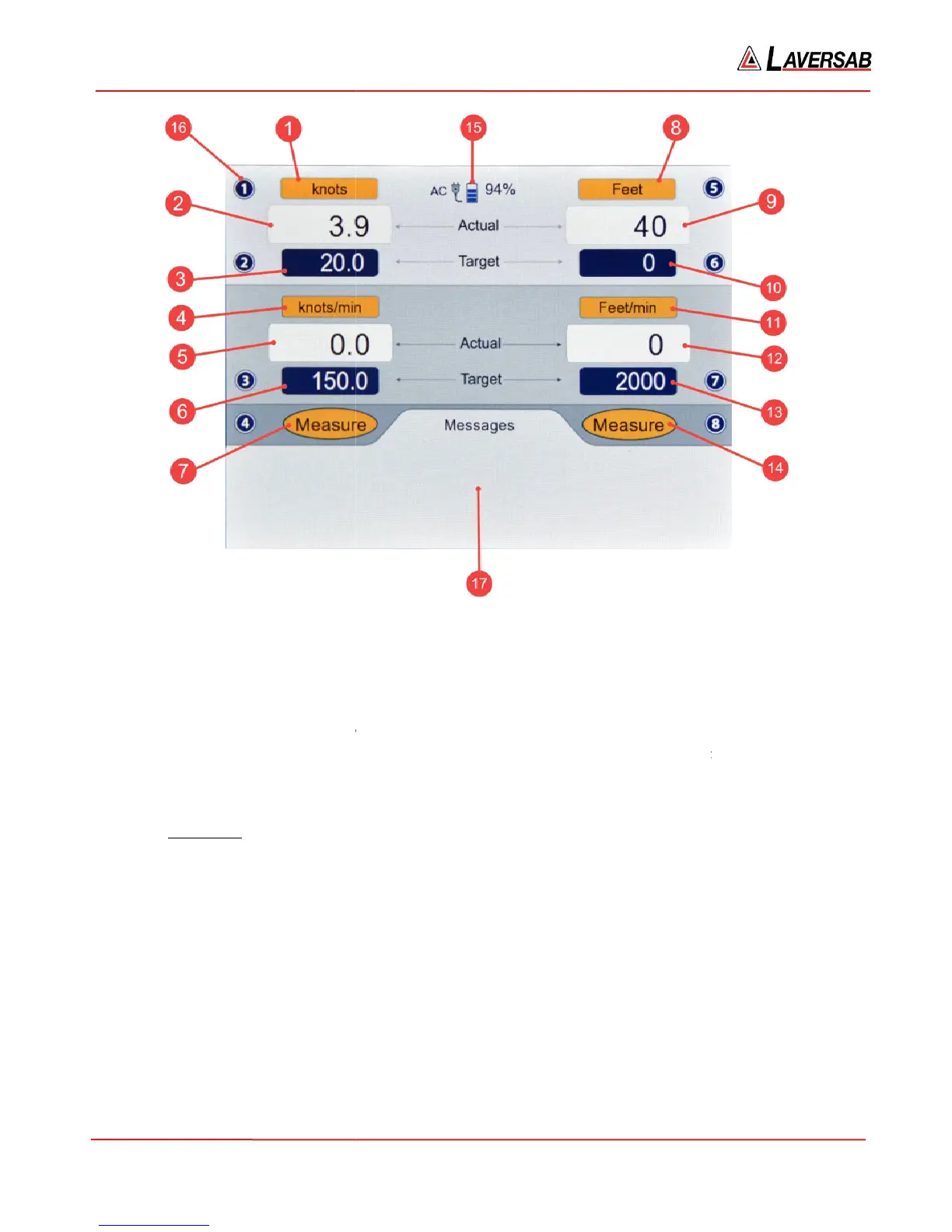
Please refer to Figure 3.1. There are 17 different items (indicated in red) shown on this screen. Numbers
1 to 7 on the left side, refer to the Pitot
Static-
output parameters. Number 15
indicating a key number (as shown, key #
Details of each item follow.
[1] Pitot units
The selected Pitot units are displaye
1. knots 5. Pt inHg
2. Mach
3. km/hr 7. Pt mbar
4. mph
Note: Qc
units display differential pressure with respect to Static pressure. Pt units display absolute
Pitot pressure.
Selecting the desired Pitot units is described in Section
Figure 3.1: Main operating screen
Please refer to Figure 3.1. There are 17 different items (indicated in red) shown on this screen. Numbers
1 to 7 on the left side, refer to the Pitot
-
ouput parameters. Numbers 8 to 14 on the right side, refer to the
output parameters. Number 15
points to the power status. Number 16 points to a typical symbol
indicating a key number (as shown, key #
1
). Number 17 points to the ‘Messages’ section of the screen.
The selected Pitot units are displaye
d here. There are 15 different Pitot units available.
9. Pt psi 13. Pt kpa
10. Qc psi 14. Qc kpa
11. Pt mmHg 15. EPR
12. Qc mmHg
units display differential pressure with respect to Static pressure. Pt units display absolute
Selecting the desired Pitot units is described in Section
3.3.
Page 16
Please refer to Figure 3.1. There are 17 different items (indicated in red) shown on this screen. Numbers
ouput parameters. Numbers 8 to 14 on the right side, refer to the
points to the power status. Number 16 points to a typical symbol
). Number 17 points to the ‘Messages’ section of the screen.
units display differential pressure with respect to Static pressure. Pt units display absolute



 To Next Page