6300 Rev H User’s Manual
125-9106A Page 22
3.3 CHANGING UNITS
Note: Selected units are maintained through a power OFF/ON cycle.
Pitot units
Pitot units can be changed only if the key# symbol (1) is displayed to the left of the Pitot units field. Press
key ‘1’ on the keypad and the Lower section of the display will appear as shown below.
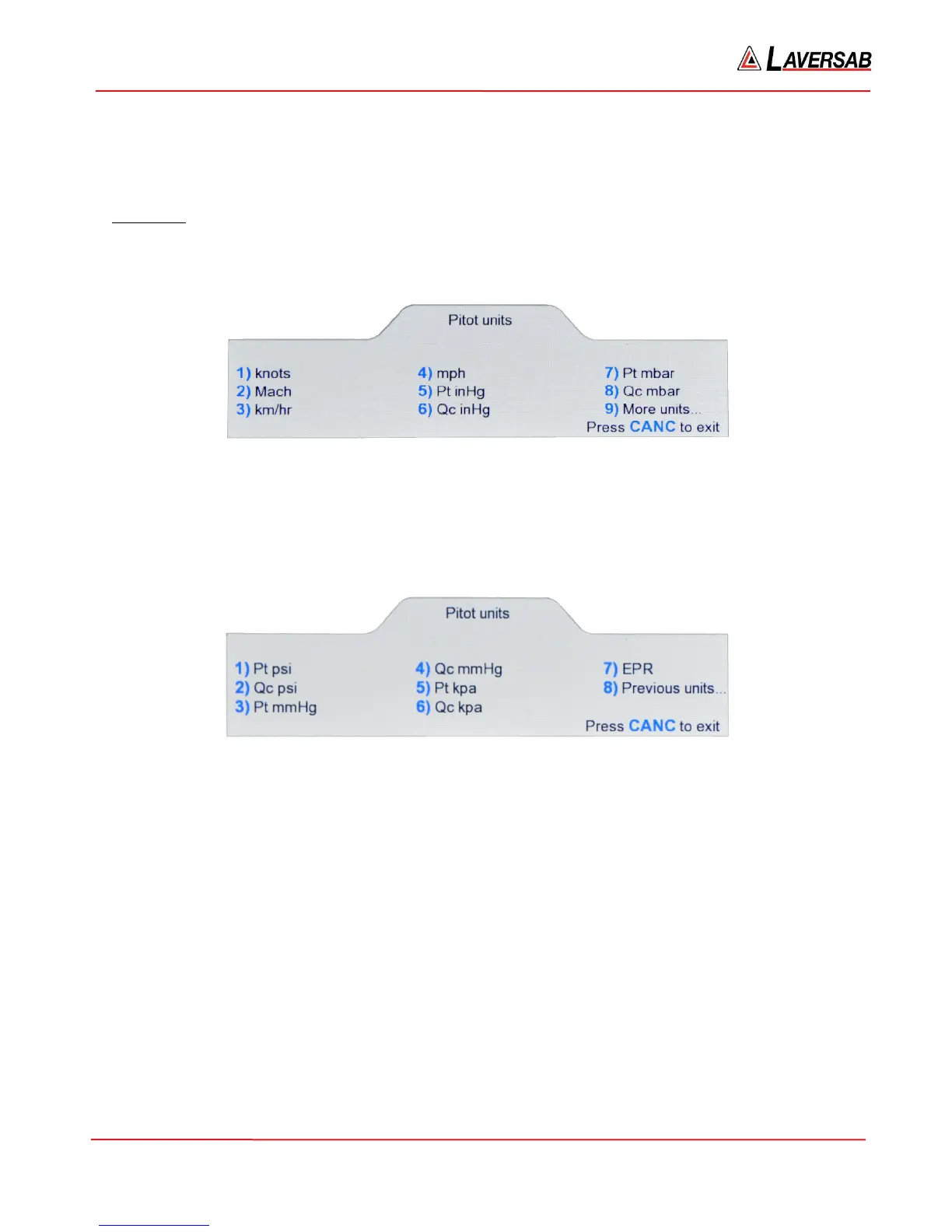
Figure 3.2 : Select Pitot units (1)
The first 8 units are shown on this screen. Press the key with the # (shown in blue) associated with the
unit to be selected. For selecting units 9 through 15, first press ‘9’ and the Lower section of the display
will appear as shown in Figure 3.3 below. Then select the unit desired by pressing the key with the #
associated with the unit. To exit from this screen without making a selection, press CANC.
Figure 3.3 : Select Pitot units (2)
For example, if units of QcinHg is to be selected, in the ‘Pitot units (1)’ screen, press ‘6’. The Lower
section will blank out and the Upper section will appear as shown in Figure 3.4 below.
The fields for Pitot units, Pitot target and Pitot-Rate target will be blinking. The Actual and Target values
will be based on the selected unit. To activate units of QcinHg, press GO. To revert back to the original
units, press CANC.
If Target values (or any other Pitot or Static parameters) need to be changed, they can be changed before
pressing GO. When GO is pressed, the blinking stops and units of QcinHg becomes activated.



 To Next Page