6300 Rev H User’s Manual
125-9106A Page 51
3.10.8 CALIBRATION (PRELIMINARY)
Section 6 provides details on calibration of the 6300. Before selecting the calibration function it is
necessary to set Pitot units to ‘QcinHg’ and the Static units to ‘inHg’. Also, both outputs must be in
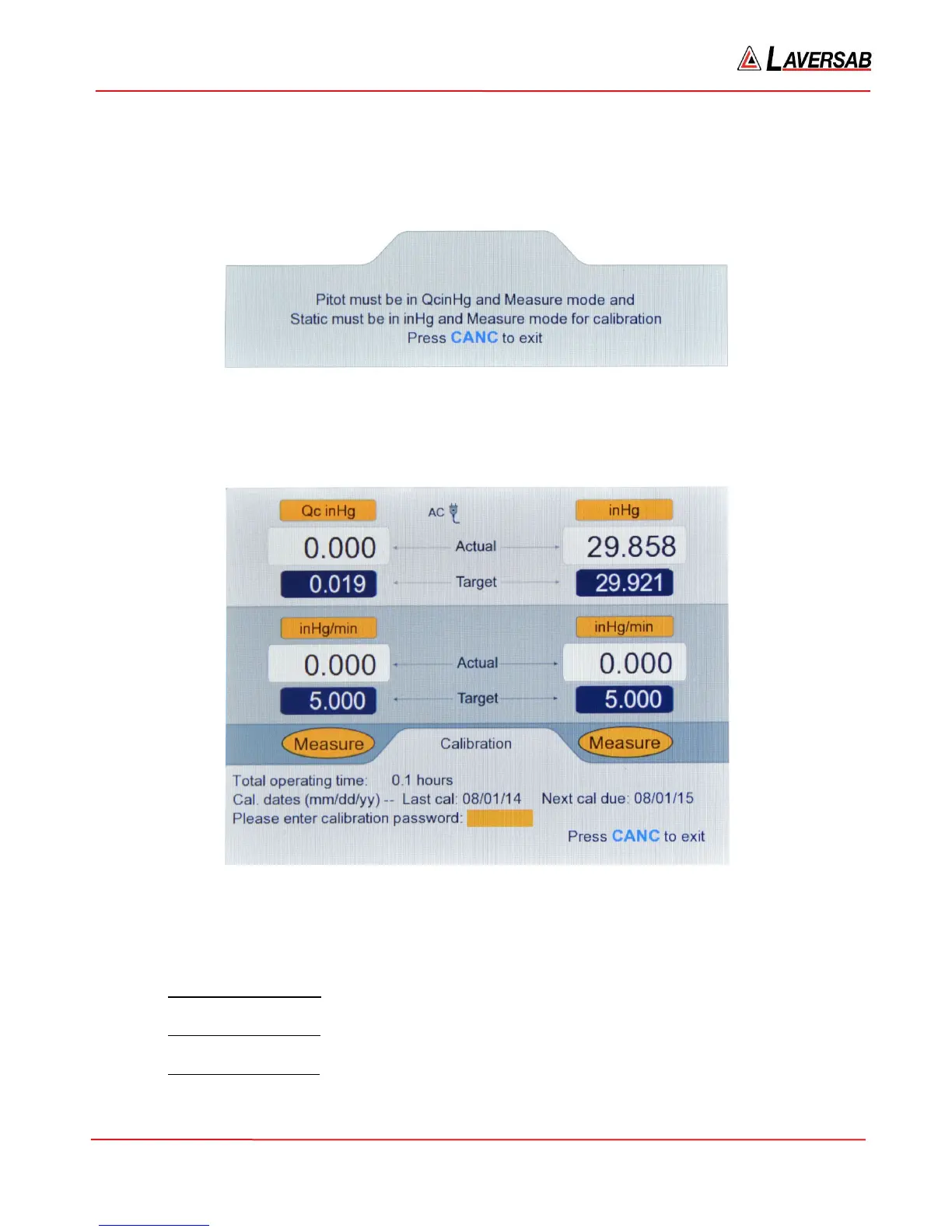
Measure mode. If this is not set up correctly and Function ‘8’ is selected, the following screen will appear.
Figure 3.50 : Calibration (invalid)
If the setup is done correctly, selecting option ‘8’ on the Functions menu will bring up the screen shown
below.
Figure 3.51 : Calibration (password)
Performing a calibration requires a password. However, without a password, other information is
provided on this screen.
a. Total operating time: This shows the total time (in increments of 0.1 hours) that the 6300 has
been operating since it was shipped from the factory. The factory-setting is 0.1 hours.
b. Last calibration date: This is the date (‘mm/dd/yy’ format) that the 6300 was last calibrated.
This date is updated each time the 6300 is calibrated.
c. Next calibration due: This is the date (‘mm/dd/yy’ format) that the next calibration is due for
the 6300. This date is also updated each time the 6300 is calibrated.



 To Next Page