6300 Rev H User’s Manual
125-9106A Page 44
3.10.2 MODIFY LIMITS
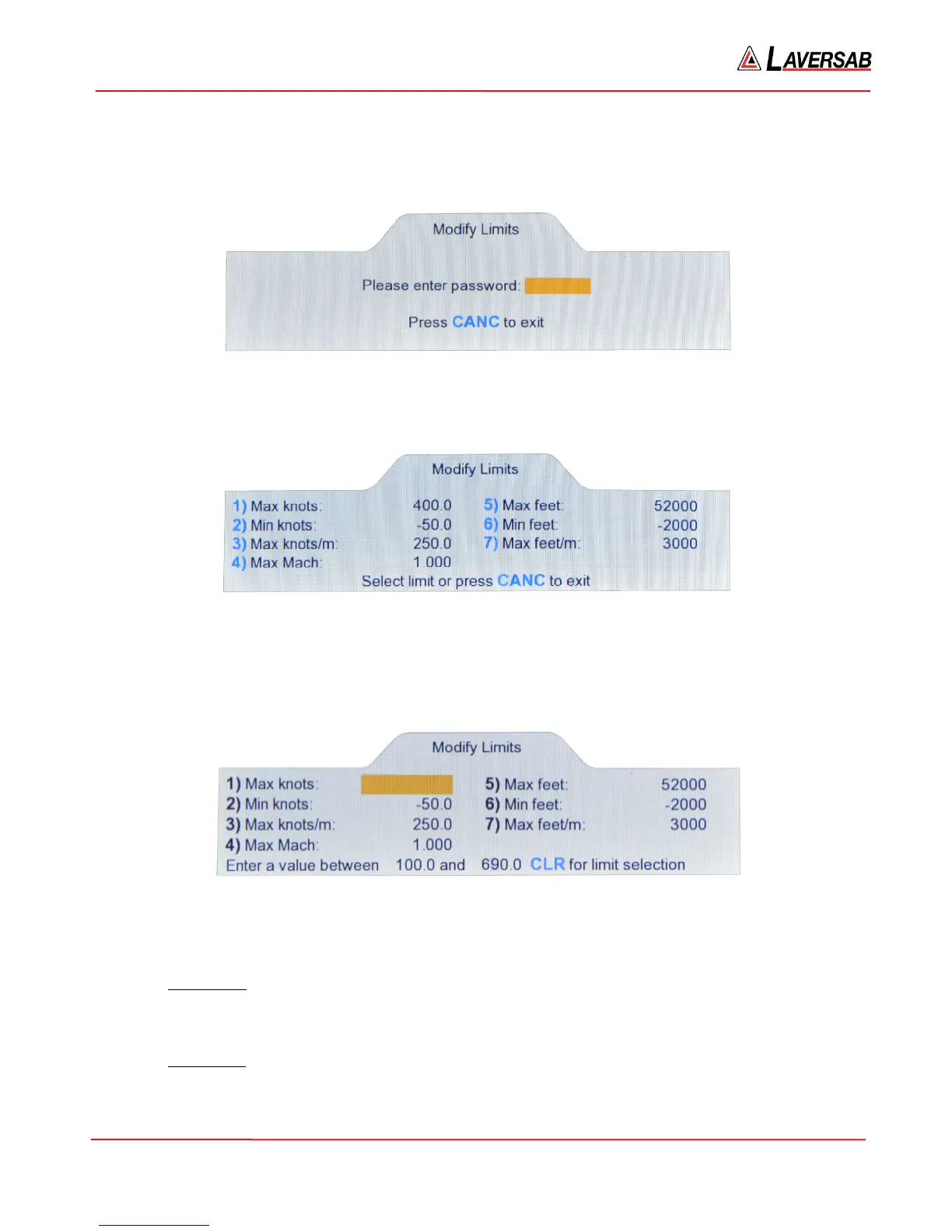
The seven user-programmable limits can be modified by selecting ‘2’ in the Functions menu. Access to
the ‘Modify Limits’ function is protected by means of a password. The following screen will appear.
Figure 3.36 : Modify Limits (password)
The password has been provided on the calibration certificate. Enter the password digits followed by
ENTER. The screen will appear as shown below.
Figure 3.37 : Modify Limits (selection)
To modify a specific limit value, press the number-key for that limit. If ‘1’ is pressed to modify the ‘Max
knots’ limit, the screen will appear as below. The last line of the display will show the upper and lower
bound of the value that may be entered. Other limit values can be modified similarly.
Figure 3.38 : Modify Limits (value entry)
An explanation of each limit follows.
1) Max knots: This limit can be set between 100 and 690 knots. It defines the maximum
airspeed that can be controlled. It also defines the maximum differential pressure (Qc) that can
be controlled. The factory setting is 400 knots.
2) Min knots: This limit can be set between -50 and -500 knots. It defines the negative-airspeed
limit. It also defines the most negative differential pressure (Qc) that can be controlled. The
factory setting is -50 knots.



 To Next Page