6300 Rev H User’s Manual
125-9106A Page 13
2.2 REMOTE UNIT
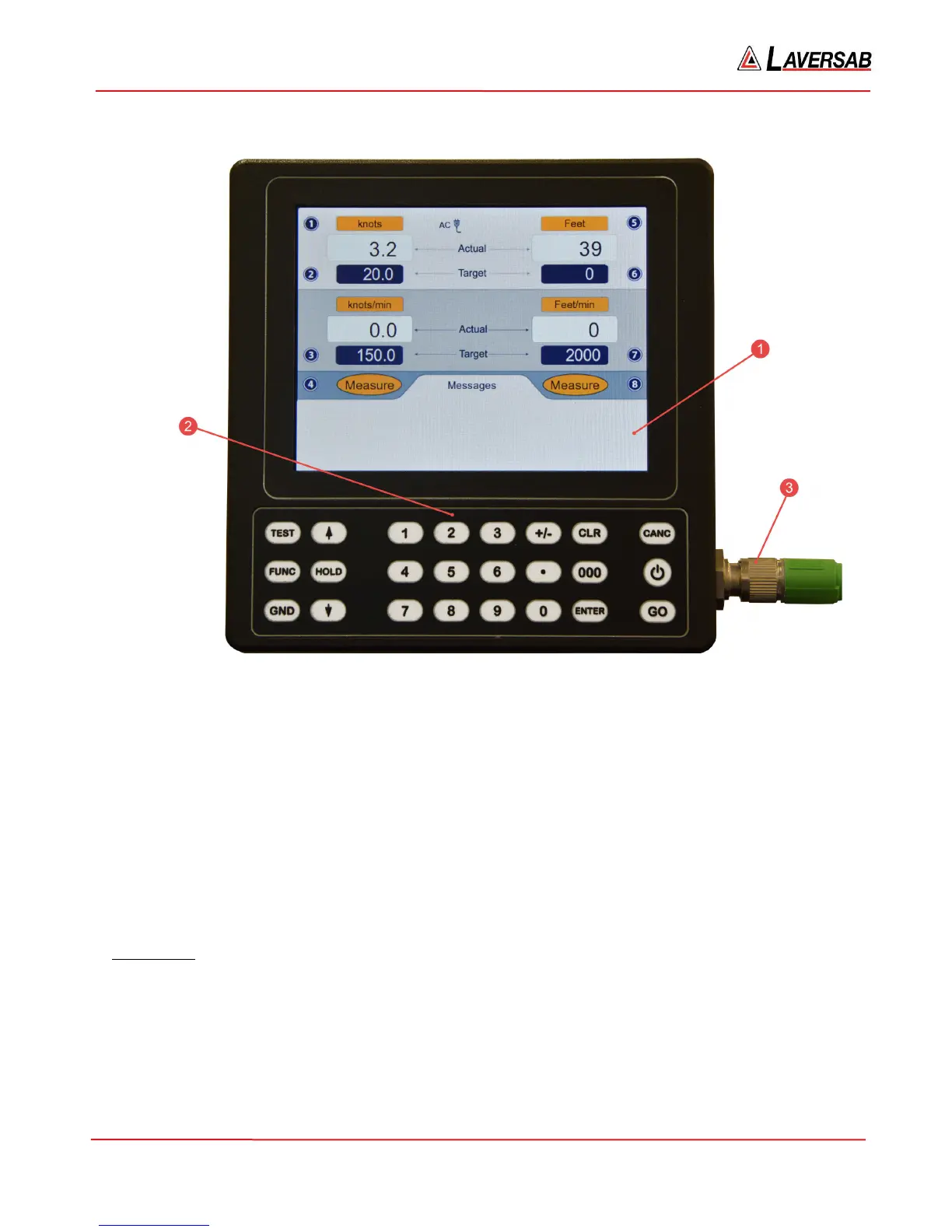
Figure 2.2 : Remote Unit
Please refer to Figure 2.2 which shows the front-view of the Remote unit.
[1] LCD Display:
The Remote unit has a 5.8 inch Color TFT display with a resolution of 640 x 480 pixels. The backlight has a
maximum brightness of 800 nits which makes the display sunlight-readable. The backlight brightness can be
adjusted by the user through a function on the Remote. More details are provided in Section 3.10.3.
[2] Keypad:
Left section: This section of the keypad includes the following keys:
TEST – Used to perform a Self-test
FUNC – Allows selection of several functions
GND – Performs the “Go To Ground” operation.
HOLD - Stops ramping to a set-point and holds outputs at current values.
Up-Arrow – Used to jog a target-value up or move to next profile-point.



 To Next Page