6300 Rev H User’s Manual
125-9106A
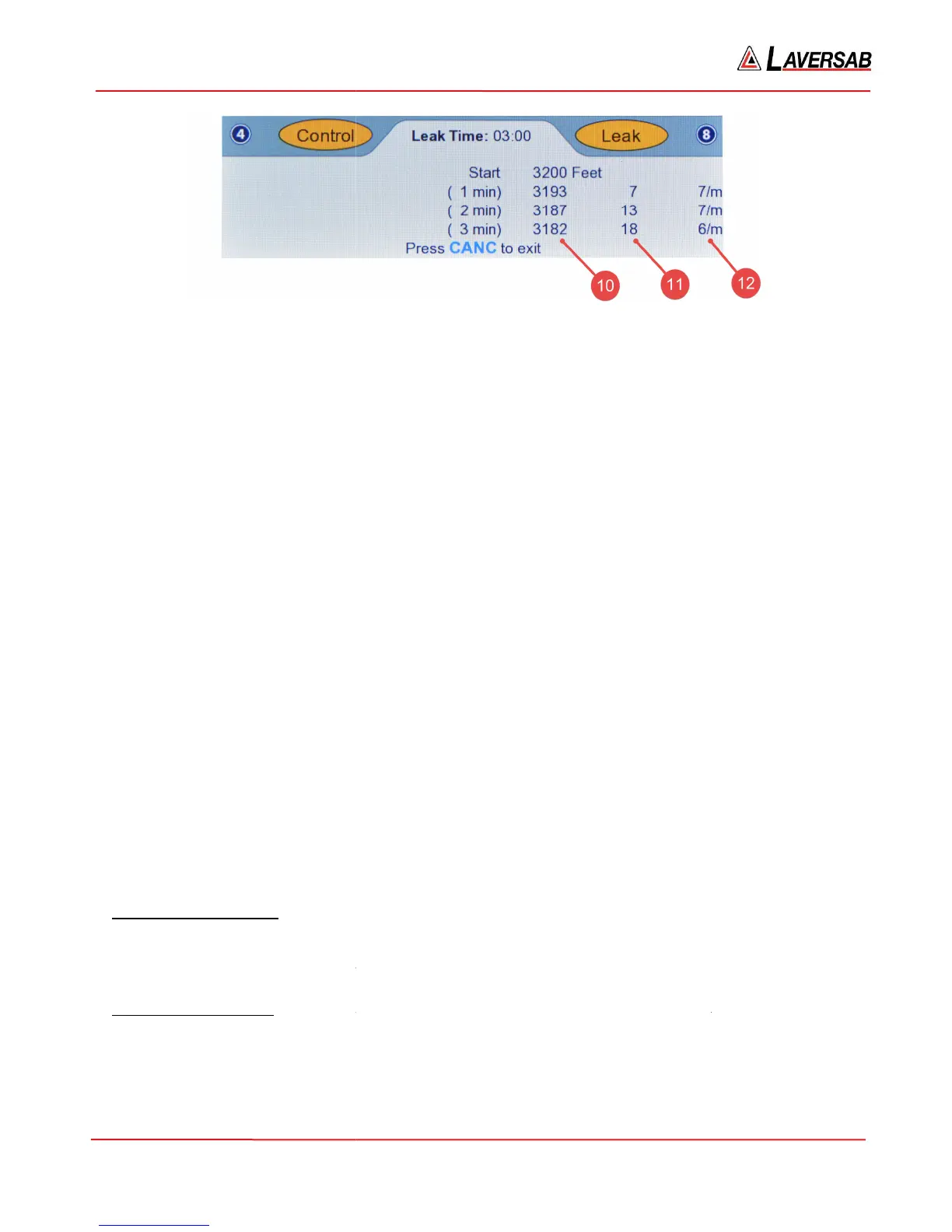
The parameters indicated in Figures 3.25 through 3.28 are explained below.
[1]
Leak Timer: Shows the elapsed time since the Leak
[2] Start value: The Actual value at the start of the leak
[3] Leak timer values: Currently set at 1, 2 and 3 minutes. Can be changed to values up to 20 minut
See Section 3.10.7 for details.
[4] The Actual value at the end of 1 minute
[5] Total leak in 1 minute
[6] Average per-
minute leak rate over 1 minute
[7] The Actual value at the end of 2 minutes
[8] Total leak in 2 minutes
[9] Average per-
minute leak rate over 2 minutes
[10] The Actual value at the end of 3 minutes
[11] Total leak in 3 minutes
[12] Average per-
minute leak rate over 3 minutes
When CANC
is pressed to exit out of Leak mode, the
Instant Static leak rate:
msec in the Upper section of the screen. The Actual Static Rate is the “instant” leak rate and will insta
indicate any change in the leak. This is especially helpful when adjustments are made to the Static system
(including tightening fittings, adjusting adapters etc) to reduce the leak.
Excessive Static Leak:
feet/min), to protect the aircraft instruments, the
mode and abort the leak check. An error message:
ERR 8: Static leak excessive. Exiting Leak mode.
Figure 3.28 : Static Leak (3-min)
The parameters indicated in Figures 3.25 through 3.28 are explained below.
Leak Timer: Shows the elapsed time since the Leak
-check was started.
[2] Start value: The Actual value at the start of the leak
-check (at time 0:00)
[3] Leak timer values: Currently set at 1, 2 and 3 minutes. Can be changed to values up to 20 minut
[4] The Actual value at the end of 1 minute
minute leak rate over 1 minute
[7] The Actual value at the end of 2 minutes
minute leak rate over 2 minutes
[10] The Actual value at the end of 3 minutes
minute leak rate over 3 minutes
is pressed to exit out of Leak mode, the
6300
automatically goes back to Control mode.
-
check is going on, the Actual values are still updated every 250
msec in the Upper section of the screen. The Actual Static Rate is the “instant” leak rate and will insta
indicate any change in the leak. This is especially helpful when adjustments are made to the Static system
(including tightening fittings, adjusting adapters etc) to reduce the leak.
-rate exceeds the Tar
feet/min), to protect the aircraft instruments, the
6300
will automatically put Static back into Control
mode and abort the leak check. An error message:
ERR 8: Static leak excessive. Exiting Leak mode.
Press CANC
Page 39
[3] Leak timer values: Currently set at 1, 2 and 3 minutes. Can be changed to values up to 20 minut
es.
automatically goes back to Control mode.
check is going on, the Actual values are still updated every 250
msec in the Upper section of the screen. The Actual Static Rate is the “instant” leak rate and will insta
ntly
indicate any change in the leak. This is especially helpful when adjustments are made to the Static system
-set at 2000
will automatically put Static back into Control



 To Next Page