31
Leica RM2245
5. Operation
There are two versions of the specimen holder
fixture, one with and one without specimen ori-
entation, which are interchangeable.
The specimen orientation allows for simple posi-
tion correction of the specimen surface when the
specimen is clamped into place.
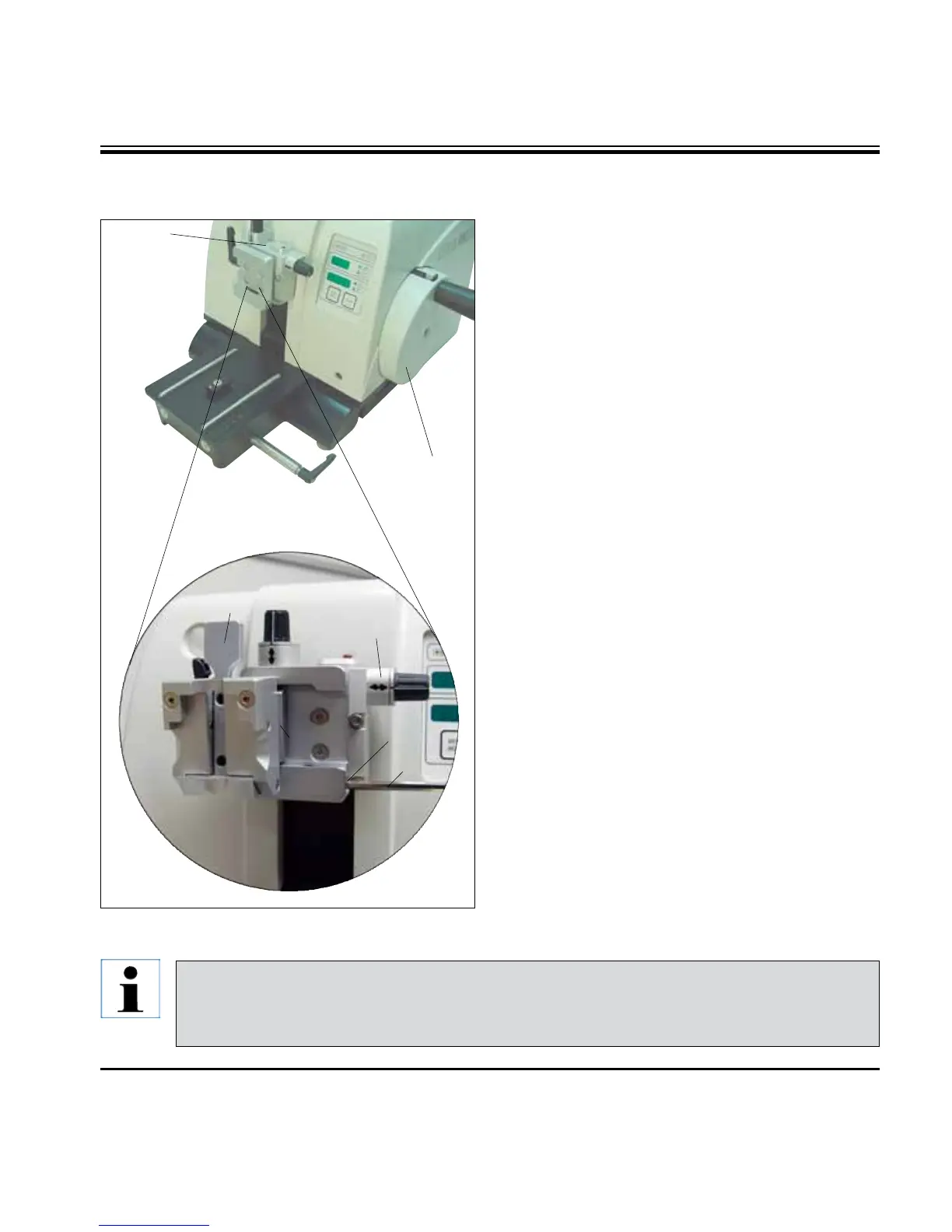
Youcanusethequickclampingsystem(64) to
hold all available accessory specimen clamps
(for more information, see Chapter 6 "Optional
accessories").
To do so, proceed as follows:
• Movethespecimenhead(60) to the upper end
position by turning the handwheel (12) and
engage the handwheel lock.
• To release the clamping system, turnthe
screw (61) of the quick clamping system (64)
counterclockwise using an Allen key No. 4 (71).
• Pushtheguide(63) of the universal cassette
clamp (62) from the left into the quick clamping
system (64) as far as it will go.
• Toclampthecassetteclampturnthescrew
(61) clockwise as far as it will go.
5.3 Inserting the universal cassette clamp
71
63
62
60
12
61
64
60
Since all stage clamps available as accessories are equipped with the same kind of guide
on the back, they are inserted in the same way described here using the example of the
cassette clamp.
Fig. 24



 To Next Page