32
Instructions for Use V 1.9 RevC - 06/2013
5. Operation
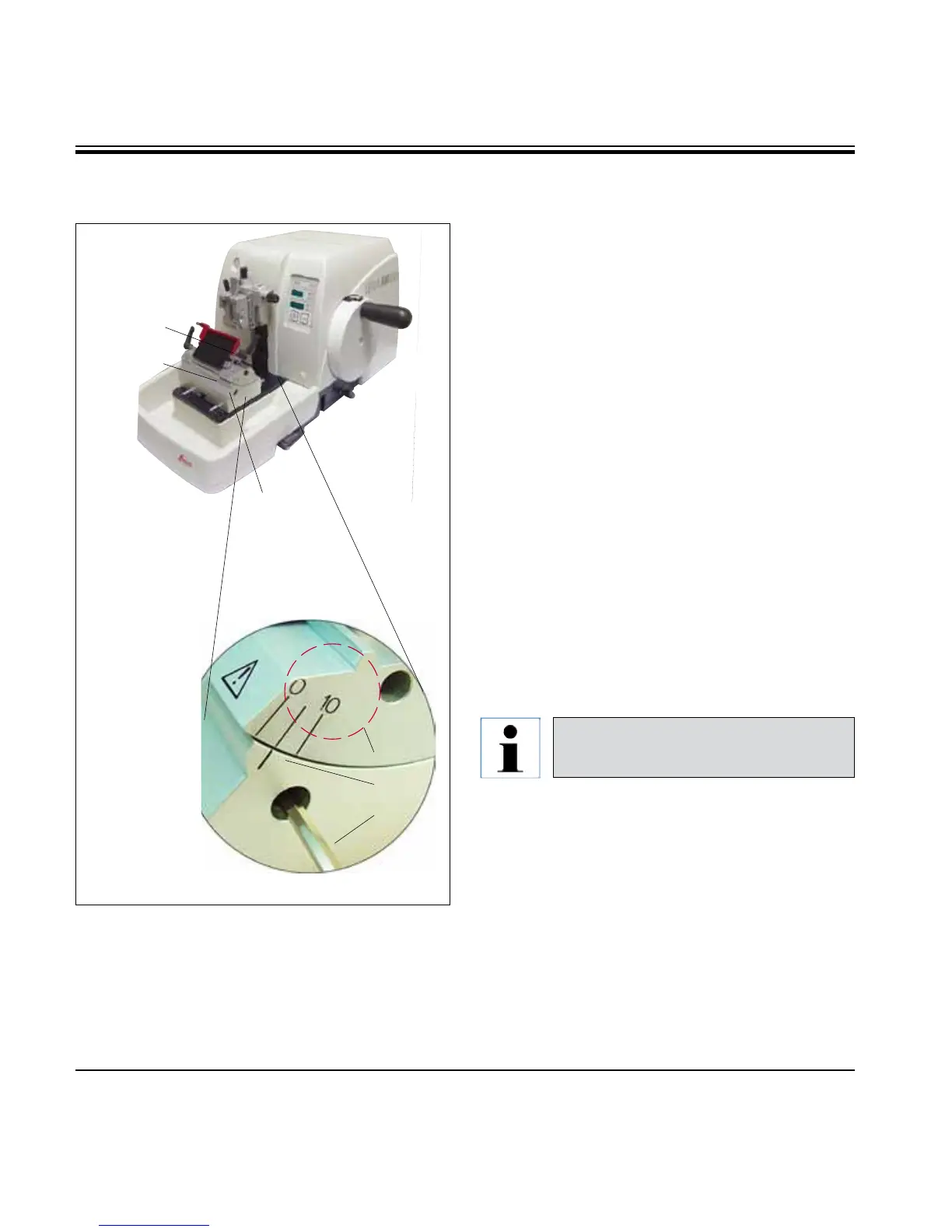
• Theindexmarks(0°,5°and10°)foradjustment
of the clearance angle (59.1) are located on the
right side of the knife holder (57).
• Thereisalsoanindexmark(59.2) on the right
side of the knife holder base (51) which serves
as a reference point when adjusting the clear-
ance angle.
• Loosenthescrew(58) using an Allen key size 4
(71) until the knife holder (57) can be moved.
• Movetheknifeholderuntiltheindexmarkof
the desired clearance angle coincides with
the reference line on the knife holder base.
Example:
Enlarged detail showing a clearance angle
setting of 5°.
5.4 Adjusting the clearance angle
51
58
57
59.1
59.2
Enlarged detail:
Index marks for
adjusting the
clearance angle.
71
Fig. 25
The recommended clearance angle
setting for knife holder E is approx. 5°.
• Holddowntheknifeholderinthispositionand
retighten the screw (58) for clamping.



 To Next Page