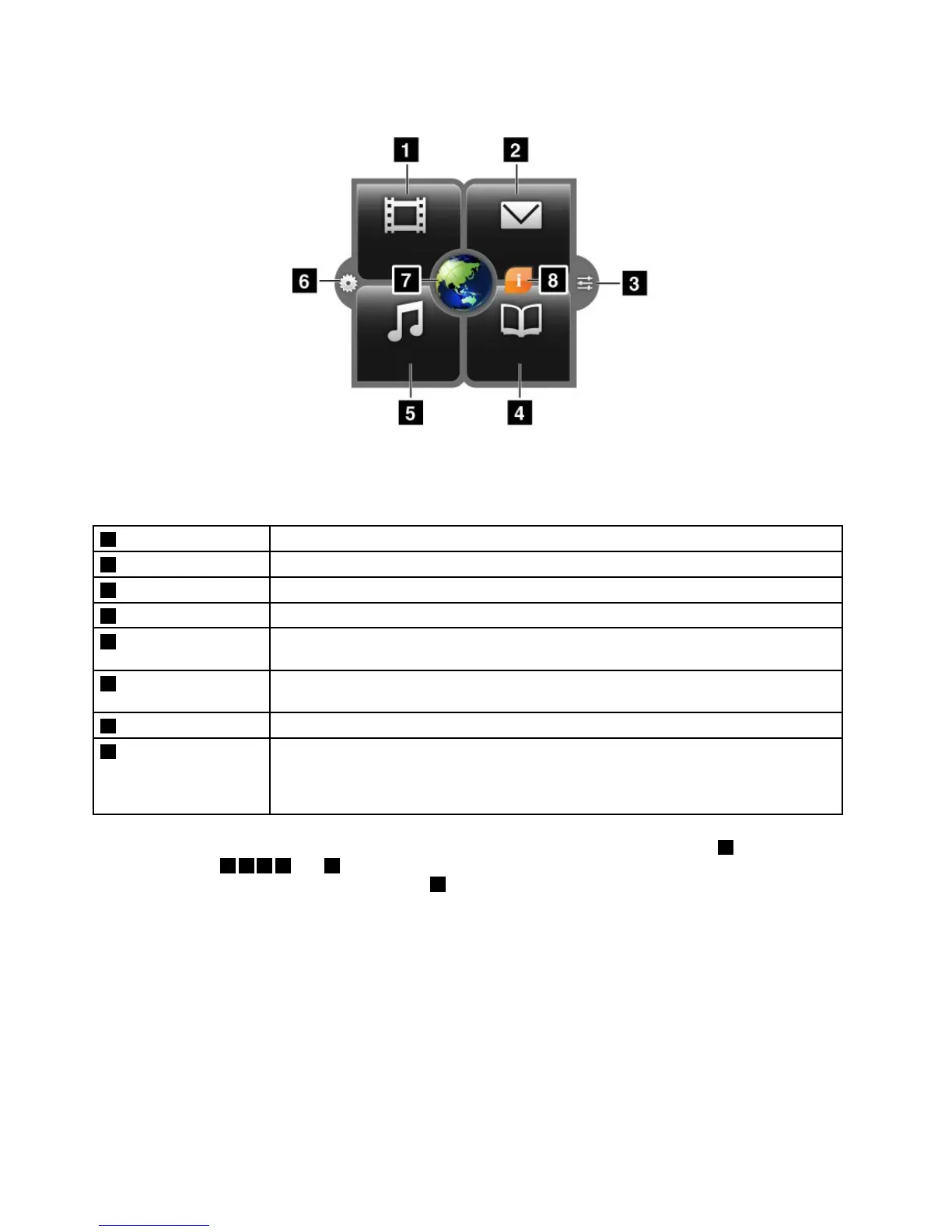
Figure5.LenovoLaunchZone
Note:DefaultapplicationsinLenovoLaunchZonevarybygeographiclocations.
1Watch
Launchthedefaultvideoplayertowatchmoviesorvideos.
2Email
Launchthedefaulte-mailapplicationtoreadandsende-mails.
3Androidsettings
OpentheAndroidSettingsscreentocongureyourtabletsettings.
4Read
Launchthedefaulte-bookreadertoreadbooks,magazines,orotherwrittencontents.
5Listen
Launchthedefaultmusicplayer,radioplayer,ormusicdownloadsitetolistentomusic,
radiobroadcasts,oraudiobooks.
6LenovoLaunchZone
settings
OpentheLenovoLaunchZonesettingsscreentochangethecolorofLenovoLaunch
Zoneorchangethecongurationofeachlaunchpoint.
7Browser
Openthedefaultbrowser.
8Featuresand
messages
Receiveinformationandtipsaboutyourtablet,aswellasspecialoffersincongured
categories.
ThisiconisdisplayedonlywhenthereareunreadsystemnoticationsfromLenovo.
Touchthisicontoviewdetailsofthenotications.
LenovoLaunchZoneisfullycustomizablethroughtheLenovoLaunchZonesettingsicon6.Theve
predenedzones,1245and7,canbechangedtolaunchpointsforotherinstalledapplications.Todo
so,touchtheLenovoLaunchZonesettingsicon
6andchangethesettingsofeachzoneasyouwish.
CustomizingyourHomescreens
BecausetheHomescreensarethestartingpointsforyoutouseyourtablet,youmightwanttocustomize
theHomescreenstomeetyourpersonalpreferences.Readthistopictolearnhowtocustomizeyour
HomescreensbyaddinganitemtoaHomescreen,rearrangingtheHomescreens,resettingthemain
Homescreen,andchangingthewallpaper.
AddinganitemtoaHomescreen
Toaddanapplication,widget,orotheritemtoaHomescreen,dothefollowing:
1.GototheapplicationlibraryandtouchtheAPPStabortheWIDGETStabtoselecttheitemthat
youwanttoadd.
12UserGuide
















 To Next Page