Chapter1.Productoverview
Thischapterprovidesanoverviewofthetablet,includingthelocationsoftheconnectorsandcontrols,tablet
features,accessories,specications,andoperatingenvironment.
Tabletlayout
Thistopicintroducesthetablethardwarefeaturestogiveyouthebasicinformationyouwillneedtostart
usingthetablet.
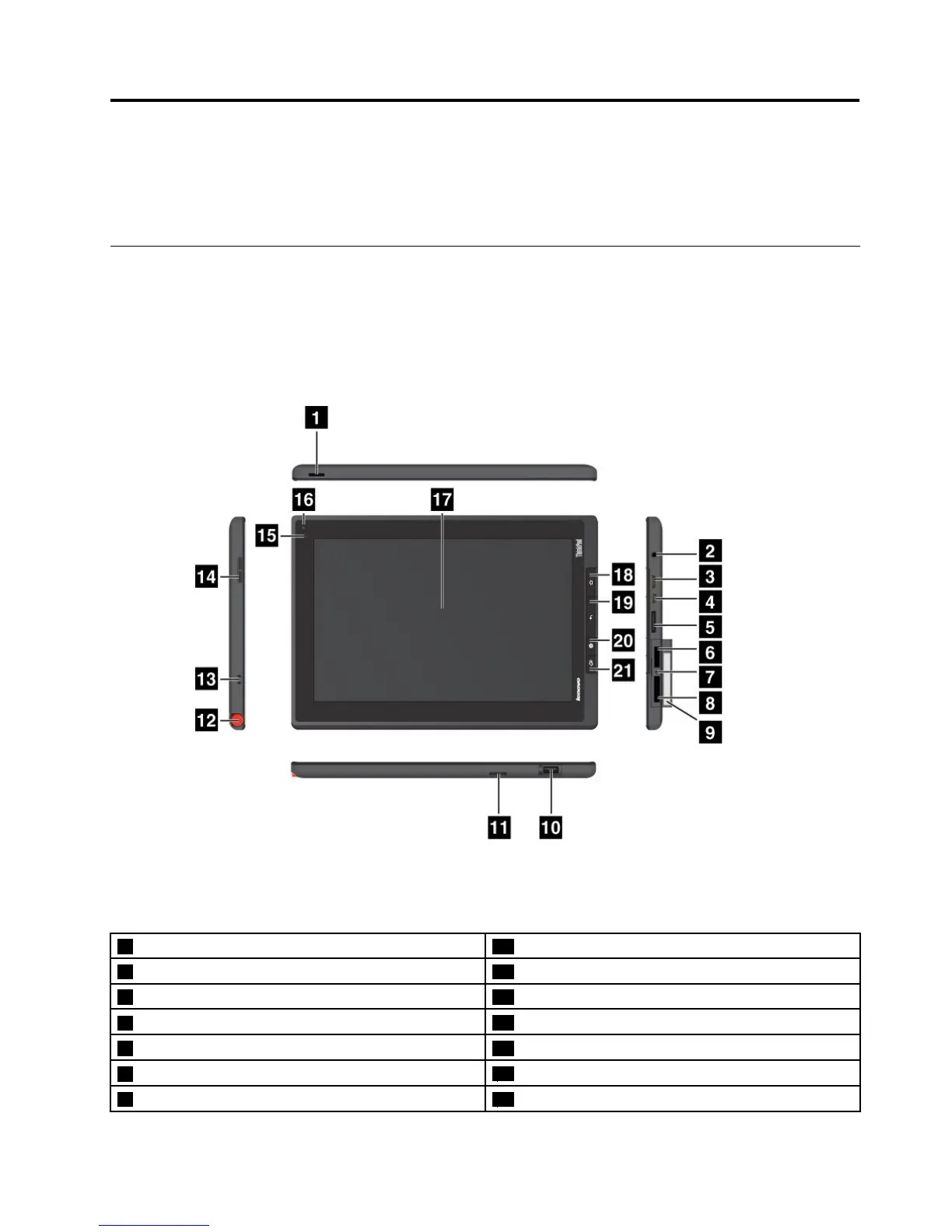
Frontandsideview
Figure1.ThinkPadTabletfrontandsideview
1 Powerbutton 12 ThinkPadTabletPenstorage
2 Headphoneormicrophoneconnector 13 ThinkPadTabletPenstringholes
3 MiniHDMIconnector 14 Volumecontrolbutton
4 MicroUSBconnector
15 Ambientlightsensor
5 ThinkPadTabletDockconnector
16 Front-facingcamera
6 SIMcardslot
17 Multitouchscreen
7 Emergencyresethole 18 Homebutton
©CopyrightLenovo2011,2012
1
















 To Next Page