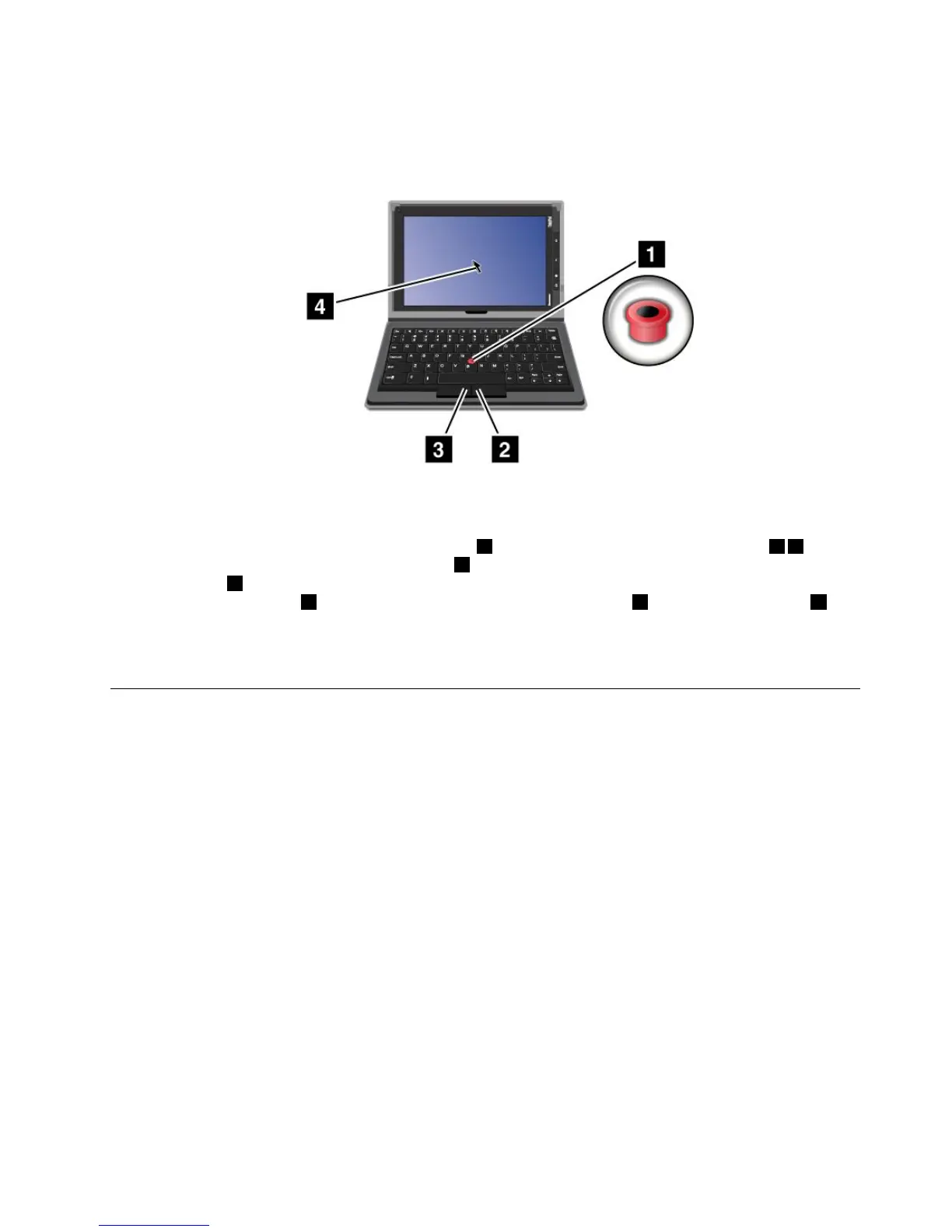
UsingtheOpticalTrackPoint
Figure14.UsingtheOpticalTrackPoint
TheOpticalTrackPointconsistsofapointingsensor1onthekeyboardandtwoclickbuttons23at
thebottomofthekeyboard.Tomovethepointer4onthescreen,slideyourngertipacrossthetopof
thepointsensor
1inthedirectioninwhichyouwantthepointertomove.Toselectanitemoropenan
application,putthepointer4onthedesireditemandpresstheleftbutton3.Presstherightbutton2to
openthemenuforthecurrentapplication
Formoreinformationaboutthekeyboardfoliocase,refertothedocumentationshippedwiththekeyboard.
UsingtheThinkPadTabletDock
Toconnectyourtablettothedock,dothefollowing:
1.Positionyourtabletwiththedockconnectorsidedownward.
2.Alignthedockconnectoronthetabletwiththeconnectoronthedock.
3.Gentlyslideyourtabletintothedockuntilitisfullyseatedasshowninthefollowingillustration.
Chapter6.ThinkPadTabletoptions49
















 To Next Page