ThinkPadTabletDock
TheThinkPadTabletDockholdsyourtabletinanuprightpositionandfreesyourhandstodoothertasks.It
alsoprovidesyoueasyaccesstoconnectorsforUSBdevices,letransfers,charging,audioinput,audio
output,andvideooutput.
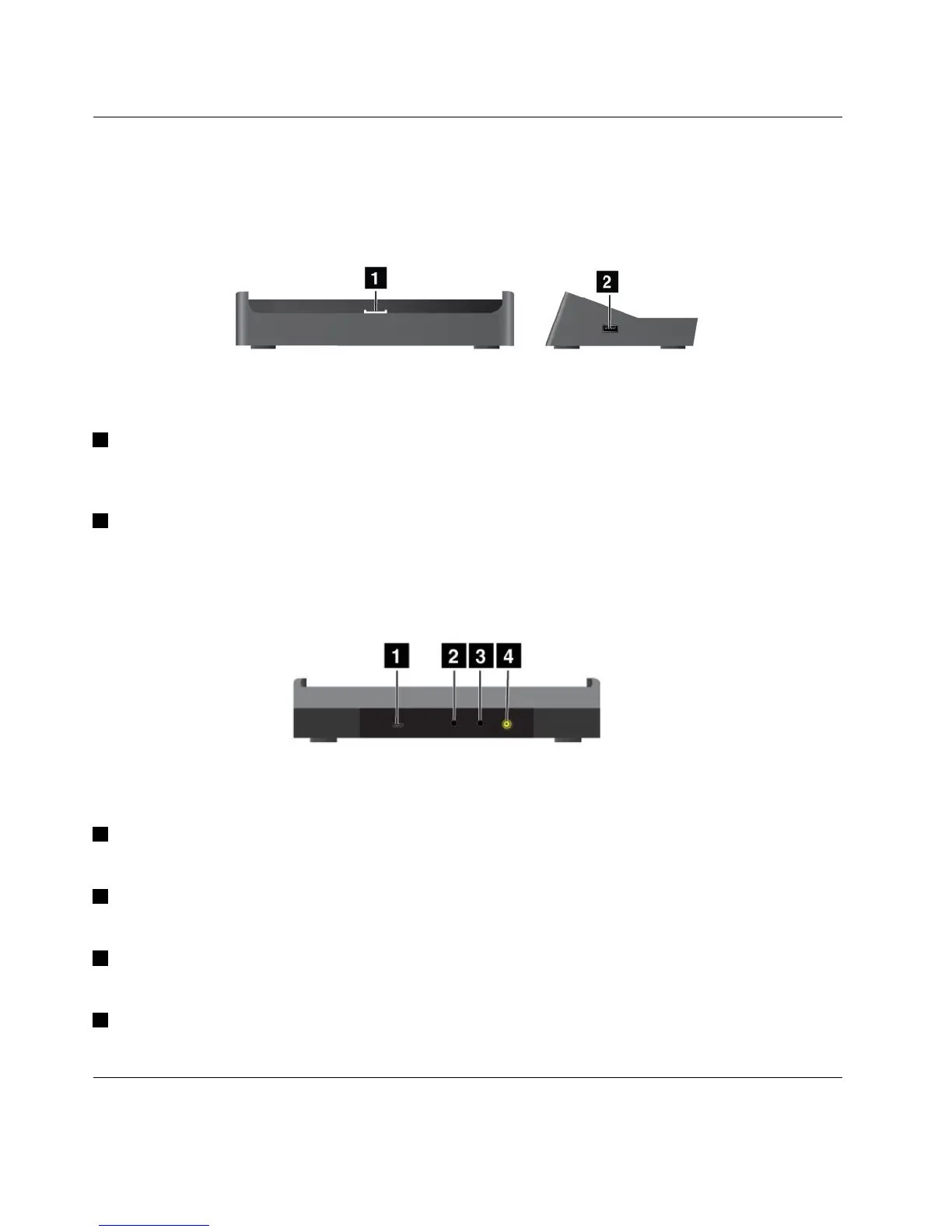
Figure10.ThinkPadTabletDockfrontviewandrightsideview
1Dockconnector
Thisconnectorestablishestheconnectionbetweenthedockandtabletwhenyourtabletisseatedinthe
dock.
2USBconnector
UsetoconnectUSBdevices,suchasaUSBkeyboardorUSBstoragedevice.
Note:ThisconnectoriscompatiblewiththeUSB2.0standard.
Figure11.ThinkPadTabletDockrearview
1MicroUSBconnector
ConnectapersonalcomputerwiththesuppliedUSBcablefordatatransfer.
2Headphoneconnector
Connectaheadphoneorpoweredspeakerstolistentotheaudiooutput.
3Microphoneconnector
Connectamicrophonetocapturesound.
4Powerconnector
Usethe65Wacpoweradaptershippedwiththedocktoprovidepowertothetabletandchargethebattery.
UsingtheThinkPadTabletKeyboardFolioCase
Toconnectthekeyboardfoliocasetoyourtablet,dothefollowing:
46UserGuide
















 To Next Page