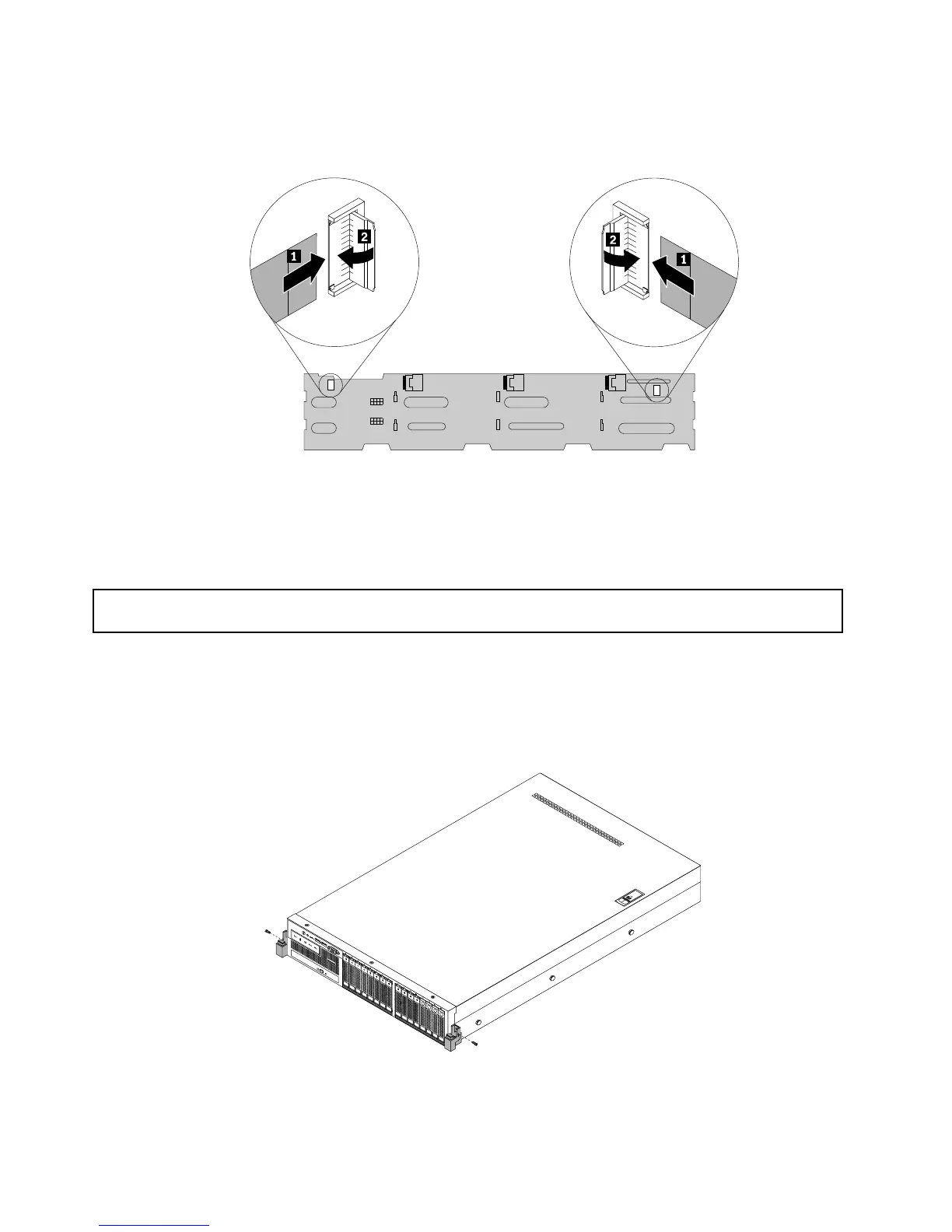
c.Connectthesignalcableofeachrackhandletothecorrespondingsignalcableconnectoronthe
backplaneforservermodelswithtwelve3.5-inchhard-disk-drivebays.
Figure50.Connectingtherackhandlesignalcablestothebackplane
8.Goto“Completingthepartsreplacement”onpage206.
Removingandreinstallingtherackhandlesforservermodelswitheight3.5-inch
hard-disk-drivebaysandservermodelswith2.5-inchhard-disk-drivebays
Attention:Donotopenyourserverorattemptanyrepairbeforereadingandunderstanding“Safetyinformation”
onpageiii
and“Guidelines”onpage87.
Toremoveandreinstalltherackhandlesforservermodelswitheight3.5-inchhard-disk-drivebaysand
servermodelswith2.5-inchhard-disk-drivebays,dothefollowing:
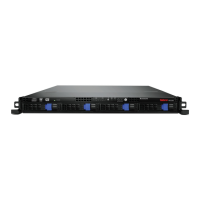
1.Oneachsideoftheserver,removethescrewthatsecurestherackhandleandthenremovetherack
handlefromthechassis.
Figure51.Removingtherackhandles
96ThinkServerRD440UserGuideandHardwareMaintenanceManual









 To Next Page