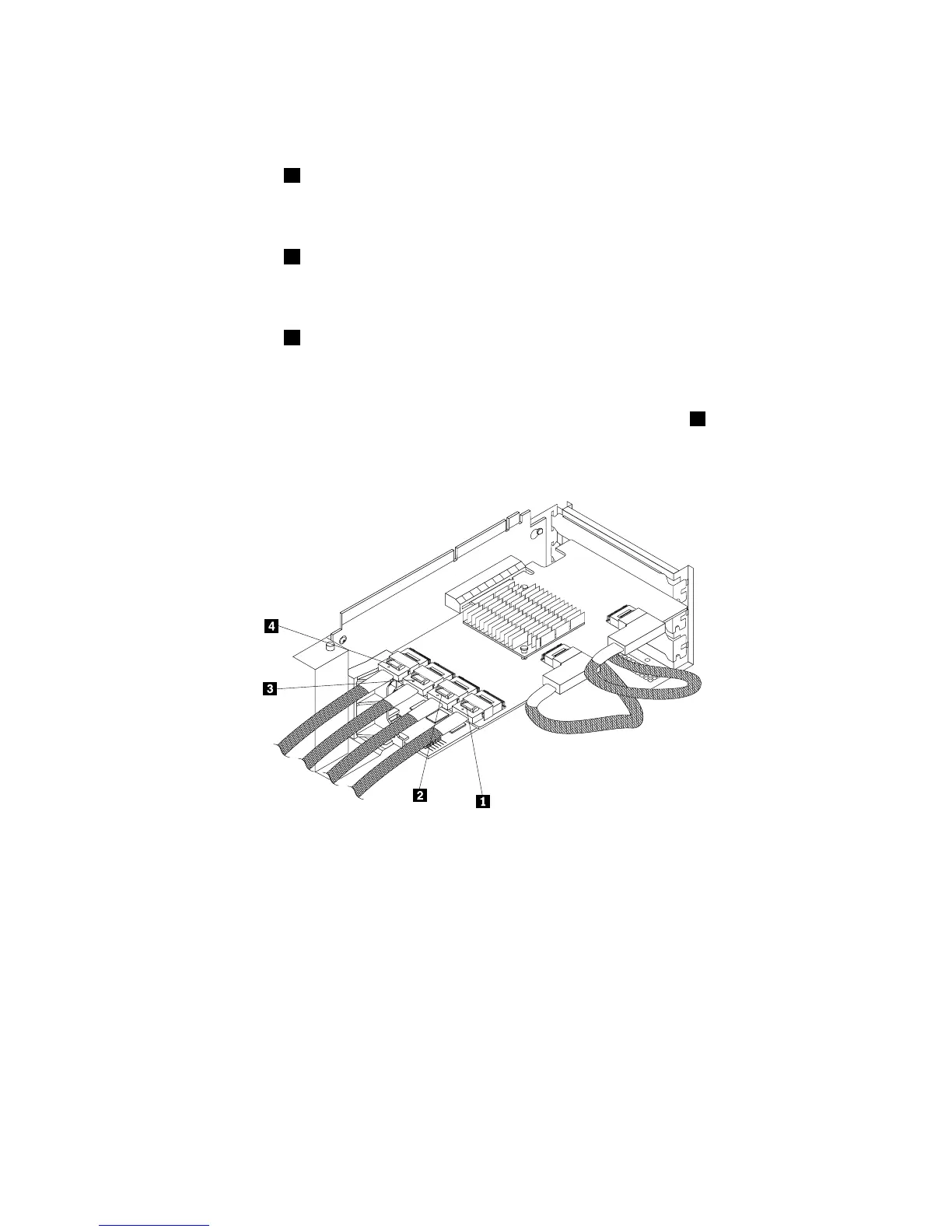
Usethefollowinginstructionstoconnectcablesfromtheexpandercardtothebackplanesfor2.5-inch
harddiskdrives:
1.Forharddiskdrive0toharddiskdrive3,useamini-SAStomini-SASsignalcableandconnectthe
mini-SASconnector
1ononeendofthecabletotheconnector3ontheexpandercard.Then,connect
themini-SASconnectorontheotherendofthecabletothemini-SASports0-3onthebackplane
for2.5-inchharddiskdrivesinthemiddlecage.
2.Forharddiskdrive4toharddiskdrive7,useamini-SAStomini-SASsignalcableandconnectthe
mini-SASconnector
2ononeendofthecabletotheconnector4ontheexpandercard.Then,connect
themini-SASconnectorontheotherendofthecabletothemini-SASports4-7onthebackplane
for2.5-inchharddiskdrivesinthemiddlecage.
3.Forharddiskdrive8toharddiskdrive11,useamini-SAStomini-SASsignalcableandconnectthe
mini-SASconnector3ononeendofthecabletotheconnector5ontheexpandercard.Then,connect
themini-SASconnectorontheotherendofthecabletothemini-SASports0-3onthebackplane
for2.5-inchharddiskdrivesintherightcage.
4.Ifyourserverhasmorethan12harddiskdrivesinstalled,forharddiskdrive12toharddiskdrive15,
useamini-SAStomini-SASsignalcableandconnectthemini-SASconnector4ononeendofthe
cabletotheconnector6ontheexpandercard.Then,connectthemini-SASconnectorontheotherend
ofthecabletothemini-SASports4-7onthebackplanefor2.5-inchharddiskdrivesintherightcage.
Figure36.Connectingcablesfromtheexpandercardtothebackplanesfor2.5-inchharddiskdrives
Refertothefollowingtopicsforinformationabouttheconnectorlocationsandthepowercableconnections:
•“Hot-swaphard-disk-drivebackplane”onpage44
•“Expandercard”onpage43
•“Systemboardcomponents”onpage53
Chapter3.Productoverview51









 To Next Page