21
Making Video available from the Internet
If your LAN is connected to the Internet, typically by a Broadband Gateway/Router and
Broadband modem, you can make the FCS-0020/WCS-0020 available via the Internet.
You will need to configure your Router or Gateway to allow connections from the
Internet to the camera.
Router/Gateway Setup
Your Router or Gateway must be configured to pass incoming TCP (HTTP)
connections (from Internet Viewers) to the FCS-0020/WCS-0020. The
Router/Gateway uses the Port Number to determine which incoming connections are
intended for the FCS-0020/WCS-0020.
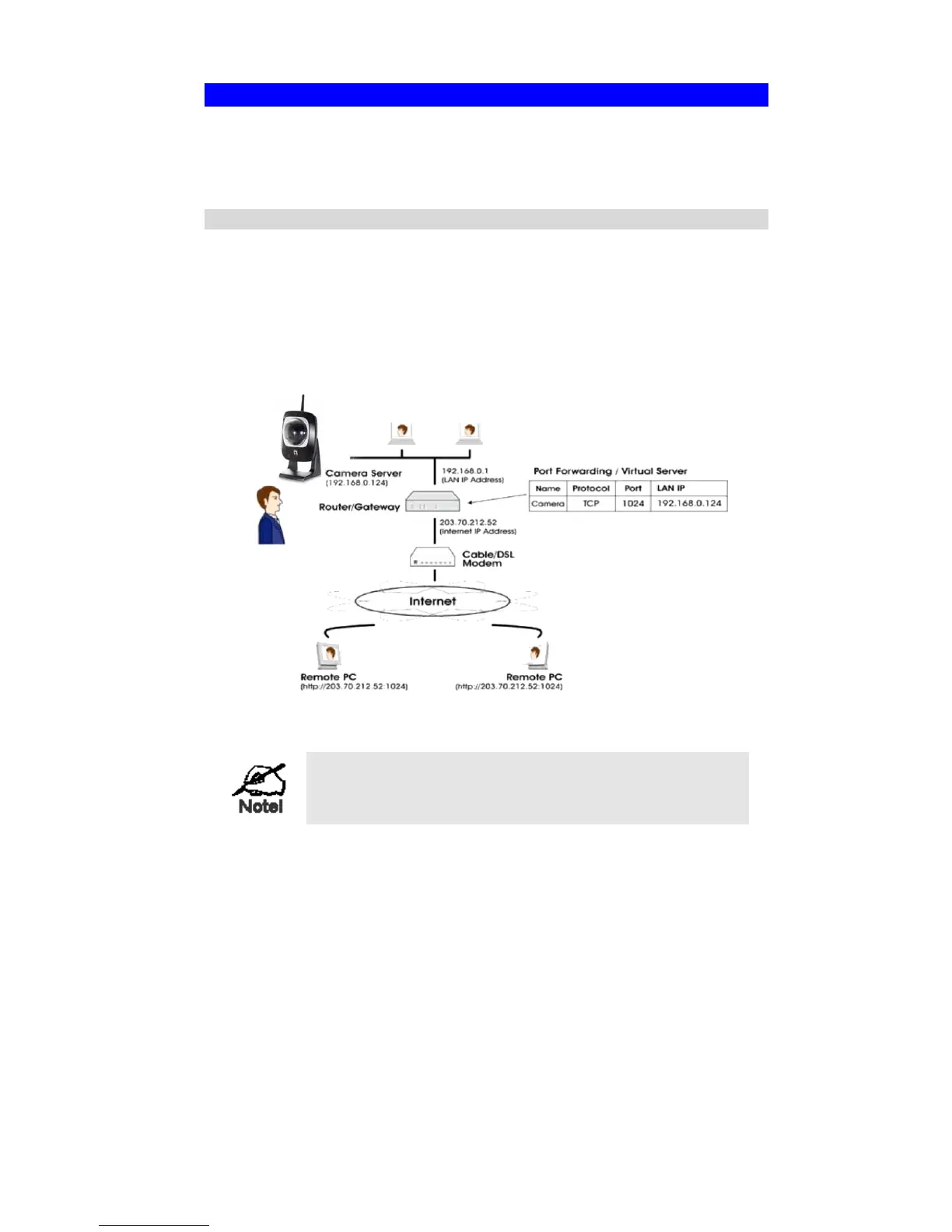
This feature is normally called Port Forwarding or Virtual Servers, and is illustrated
below. The Port Forwarding/Virtual Server entry tells the Router/Gateway that
incoming TCP connections on port 1024 should be passed to the FCS-0020/WCS-
0020. If necessary, check the user manual for your Router/Gateway for further details.
Figure 9: Connecting via the Internet
The "Port" for the Port Forwarding / Virtual Server entry
above is the " Secondary Port" number specified on the
Network screen of the FCS-0020/WCS-0020.















 To Next Page