User’s Manual
WAB-3003 108M 11g Outdoor PoE CPE/ AP/ Bridge
22
Step 6
: Network Interface Configuration
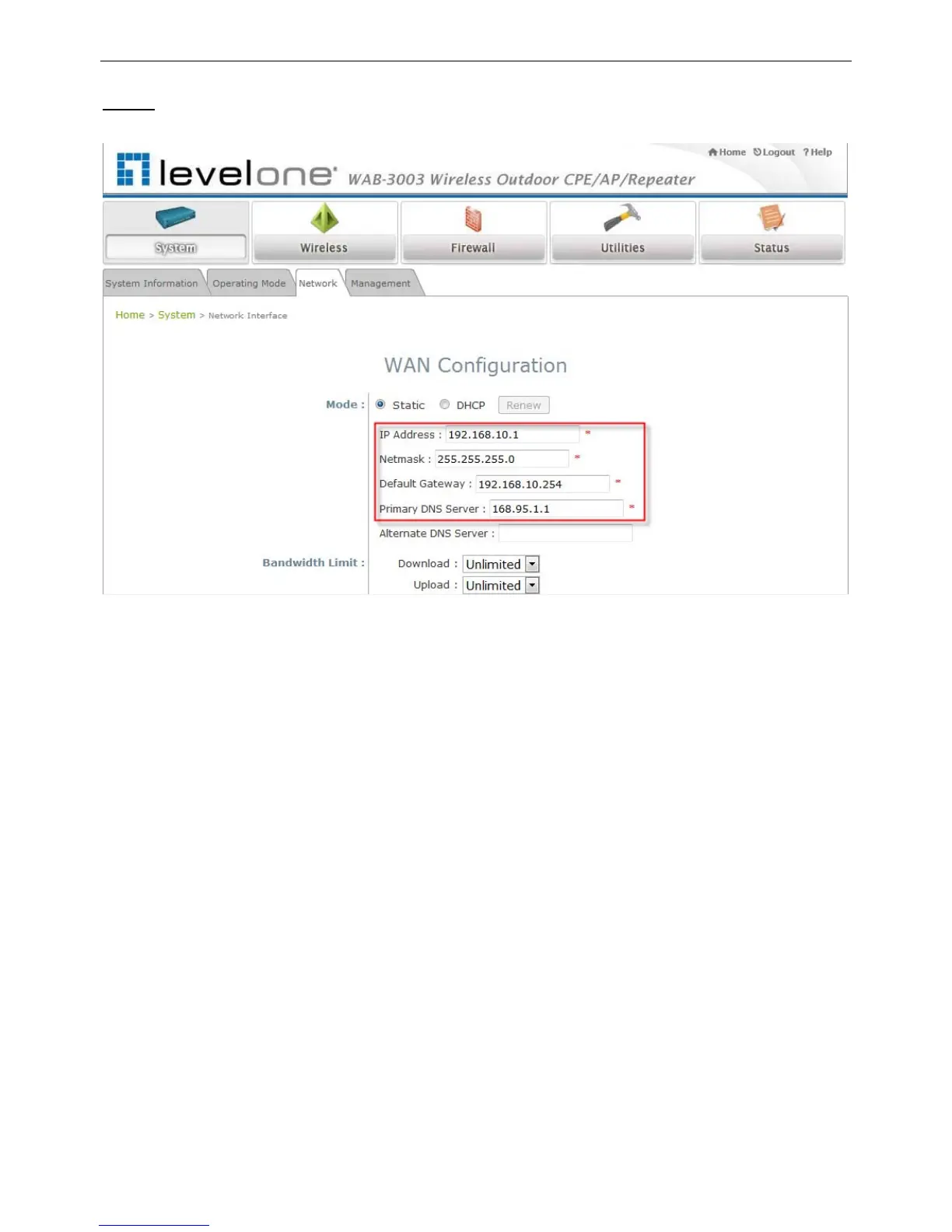
Click on the System button and then select the Network tab.
【Settings here are for example only.】
WAN Configuration
Enable Static, and then enter the related information in the fields marked with red
asterisks.
Click SAVE to save the settings.
Dynamic DNS Configuration
The Dynamic DNS section is on the same page as WAN Configuration section.
When enabled, choose the service Provider with provided Host Name, User Name/E-mail,
and Password/Key.
Click SAVE to activate all settings configured so far.
LAN Configuration
The LAN Configuration section is on the same page as WAN Configuration section.
Enter the IP Address and Netmask of the LAN port.
Click SAVE to save all settings configured so far;
all updated settings will take effect upon
reboot.
Congratulations!
The CPE mode is now successfully configured.















 To Next Page