Basic System Settings
For users who use the WAB-5120 300Mbps 5G Wireless Outdoor PoE Access Point/Bridge for the first
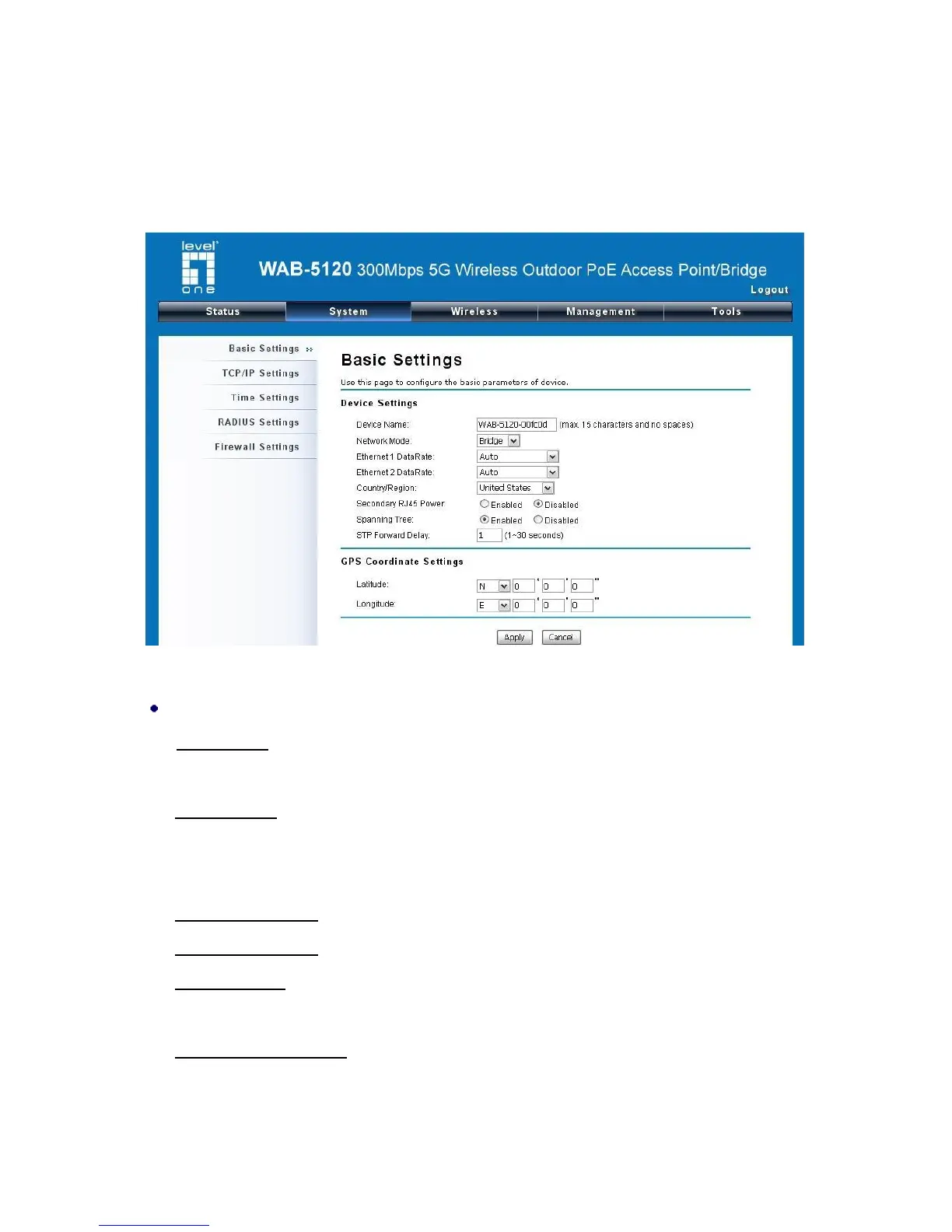
time, it is recommended that you begin configuration from “Basic Settings” in “System” shown below:
Figure 11 Basic System Settings
Basic Settings
Device Name: Specify the device name, which is composed of no more than 15 characters with
(0-9), (A-Z), (a-z) or (-).
Network Mode: Specify the network mode, including Bridge and Router. It is easy to configure
parameters in Bridge Mode; however, users must pay extra attention to the way they configure the
device when it is set to Router Mode.
Ethernet 1 Data Rate: Specify the transmission rate of data of LAN1. Default is Auto.
Ethernet 2 Data Rate: Specify the transmission rate of data of LAN2. Default is Auto.
Country Region: The availability of some specific channels and/or operational frequency bands
are country dependent.
Secondary RJ45 Power: The secondary Ethernet port (labeled LAN 2) is for WAB-6120
integration. To use it you need to enable the secondary port via WEB UI in advance before
connecting with the WAB-6120.















 To Next Page