Head
GA10218_0101 - 9/2002
⏐ 86
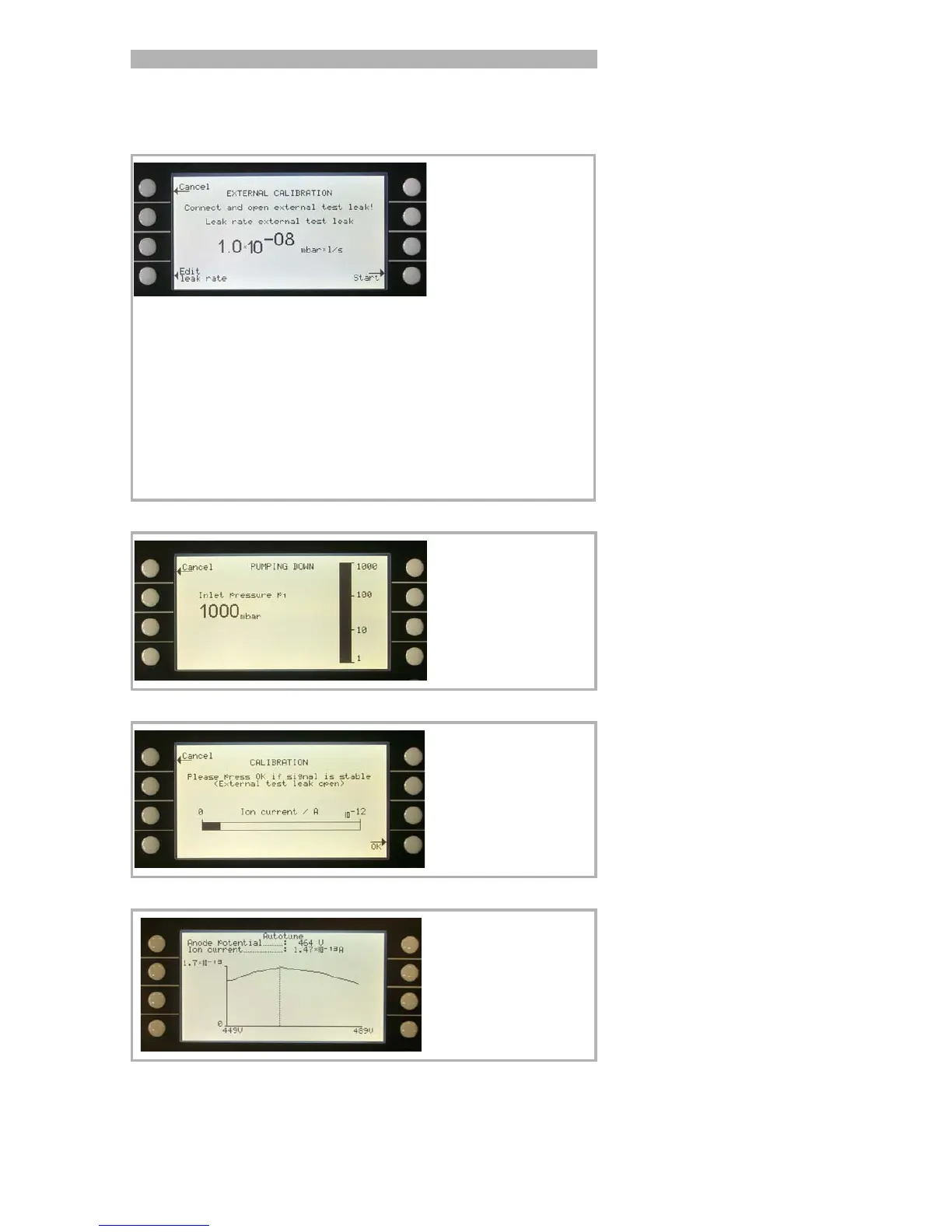
After External Calibration ( Fig. 23, Soft Key no. 8) has been chosen the
following messages are displayed and the described actions are required:
Check the leak rate printed on the test leak
and compare it with the leak rate at the
display. If the leak rates are not identical
press Edit leak rate (Soft Key no. 4) and
correct the value.
If the leak rates are okay press START (Soft
Key no. 8).
Make sure that the
correct mass is selec-
ted.
Make sure that the test
leak is connected and
opened.
Fig. 29 Display: External Calibration, Step 1
No action required.
Fig. 30 Display: External Calibration, Step 2
The bargraph display
shows a signal which
must not vary much. If
so please press OK
(Soft Key no. 8).
Fig. 31 Display: External Calibration, Step 3
No action required.
Fig. 32 Display: External Calibration, Step 4



 To Next Page