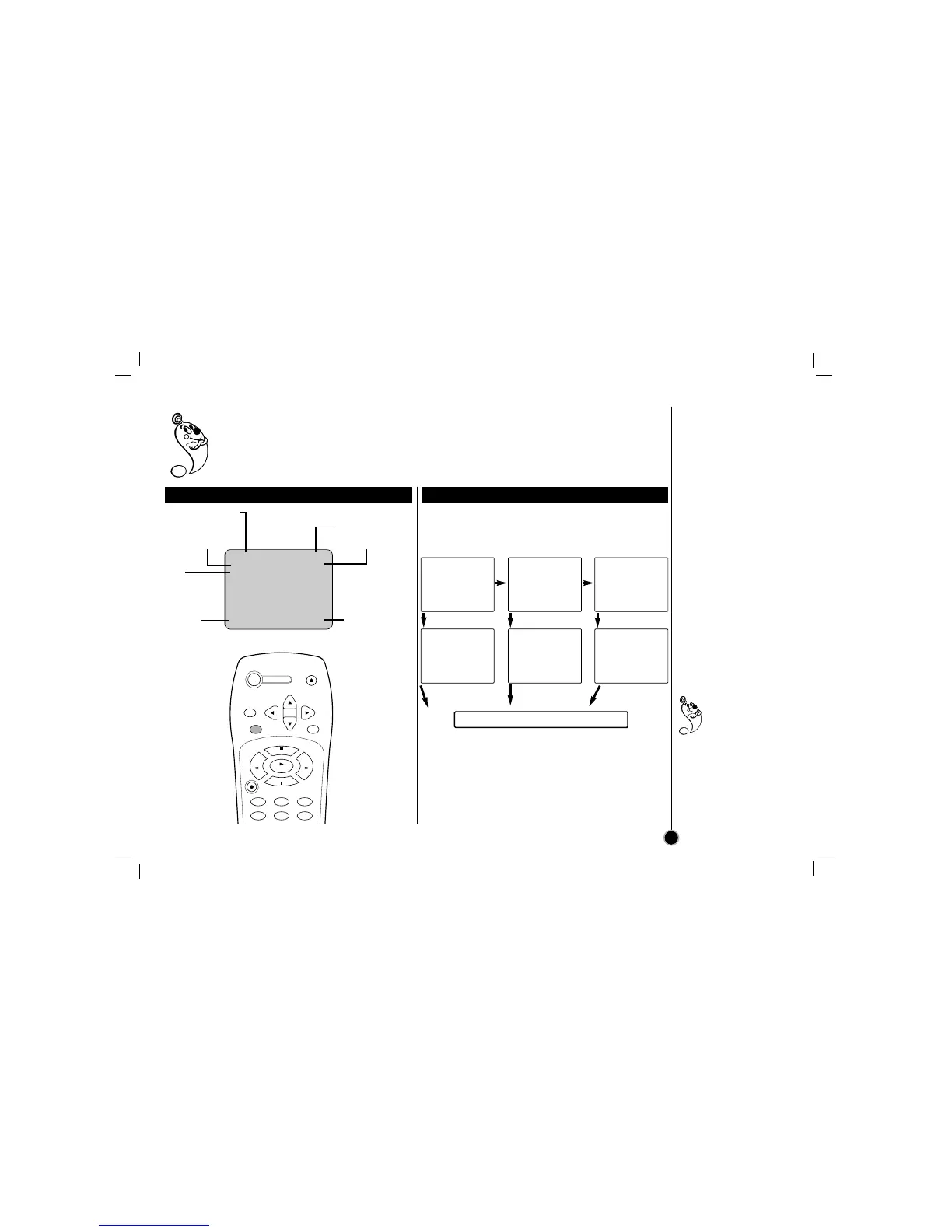
Some of these functions will be displayed every time the VCR is operated.
Operation mode
Channel number
Tape speed Broadcast type
ITR
Information
Current Clock/Counter
date
Each press of the ENTER changes the TV screen in
the following sequence.
On-screen Display
OSD
11
The clock (or tape
counter) only
mode will
continue until you
press ENTER again.
The tape counter
display does not appear
when the tape is not
inserted.
STOP CH 4
SP MONO
0H30M
JUL 05 , WED 2:15 PM
Identifying the on-screen display item
Changing the on-screen function display
One press Two presses Three presses
STOP CH 4
SP MONO
JUL 05 , WED 2:15 PM
STOP CH 4
SP MONO
JUL 05 , WED 2:15 PM
STOP CH 4
SP MONO
M 0:35:40
2:15 PM M 0:35:40
After 3 seconds
2:15 PM
After 3 seconds
After 3 seconds
Press ENTER.
Press ENTER. Press ENTER.
All indicator are turned off.



 To Next Page