Setting the
On-screen Display
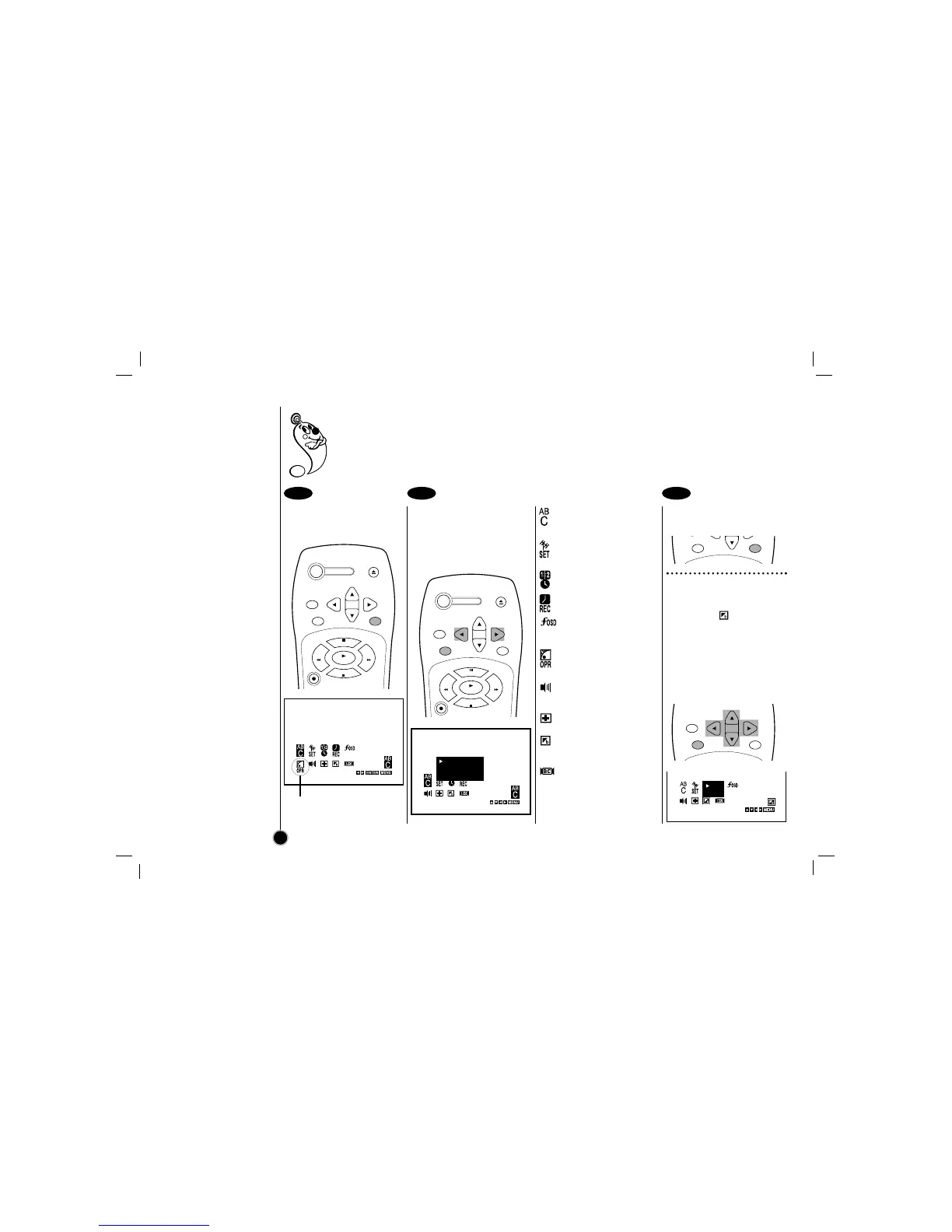
Press MENU.
The main menu appears.
You may only set OPR when
playing a tape.
Select the desired menu
with
FF
or
GG
and then
press ENTER to see
desired sub menu to be
used.
To change the
language setting for
OSD (page 13).
Manual/Automatic
tuning setting
(page 14).
Date & clock setting
(page 13).
Timer recording
setting (page 20).
To display the
operational mode of
your VCR (page 13).
To improve the
playback picture
(page 17).
To select the
channel for audio
output (page 23).
To check a problem with
your VCR (page 26).
To use blue background
on-screen function
(Details are on the right).
To select received
Broadcast type.
(page 24)
Press MENU to exit the
menu.
Blue Background on-
screen Function On/Off
Select the item on the
main menu with
FF
or
GG
and then press ENTER.
Select a desired mode
(ON or OFF) with
DD
or
EE
and then press
FF
or
GG
.
The SETUP, clock setting, and timer recordings are accessed conveniently with On-screen Menu Displays
that lead you through each step. The following pages describe the On-screen selections to be set.
Blue Background on-screen Function: Shows blue background color on-screen while setting a
menu. We recommend keeping blue background option ON when On-screen display flickers.
12
1 2 3



 To Next Page