EasyManua.ls Logo

LG CC990M - Scan; Tuner with Autochannel; Setting the Menu; Programming and Multichannel Language Select

LG CC990M
30 pages
Print Icon
To Next Page IconTo Next Page
To Previous Page IconTo Previous Page
Loading...
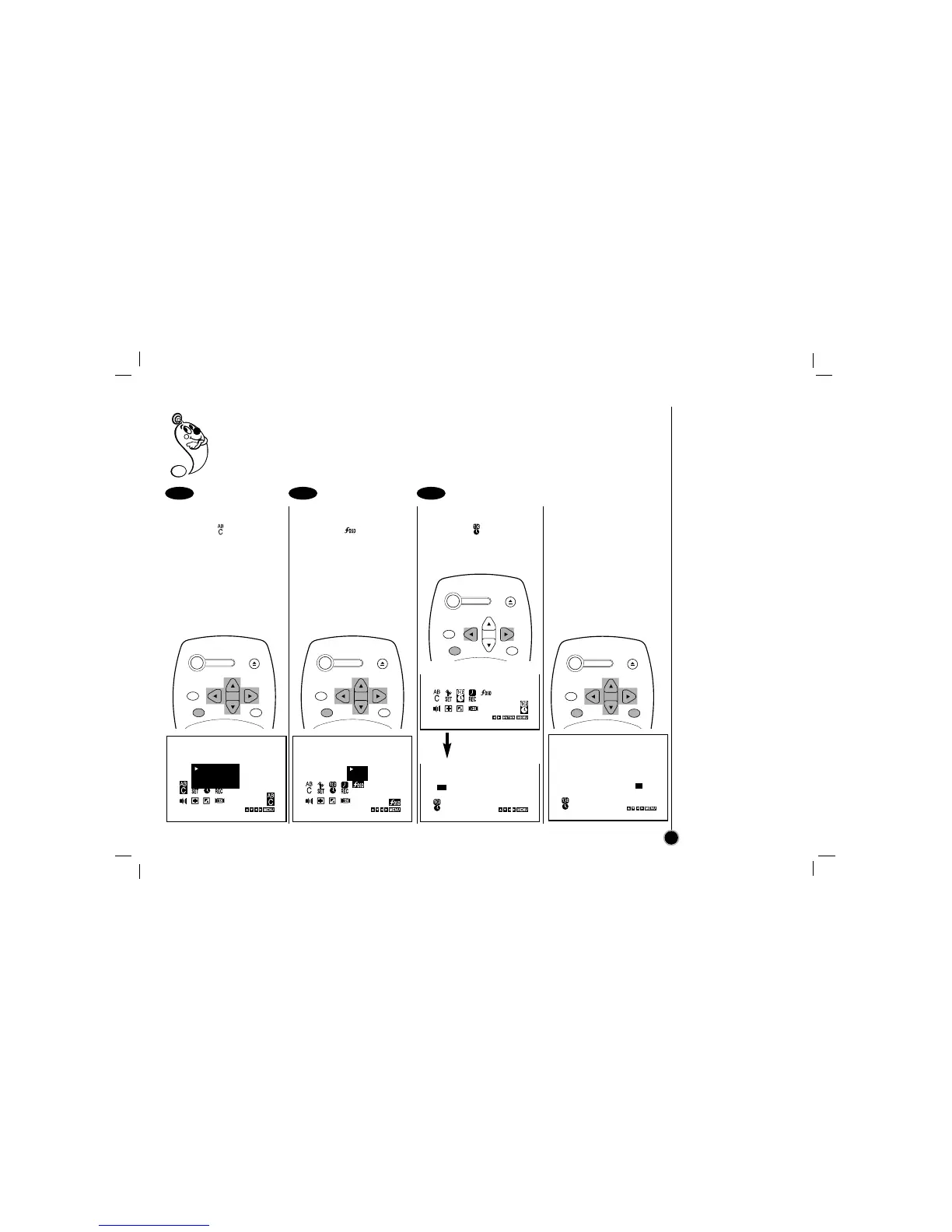
Language Selection: The on-screen programming of this VCR can display in either English, Spanish, or
Portuguese.
Function OSD On/Off: The on-screen display of this VCR can be turned on or off.
Setting the Clock: You must set the date and time for timer recordings.
Language Selection
Select the item on the
main menu with
FF
or
GG
and then press ENTER.
Select a desired
language with
DD
or
EE
and
then press
FF
or
GG
.
Function OSD ON/OFF
Select the item on the
main menu with
FF
or
GG
and then press ENTER.
Select a desired mode
(ON or OFF) with
DD
or
EE
and then press
FF
or
GG
.
Setting the Clock
Select the item on the
main menu with
FF
or
GG
and then press ENTER.
Press the
EE
or
DD
to set
MONTH first, then press
GG
to move to next option.
And then set DAY, YEAR
and TIME by using
EE
,
DD
,
and
GG
.
Press MENU to exit the
menu.
1 2 3
Setting the Menu
Language Select
Function OSD On/Off
Setting the Clock
13
ESPAÑOL
ENGLISH
PORTUGUÊS
ON
OFF
Press ENTER
POWER
EJECT
CH+/TRK+
CH/TRK
CLEAR
ENTER
MENU
POWER
EJECT
CH+/TRK+
CH/TRK
CLEAR
ENTER
MENU
POWER
EJECT
CH+/TRK+
CH/TRK
CLEAR
ENTER
MENU
POWER
EJECT
CH+/TRK+
CH/TRK
CLEAR
ENTER
MENU

Related product manuals