EasyManua.ls Logo

LG CC990M - Your Vcrs Controls (Front & Rear)

LG CC990M
30 pages
Print Icon
To Next Page IconTo Next Page
To Previous Page IconTo Previous Page
Loading...
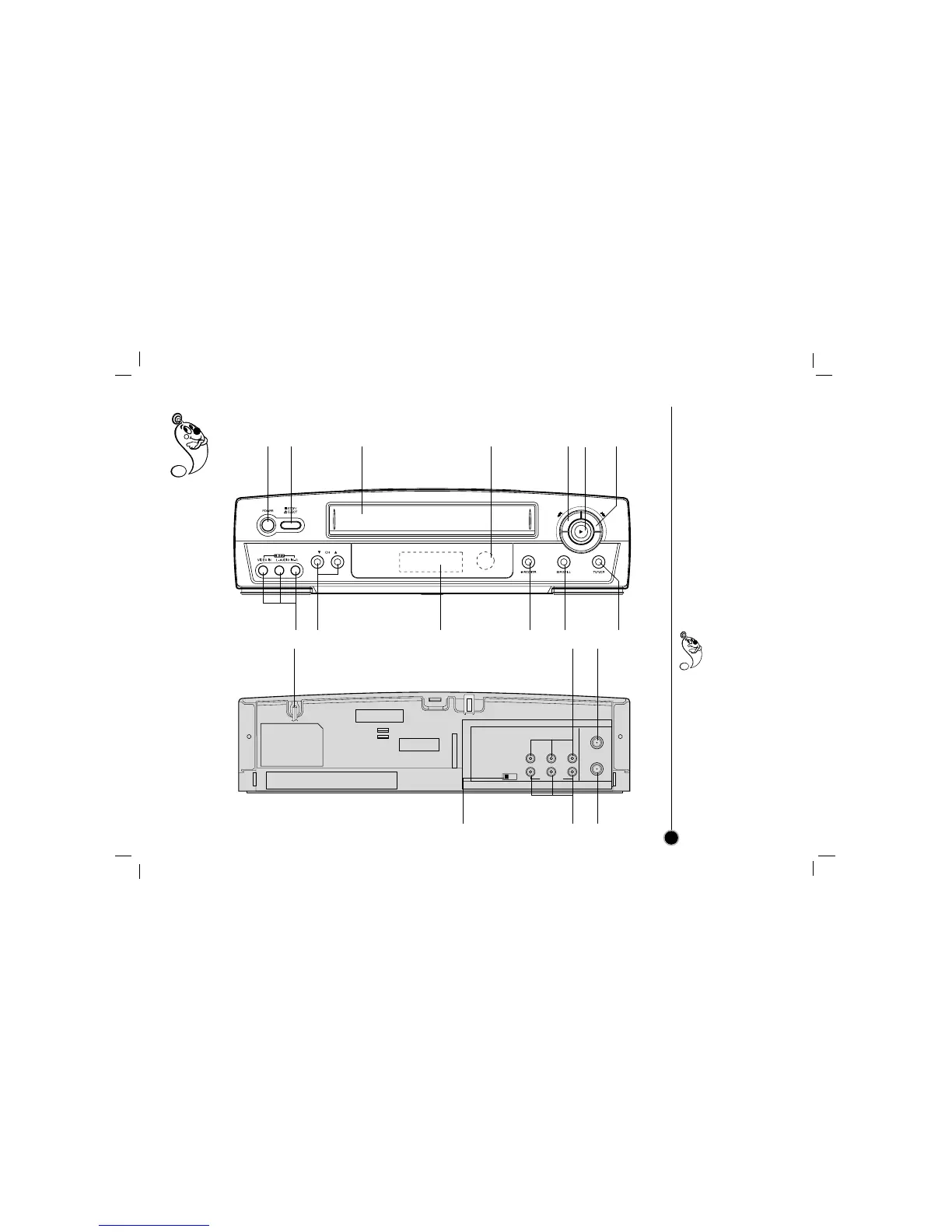
Each button on your VCR has the same function as its corresponding button on the remote control.
Your VCRs
Controls
7
Power
(On/Off)
AUDIO IN Left/Right/
VIDEO IN jacks
(LINE2)
Remote
Control
sensor
Display
window
Channel
Selectors TV/VCR
PAUSE/
STILL
Fast
Forward
REC/ITR
(instant timer record)
Stop & Tape
Eject
Cassette
Compartment
Rewind
Play
You can select LINE1
(from AUDIO/
VIDEO IN jacks at
the rear) or LINE 2
(from AUDIO/ VIDEO IN
jacks at the front) pressing
CH (+/) continuously to
display LINE1 or LINE2
on the TV screen.
You can also select
LINE1 or LINE2 by
pressing 0 button twice or
four times.
VHF/UHF
/CATV
ANT.
IN
OUT
TO
TV
CH3 CH4
VIDEO
OUT
MONO
LINE1(AUX1)
IN
OUT
IN
R - AUDIO - L
Power cord
RF OUT CHANNEL Selector
Set this switch to channel 3 or 4.
AUDIO OUT Left/Right/
VIDEO OUT jacks
AUDIO IN Left/Right/
VIDEO IN jacks
(LINE1)
ANT.(Antenna)IN
(connect the
antenna using this
jack)
OUT TO TV
(connect to your TV
using this jack)

Related product manuals