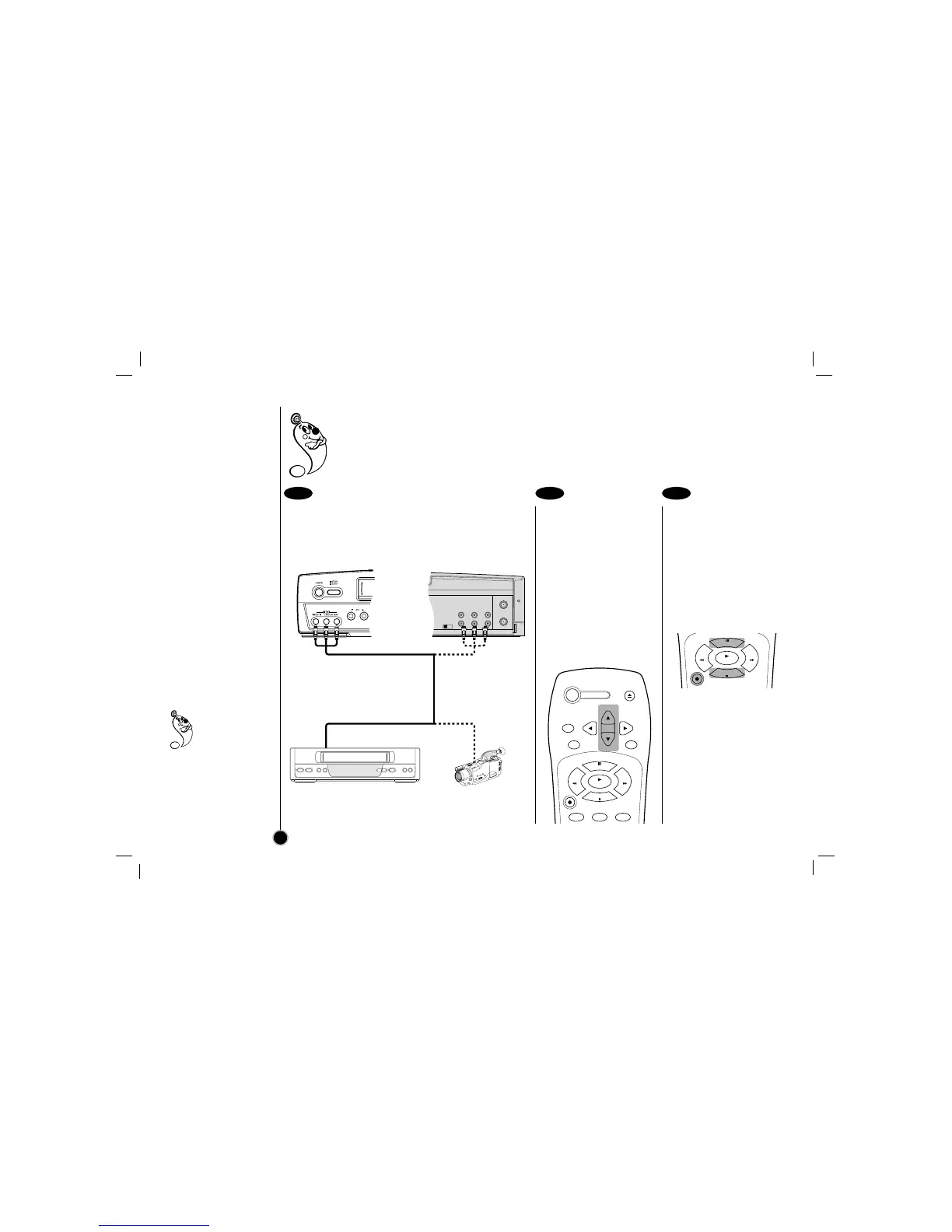
Set the input channel
“LINE1” or “LINE2”.
Press CH (+/–) continuously
to display “LINE1” (from
AUDIO/VIDEO IN jacks at
the rear) or “LINE2” (from
AUDIO/VIDEO IN jacks at
the front) on the TV screen.
You can also select “LINE1”
or “LINE2” by pressing the 0
button twice or four times.
Play the tape in the
another VCR (or
camcorder).
If you have a TV attached to
your VCR, you can see the
video playing.
Press REC/ITR on the
recording VCR.
To edit out unwanted parts
Press P/STILL on the
recording VCR while copying
is in progress. Press
P/STILL again to resume
copying.
To stop copying
Press STOP on the
recording VCR.
1 2 3
How to record
Dubbing and Editing
22
If you wish to edit or dub your another VCR (or camcorder) recordings to this VCR, the rear (or Front) panel
mounted Audio and Video input jacks make the connections quick and easy. The direct A/V jacks will
also provide better picture results than using the RF jack on the rear panel.



 To Next Page